MCP vs CLI for AI Agents: Do You Need Both?
You already ship a CLI. Add an MCP server when your customers' agents run in clients that can't run the CLI installed on their machines. A decision guide based on client reach, execution environment, and where your API enforces permissions, traced through one read-only Stripe task.
- Written by
- Puneet Arora (opens in a new tab)
- Published on
- Read time
- 16 min

You already ship an API and a CLI. Now someone wants an MCP server, and nobody can say which customers would use it, from which clients, or with what permissions. Shipping it anyway gives you a second surface to secure. Skipping it may shut out customers whose agents work in clients that don't run it.
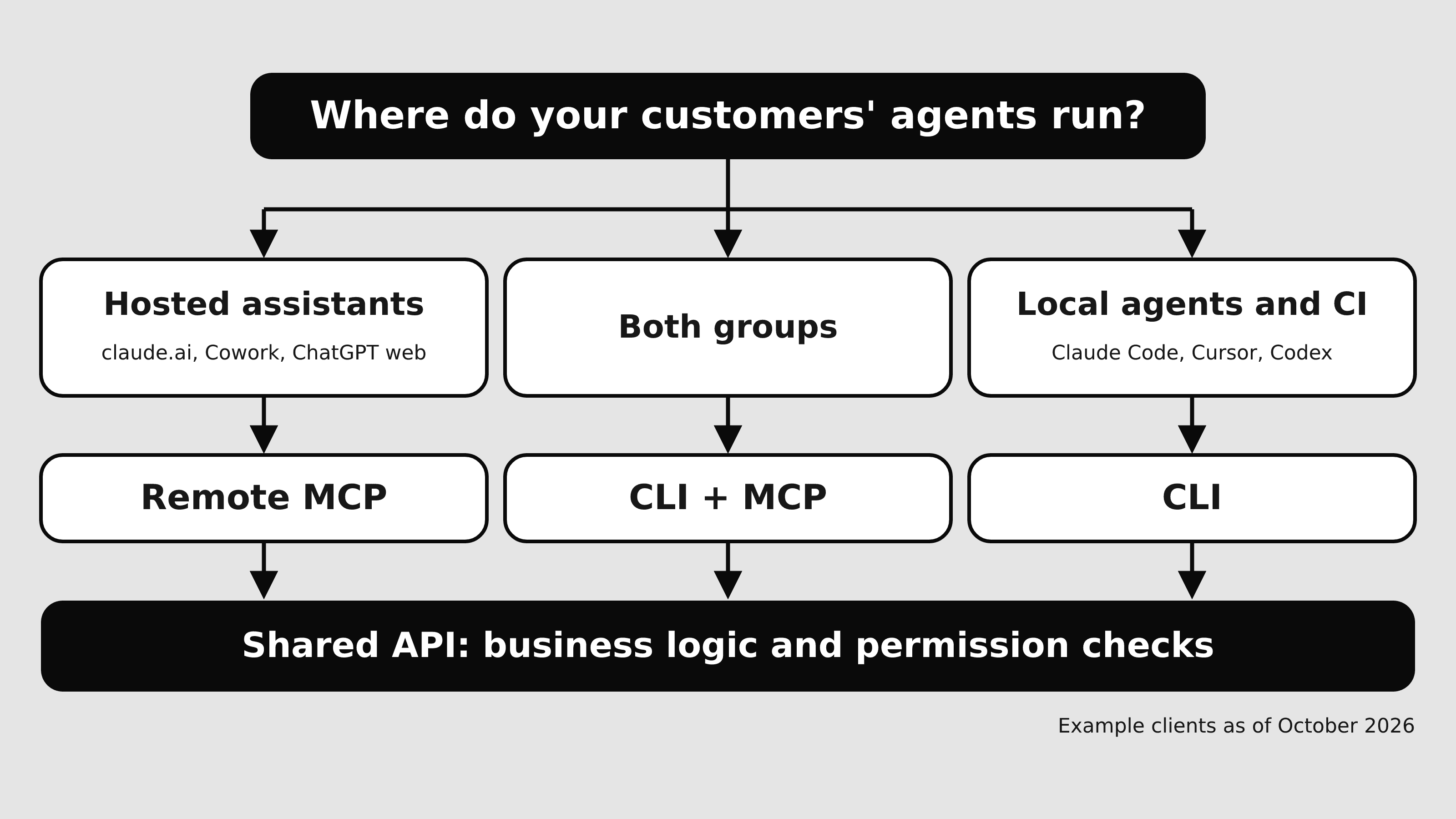
Add MCP next to your CLI when your customers' agents run in clients that can't run the CLI installed on their machines. Today that means hosted assistants such as claude.ai and Cowork, plus ChatGPT on the web, whose docs describe remote MCP as the way to reach a vendor. When your customers work in local coding agents with a shell, your CLI already reaches them. Either way, your API and its permission model stay shared underneath.
The choice depends on which clients your customers use, where their agents execute, where your API enforces authority, and which operations each interface covers. Neither interface is safer, cheaper, more universal, or more capable by nature. The evidence below follows one safe, read-only task through both of Stripe's interfaces: retrieving a sandbox customer. Stripe is one implementation, and its auth model and coverage do not describe every MCP server. All vendor and client docs cited were read on October 22, 2026.
TL;DR
- Start from your customers' clients. The hosted assistant docs read describe remote MCP as the way to reach a vendor, and none show those assistants running a customer's installed CLI.
- Local coding agents such as Claude Code, Cursor, and Codex can run your CLI and load MCP servers. Test that your CLI reaches your API from inside their sandboxes.
- Authority lives on your server. Client prompts help a user review a call; server checks decide what it can do.
- Prove the choice with one acceptance test: the same safe task, run in every client your customers use.
Terms to settle first
- Your CLI calls your API with the credential it holds. What it can do comes from that credential and the checks your API runs.
- An MCP host is the client application your customer runs, such as Claude Desktop, Cursor, or VS Code. The application, or its vendor's cloud, holds the connection to your server; the model inside it does not. Claude makes remote connections "from Anthropic's cloud infrastructure, rather than from your local device."
- Local stdio MCP means the client launches your server and exchanges "newline-delimited messages over the standard streams of a client-launched subprocess." The authorization spec tells stdio implementations to "retrieve credentials from the environment" instead of following its OAuth flow.
- Remote Streamable HTTP MCP means "each message is an HTTP POST to a single MCP endpoint." Authorization is optional in the 2026-07-28 spec, and the HTTP flow builds on the OAuth 2.1 draft. For OAuth in depth, read OAuth for AI agents.
Either interface can run locally or hosted. A CLI runs on a laptop or a CI runner. An MCP server can be a local subprocess or a vendor service, like Stripe's remote endpoint https://mcp.stripe.com. Tools that act inside a user's browser session are a separate decision, covered in What is WebMCP.
Which clients can reach which interface
| Client | Can the agent run your installed CLI? | MCP it can load |
|---|---|---|
| claude.ai, Cowork | Not shown in the docs read. On claude.ai, Claude's code execution runs "within an isolated, sandboxed container." On Team and Enterprise plans, owners set its network egress to off, package managers only, an allowlist, or all domains. | Remote custom connectors, reached from Anthropic's cloud. Local servers "aren't available in Cowork or claude.ai." |
| Claude Desktop | Not shown in the docs read. | Remote connectors, plus local servers in claude_desktop_config.json. |
| ChatGPT web | Not shown in the docs read. | Remote MCP tools through plugins. |
| ChatGPT desktop, Codex CLI, Codex IDE extension | Yes. Their local commands "run inside a constrained environment instead of running with full access by default." | MCP servers; stdio only in local Codex environments. Bearer token or OAuth. |
| Claude Code | Yes. The Bash tool "Executes shell commands in your environment," with permission required. | stdio, HTTP with OAuth 2.0, WebSocket, and deprecated SSE. |
| Cursor | Yes. "Cursor runs shell commands directly in your terminal," under your Run Mode. | stdio, SSE, and Streamable HTTP, with OAuth using PKCE. |
| VS Code | Not covered in the sources read. | "Command (stdio)" and "HTTP (HTTP or Server-Sent Events)" servers. Organizations can restrict which servers are available. |
For hosted assistants, the docs read describe only remote MCP, which is the main reason to add MCP. Local coding agents can run your CLI and load MCP servers too.
"Can run your CLI" still has conditions. Cursor's sandbox "blocks unauthorized file access and network activity," and Codex users set permissions per surface, with /permissions in the CLI. So a CLI call to your API can fail inside the agent's sandbox.
One task through both interfaces: retrieve a sandbox customer
Retrieving a customer is a read, and a sandbox keeps live data out of the test.
| Step | Stripe CLI | Stripe MCP |
|---|---|---|
| Client | A local coding agent with a shell, such as Claude Code or Cursor. | Any client in Stripe's setup list: Cursor, Claude Code, Claude Desktop and web, Codex, ChatGPT, VS Code, and "Other." |
| Where it executes | On the customer's machine, through the agent's shell. | On Stripe's remote server. Connectors in claude.ai, Cowork, and Claude Desktop reach it from Anthropic's cloud. |
| Install and onboarding | Install the CLI. For versions newer than v1.50.0, "an Administrator or IAM Admin must enable CLI access before you can authenticate" under Settings → Team and security → MCP and CLI access. | Add https://mcp.stripe.com in the client, or "Install the Stripe CLI with npm install -g @stripe/cli and run stripe agent setup." Admins enable MCP access for the team, separately for live mode and sandboxes. |
| Credentials | stripe login "opens the Stripe Dashboard, where you confirm the code and configure the CLI's access to accounts, sandboxes, and live mode." Credentials go to "your operating system's secure credential store (when available)." | OAuth "when a client accesses Stripe on behalf of your Stripe user account," or an agent API key "when an AI application needs independent, persistent access to Stripe," sent as a bearer token when the client lacks OAuth. |
| Delegated authority | The accounts and environments approved at login, after an admin enables CLI access. | The OAuth consent page grants access to chosen live mode accounts or sandboxes, with permissions set per environment. Grant the sandbox only. |
| Tool or command | stripe customers retrieve <id>, run without --live. | stripe_api_read ("Read data with any Stripe API GET method") against the listed method "Retrieve a customer." The docs do not show its argument schema; stripe_api_details returns parameter details for a method, so confirm the arguments in a live client. |
| Result | Stripe's reference shows a sample response with "livemode": false. | Record what the client returns and compare it with the CLI result for the same customer ID. |
| Approval boundary | Client: the shell tool's permission prompt. Server: CLI access in the Dashboard and the login scope. | Client: tool approval, which Stripe says to turn on. Server: MCP access in the Dashboard and the OAuth grant. Stripe's human confirmation covers certain stripe_api_write actions, so this read does not trigger it. |
Both columns end at the same Stripe API, configured on the same Dashboard page, MCP and CLI access. The CLI adapts to agents too. Its --non-interactive flag will "Print the browser URL, verification code, and next command as JSON, then exit." It turns on automatically when standard input isn't a terminal.
Client approval and server permission are separate layers
Client approval happens in the customer's application. In its default mode, Claude Code asks permission before most Bash commands, and Cursor asks for approval before using MCP tools by default. These prompts help a person review a call, and their settings belong to the customer.
Server permission happens in your API. At Stripe, admins enable MCP and CLI access per environment. Agent-tagged keys "work the same as other restricted API keys for authentication and permissions." They are also "automatically subject to approval rules, which require a designated reviewer to approve sensitive actions before they take effect." The MCP spec puts the same duty on servers. They "MUST validate that access tokens were issued specifically for them as the intended audience," and they "MUST NOT accept or transit any other tokens."
Several comparison pages say a CLI will "inherit the permissions of whoever invoked it" or reach "everything the shell has access to." Stripe's CLI docs describe something else: login scoped per account and environment, admin enablement, and a device name you set with STRIPE_DEVICE_NAME that is visible in the Dashboard. At Stripe, both interfaces call the same API and are gated from the same Dashboard settings page.
Stripe's calendar shows why the permission model needs a named owner: "Migrate by November 30, 2026. Starting in December, Stripe MCP will stop accepting full-access secret keys and restricted API keys without the Agent tag." After that, requests with an unsupported key receive a 401 response with an OAuth discovery challenge.
Compare the three options on the same criteria
Stripe facts are labeled; the rest depends on your implementation.
| Criterion | CLI only (status quo) | MCP only for agents | Both |
|---|---|---|---|
| Supported clients and distribution | Local coding agents with a shell. Stripe ships its CLI as an npm package. | Remote servers reach hosted and local clients; stdio reaches local clients only. | Both groups of customers. |
| Install and updates | Installed per machine; behavior can change by version, as Stripe's v1.50.0 rule shows. | Stripe: one remote endpoint, added per client by URL, connector, or plugin. | Stripe's CLI sets up MCP with stripe agent setup. |
| Discovery, schema, help | Stripe: command reference per resource. Depends on implementation. | Stripe: tool descriptions, a methods list, and stripe_api_details for parameters. Depends on implementation. | Two descriptions to keep consistent. |
| Auth and scopes | Stripe: login scoped to accounts, sandboxes, and live mode, or a key by --api-key or STRIPE_API_KEY. | Stripe: OAuth or an agent API key. Spec: stdio takes credentials from the environment; HTTP servers validate audience. | Same keys and server checks underneath, if you build it that way. |
| Approval UI | The agent's shell permission prompt. | The client's tool approval, plus Stripe's human confirmation for certain writes with user credentials. | Two client prompt models for customers to configure. |
| API operation coverage | Stripe: commands for "all types of Stripe API resources." | Stripe: "much of the API," through an enumerated list; no OAuth for connected accounts. Depends on implementation. | Document the gaps between the two. |
| Auditability | Stripe: CLI device name visible in the Dashboard. Depends on implementation. | Stripe: authorized clients appear as OAuth sessions. Depends on implementation. | Map both to one identity model. |
| Errors | Stripe: non-interactive login prints next steps as JSON. | Stripe: unsupported keys get a 401 with an OAuth discovery challenge after the migration. | The same failure should read the same in both. |
| Retry and idempotency | Not covered in the Stripe CLI pages read. Depends on implementation. | Stripe: after a human approves a confirmed write, the user tells the agent to retry the call. Otherwise depends on implementation. | Test both before you expose writes. |
| Ongoing maintenance | One agent surface. | A remote service with auth flows and client compatibility to support. | Two surfaces over one API, kept in step by contract tests. |
The interfaces differ most in client reach, approval UI, and coverage. Auth and audit depend on how your API enforces them.
The counterargument: agents can already call your CLI
At full strength: any agent with a shell can call your CLI, which already has auth, help text, and full API coverage. An MCP server adds a second surface to maintain and gives customers no new capability.
Stripe's CLI "has commands to interact with all types of Stripe API resources," while its MCP server covers "much of the API." Cloudflare launched cf, "the agentic CLI for the entire Cloudflare API," covering "over 3,000 operations," and the launch post does not mention MCP. SmartScope argues that thin MCP wrappers around CLIs can be removed when the agent has terminal access, and keeps MCP for cases such as "Lack of Terminal Access."
The objection holds for local coding agents. It fails for hosted assistants, whose docs describe remote MCP as the path to a vendor. "No new capability" is also contested at Stripe, where the MCP path has per-client OAuth sessions and, with user credentials, human confirmation for some writes.
Decision matrix
| Ship | When these conditions hold | Watch for |
|---|---|---|
| CLI only | Your customers' agents run in local coding agents or CI with a shell. The operations they need exist in the CLI. Your API scopes CLI credentials by account and environment. | Customers asking from hosted assistants, and agent sandboxes that block your API's network calls. |
| MCP only for agents | Your customers' agents run mostly in hosted assistants. You can run remote auth and validate token audience on the server. | The CLI stays for people and CI, under the same permission model. |
| Both | Your customers split between hosted assistants and local coding agents. You can fund contract tests across both. | Business logic creeping into one interface, and coverage gaps such as Stripe's connected-accounts limit on MCP OAuth. |
Stripe ships both: one API, one Dashboard settings page for MCP and CLI access, and a CLI that installs the MCP configuration.
Keep one implementation underneath both
If you ship both, keep business logic and permission checks in your API and both interfaces thin. Stripe's design points this way: stripe_api_read maps onto the API's GET methods, and CLI commands map onto API resources. Then test both against the same task fixtures:
- One fixture per task: a sandbox record, the expected fields, and the credential scope.
- The same call through both interfaces returns the same data.
- The same credential without access fails in both.
- A missing record, a revoked session, and disabled access return messages an agent can act on.
If a test passes in one interface and fails in the other, the two interfaces have drifted.
Operating cost and security limits
Comparisons such as Blocks.ai, Speakeasy, and Manveer Chawla weigh context-window overhead heavily. Those figures depend on the model, client, server, and tool loading, so they cannot settle this for your API. If you measure, record the model and version, the client and version, the task, how tools load, the number of runs, and what you counted.
Security limits apply to both. The MCP spec says local MCP servers "may have direct access to the user's system." For clients that offer one-click local server setup, it recommends they "Warn that MCP servers run with the same privileges as the client." VS Code warns that "Local MCP servers can run code on your machine, and tools can access external services using your permissions." Stripe asks users to "exercise caution when using the Stripe MCP with other servers to avoid prompt injection attacks." A CLI run through an agent's shell has that shell's access to the machine, which is why clients gate the shell tool. On either path, your API credential decides what the call can do.
Remote auth also brings support work. On Atlassian MCP server issue #281, opened October 21, 2026, users report that sign-in never completes from the claude.ai connector, Claude Code, and Cursor. One says "Looks like a 429 error." One vendor and one issue, but plan for that kind of ticket. If customers will bring their own agents to your API through other protocols, see What is Poppy.
Onboarding acceptance test
Run this checklist before you commit to CLI only, MCP only, or both:
- List the clients your customers actually use, from support tickets, sales calls, and top accounts.
- Pick one safe, read-only task with a sandbox fixture, such as retrieving a sandbox customer.
- Verify setup in each client from a clean account, using only your public docs.
- Verify the authorization boundary: the credential reaches the sandbox only, a live request is refused, and turning off access blocks both interfaces.
- Verify the execution environment: in each local agent, the CLI reaches your API from inside the agent's sandbox at its default permissions.
- Verify operation coverage: the task exists in each interface, and you have listed the operations one interface lacks.
- Verify errors: a wrong ID, a revoked session, and an unsupported key each return a message the agent can act on.
- Verify successful completion: the same record and fields come back in every client. Record the model, client version, and date.
- Rerun the test after any change to key or auth policy, such as Stripe's November 30, 2026 migration.
This week, run the test in the two clients your customers use most, with a sandbox record and no writes. The results tell you which row of the decision matrix you are in.
FAQ
Yes, in local coding agents. Claude Code has a Bash tool and also loads MCP servers. Cursor runs shell commands in your terminal and loads MCP servers, and its MCP tools follow the same Run Modes as terminal commands. Stripe's CLI even configures its MCP server with stripe agent setup.
Neither is more secure by nature. Security depends on where your API enforces authority. At Stripe, both interfaces call the same API and are gated from the same Dashboard settings page. The MCP side requires OAuth or agent-tagged keys, which carry approval rules, and lists its OAuth sessions where you can see them.
It can, but a local stdio wrapper reaches only clients that load local servers, such as Claude Desktop, Claude Code, Cursor, and Codex. It does not reach claude.ai, Cowork, or ChatGPT on the web. To reach hosted assistants, the server must be remote; Claude, for example, reaches it from Anthropic's cloud.
A CI runner has a shell, so the CLI fits. Stripe's CLI accepts keys through --api-key or STRIPE_API_KEY. Scope the CI key to the environment the pipeline needs.
Sources
- Model Context Protocol (MCP), Stripe Docs
- resources, Stripe CLI reference
- login, Stripe CLI reference
- Using Stripe API keys, Stripe CLI
- API keys, Stripe Docs
- Transports, MCP specification 2026-07-28
- Authorization, MCP specification 2026-07-28
- Security Best Practices, MCP specification 2026-07-28
- Getting started with custom connectors using remote MCP, Claude Help Center
- Create and edit files with Claude, Claude Help Center
- MCP, OpenAI documentation
- Sandbox, OpenAI documentation
- Connect Claude Code to tools via MCP, Claude Code Docs
- Tools reference, Claude Code Docs
- Model Context Protocol (MCP), Cursor Docs
- Terminal, Cursor Docs
- MCP servers in VS Code, Visual Studio Code Docs
- Introducing cf: the agentic CLI for the entire Cloudflare API, Cloudflare, September 28, 2026
- Should You Remove Thin-Wrapper MCP Servers?, SmartScope, September 28, 2026
- CLI vs MCP: which API interface should you build first?, Fern
- MCP vs CLI: a framework for choosing the right tool interface for AI, Speakeasy, March 6, 2026
- MCP vs. CLI for AI agents: When to Use Each, Manveer Chawla, March 8, 2026
- Your coding agent spends 26,000 tokens before it reads your prompt: Comparing MCP and CLI, Blocks.ai, August 2026
- Can't authenticate to Atlassian MCP server, issue #281, GitHub
- OAuth for AI Agents: Why General-Purpose Agents Strain the Integration Model, EkLine
- What Is WebMCP? When to Expose Browser Tools to AI Agents, EkLine
- What Is Poppy? When Should Your API Support Customer Agents?, EkLine