What Is WebMCP? When to Expose Browser Tools to AI Agents
WebMCP lets a web app expose structured actions to browser agents. This guide compares it with browser automation and MCP servers.
- Written by
- Puneet Arora (opens in a new tab)
- Published on
- Read time
- 12 min

WebMCP lets a web app declare structured tools that a browser agent can call. Each tool runs inside the page, with access to the user's authenticated session and current application state.
That context supports actions tied to what the user already has open, such as updating the current cart, saving a draft on the active support ticket, or creating an issue in the selected workspace.
On September 28, 2026, Shopify added checkout WebMCP tools that can read checkout state; update buyer details, fulfillment, discount codes, declared fields, and payment; and place an order after buyer confirmation. Shopify's storefront and cart tools were already available.
Cloudflare extended Browser Run's beta WebMCP support to Kitesurf that day and migrated Chrome Lab sessions from the earlier testing API to document.modelContext.
WebMCP is still experimental. Its specification is a Draft Community Group Report. Chrome 149 and Edge 150 offer origin trials, Brave lists experimental Leo support, and the implementation-status page lists ChatGPT Desktop support. It does not list Firefox or Safari implementations, so broad browser interoperability is not available.
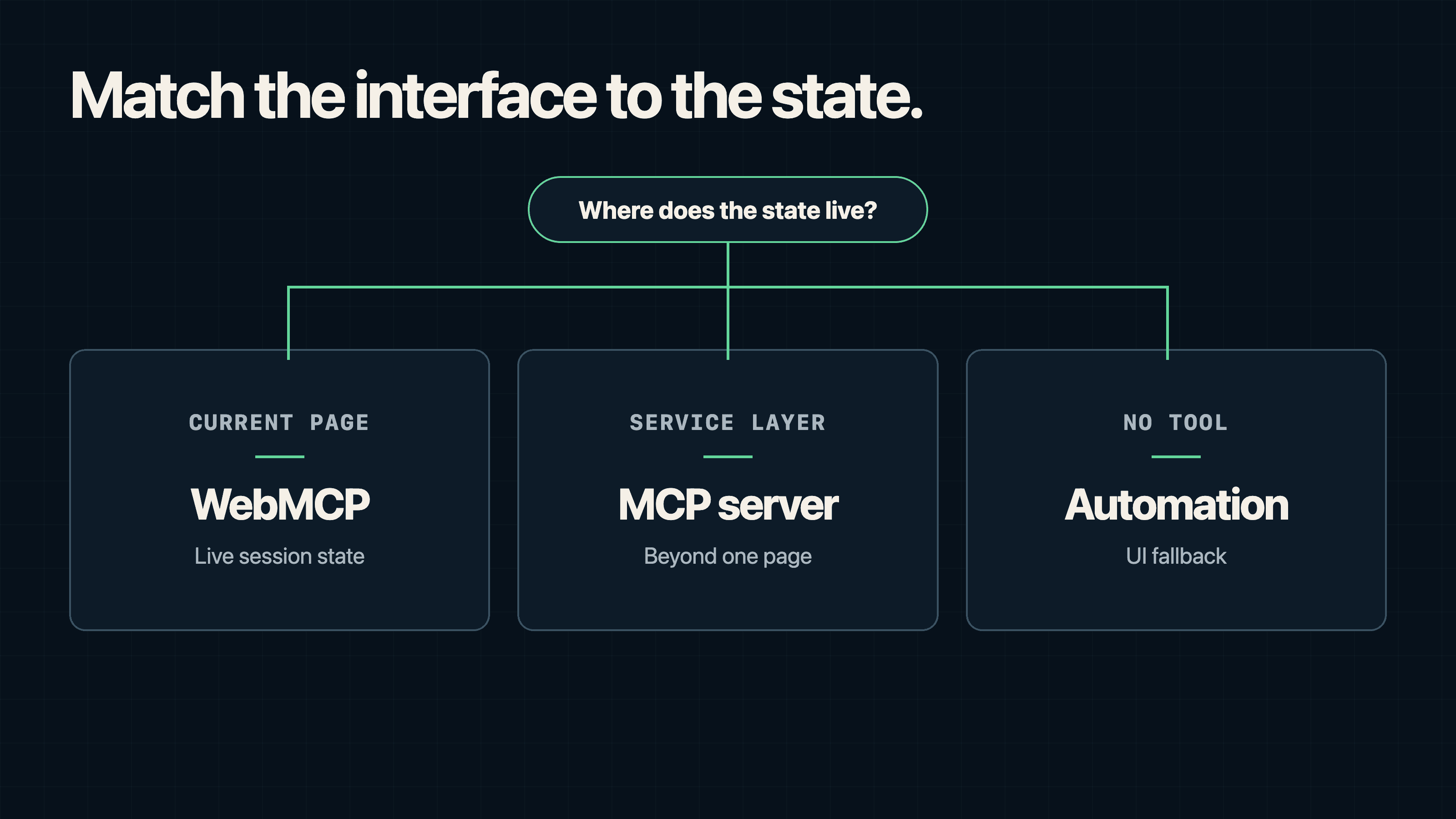
Use WebMCP for actions tied to the current browser session, an MCP server for capabilities that must run without the page, and browser automation when a site exposes no adequate structured agent interface.
TL;DR
- WebMCP lets a page expose named, schema-defined tools to AI agents through the browser.
- It is a good fit for session-aware actions such as searching a catalog, updating a cart, saving a draft, or changing the object open in the current tab.
- It is a poor fit for unattended jobs, cross-service orchestration, or integrations that must work after the website closes.
- Declarative WebMCP turns HTML forms into tools. Imperative WebMCP registers JavaScript tools through
document.modelContext. - Treat it as progressive enhancement. Keep the existing interface or API path available while browser support remains experimental.
- Start with one read-only or reversible workflow. Do not make payment, deletion, publishing, or permission changes your first test.
What is WebMCP?
WebMCP is a browser API for exposing web application actions as structured tools. Each tool defines an action, its accepted inputs, its execution path, and what value, if any, execution returns. Imperative tools can also supply optional risk or debugging hints.
The proposal has two authoring models: declarative metadata on HTML forms and imperative registration through document.modelContext.
This contract lets an agent call an action directly rather than infer it from the DOM, accessibility tree, screenshots, labels, or layout. Chrome describes the structured path as more reliable and token-efficient than element-by-element navigation.
The website remains the application surface. It keeps the state and business logic, while the browser exposes only the tools the page registers.
How WebMCP works
A typical flow has five steps:
- The user opens and signs in to a web application.
- The page declares or registers tools relevant to its current state.
- A browser agent discovers the available tools.
- The agent selects a tool and supplies arguments that match its schema.
- The page executes the action. An imperative callback's serializable return value is passed to the caller; an invocation that navigates the page can resolve to
null.
WebMCP tools run in the page context, so they can use the session, account, cart, draft, route, or other frontend state already open.
Declarative WebMCP
Use the declarative API when the action is already represented by an HTML form. Add a tool name and description to the form, then describe the parameters on the relevant controls.
<form
  action="/catalog/search"
  method="get"
  toolname="search_catalog"
  tooldescription="Search products by query and maximum price."
  toolautosubmit
>
  <label>
    Query
    <input
      name="query"
      type="search"
      required
      toolparamdescription="Product name or feature to search for."
    />
  </label>

  <label>
    Maximum price
    <input
      name="maxPrice"
      type="number"
      min="0"
      toolparamdescription="Highest acceptable price in US dollars."
    />
  </label>

  <button type="submit">Search</button>
</form>
The toolautosubmit attribute lets the agent submit the form directly, which suits read-only searches. For payments, deletions, publishing, or permission changes, leave it off so users keep the existing review step.
Declarative tools let people and agents use the same form, validation, and submission path. The team maintains one workflow for both.
Imperative WebMCP
Use the imperative API when the action depends on dynamic application logic or cannot be represented cleanly as a form.
async function registerSupportDraftTool() {
  if (!("modelContext" in document)) return null;

  const controller = new AbortController();

  await document.modelContext.registerTool({
    name: "save_support_draft",
    description: "Save a draft reply for the support ticket open in the app.",
    inputSchema: {
      type: "object",
      properties: {
        ticketId: {
          type: "string",
          description: "The ID of the open support ticket."
        },
        body: {
          type: "string",
          description: "The reply text to save as a draft."
        }
      },
      required: ["ticketId", "body"]
    },
    annotations: {
      readOnlyHint: false
    },
    execute: async ({ ticketId, body }) => {
      const draft = await saveDraft({ ticketId, body });

      return {
        draftId: draft.id,
        status: "saved",
        reviewRequired: true
      };
    }
  }, {
    signal: controller.signal
  });

  return controller;
}
The imperative API supports unregistration through an AbortSignal. In a single-page application, abort the existing registration and register a replacement when the route, selected object, or available action changes.
const supportDraftRegistration = await registerSupportDraftTool();

// When the route, permissions, or state changes:
supportDraftRegistration?.abort();
WebMCP vs browser automation vs a backend MCP server
Choose the interface based on where the required state lives and how long the task must run. These layers can also be combined. A browser-automation client can invoke WebMCP tools when a site exposes them and fall back to DOM, accessibility-tree, or visual interaction when it does not.
| Approach | Best fit | Main advantage | Main tradeoff |
|---|---|---|---|
| WebMCP | Actions inside the current authenticated page | Reuses live browser state and lets the site define a stable tool contract | Experimental browser support and page-bound availability |
| DOM or visual browser automation | Sites or workflows without an adequate structured tool interface | Works without cooperation from the product team | Depends on selectors, layout, visual interpretation, or other interface details that can change |
| MCP server, usually remote for service-level integrations | Remote tools, background work, cross-client access, and service-level integrations | Runs independently of the page and fits MCP's client-server model | Requires a separate integration and may need explicit session or object context |
MCP uses a host-client-server architecture. An MCP server can run locally or remotely and expose tools and other capabilities to a host through an MCP client. WebMCP does not require an MCP server in the page-level discovery and execution path, although a page tool may still call backend services.
Browser automation covers sites with no WebMCP or API integration, including exploratory work and compatibility testing. Selectors, layouts, and visual cues can change, which makes the automation fragile. WebMCP replaces that inference step with a contract defined by the product team.
Apply the same rule to implementation:
- Use WebMCP when the task depends on state in the current tab.
- Use an MCP server when the state lives in a service or the task must work across clients.
- Use browser automation when neither structured option exists, and budget for maintenance as the interface changes.
Five signs that WebMCP fits your product
1. The current browser session matters
WebMCP is useful when the user has already selected the relevant account, workspace, cart, ticket, document, or draft. The agent can act inside that context instead of reconstructing it through a second authentication and selection flow.
Shopify's checkout implementation shows the pattern. Its tools operate on the active checkout and cover reading state, updating checkout fields such as contact details, fulfillment, discounts, and payment, and placing the order after buyer confirmation. Cart-item changes remain the job of storefront or cart tools, or the checkout interface.
2. The action already exists in the interface
A WebMCP tool should map to an existing interface action, such as searching the catalog, adding an item, saving a draft, creating an issue, or applying a filter. That shared path preserves a visible fallback and reuses the product's validation and business rules. Actions with no clear interface meaning usually need a narrower contract before agent use.
3. The user should remain close to the action
WebMCP suits workflows where users need to inspect state before or after execution, especially payments, publishing, privacy, and access changes.
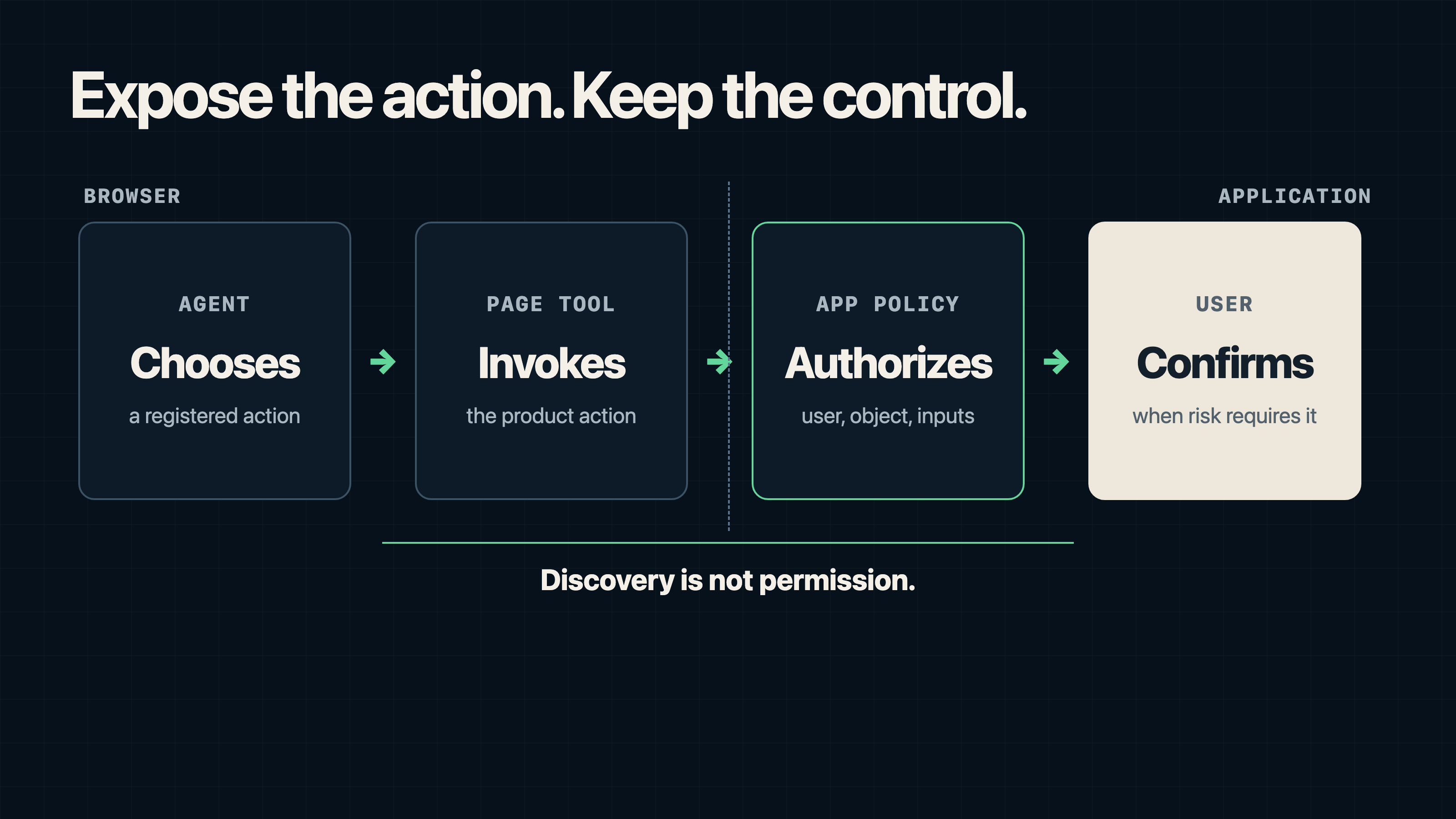
Shopify's checkout tools require confirmation before completion. Apply the same boundary to consequential actions: let the agent prepare the change, while application policy and user approval govern execution.
4. The task has bounded inputs and a clear result
Tools work best when their names, descriptions, schemas, and return values remove ambiguity. search_catalog is better than interact_with_store. save_support_draft is better than handle_ticket.
Chrome's guidance recommends concise descriptions, focused tools, and dynamic registration based on the current application state. If you need a long prompt to explain what a tool might do, the action is probably too broad.
5. The agent can call product logic directly
A WebMCP tool can call the same application function as a button or form. The contract can stay stable as the control's placement or label changes. Keep interface tests for the human path.
When WebMCP is the wrong interface
The capability must outlive the page
Scheduled jobs, long-running processing, webhooks, background orchestration, and tools used from multiple clients belong at the service layer. Use an API or MCP server when the task must run after the page closes or from an IDE, desktop assistant, command line, support platform, or automated workflow.
The workflow crosses several products
Keep cross-service orchestration outside the page. It needs explicit authentication, retries, observability, and ownership at the service layer.
The action cannot be made safe enough for agent use
Do not expose a destructive or irreversible operation because it is technically possible. Some actions need a review screen, a confirmation token, a second factor, a transaction limit, or no agent path at all.
Browser coverage would block the core workflow
WebMCP still lacks broad browser interoperability. Keep the existing interface and API path available so the workflow works outside supported browsers.
 (opens the full-size image in a new tab)
Enforce security in application code
WebMCP makes tool invocation explicit. Product controls still determine whether an action is authorized and safe.
For imperative tools, Chrome's security guidance covers prompt injection, untrusted tool output, origin boundaries, and confirmation for consequential actions. Optional annotations such as readOnlyHint, untrustedContentHint, and consequentialHint give the agent risk signals; application code enforces the policy.
A practical security baseline includes:
- Validate every argument on the server, even if the page already validated it.
- Authorize the requested action against the current user and object.
- Require explicit confirmation for payment, deletion, publication, permission, and identity changes.
- Return the minimum data the agent needs.
- Treat page content and tool results as untrusted input to the model.
- Log the tool name, actor, result, confirmation path, and only the argument data permitted by the product's privacy policy.
- Rate-limit actions independently of the chat interface.
The tools Permissions Policy defaults to self. An embedding page can delegate it to a cross-origin iframe with <iframe ... allow="tools">. For cross-origin in-page agents, the registering document must also include the caller's secure origin in registerTool(..., { exposedTo: [...] }), and the caller must request the tool owner's origin through getTools({ fromOrigins: [...] }). These browser boundaries do not replace application authorization.
Cloudflare documents an important beta limitation: Kitesurf does not yet implement the tools Permissions Policy or origin-based tool filtering, and tools registered in iframes or popup windows are not exposed through its CDP integration.
Keep the tool surface smaller than the interface
Large web applications may have hundreds of actions. Exposing them all can make selection harder and consume more agent context.
Chrome's Lighthouse audit flags pages with more than 40 declared tools. Treat 40 as an audit trigger. Most routes should expose far fewer.
Register tools dynamically:
- A project list can expose
search_projectsandcreate_project. - A project detail route can expose
rename_project,add_member, andarchive_project. - A support ticket can expose
summarize_ticket,save_reply_draft, andchange_status.
Unregister tools when the user leaves the route or loses access so the agent sees only actions relevant to the current route and permissions.
A seven-step WebMCP pilot
1. Pick one reversible outcome
Start with search, filtering, drafting, or saving a non-public change. Avoid purchases, deletion, publication, and permission changes in the first pilot.
2. Write the contract before the code
Define the tool name, one-sentence description, input schema, success result, error cases, permission checks, and confirmation rule.
3. Reuse the existing product action
Call the same domain function used by the form or button, keeping one implementation for human and agent paths.
4. Preserve the human path
WebMCP requires a secure, origin-isolated document. Chrome documents that pages using document.domain, including pages configured with Origin-Agent-Cluster: ?0, cannot use the API.
Keep the form or controls functional when document.modelContext is unavailable. Detect support at runtime and add WebMCP as progressive enhancement.
5. Add risk controls
Set the relevant annotations, then enforce authorization, validation, confirmation, and rate limits in application code.
6. Test the tool and the fallback
Run direct tool calls with valid, invalid, stale, unauthorized, and adversarial inputs. Test the normal interface without WebMCP. Chrome also provides Lighthouse checks for common tool-definition problems.
7. Measure task success
Track tool choice, argument validity, task completion, human correction, and fallback to browser navigation. Use completion and correction rates as the decision metrics; tool-call volume measures activity rather than success.
Choose by state, lifetime, and fallback
Start by identifying the product action, the state it needs, and how long it must remain available. Use WebMCP when the action depends on the current tab. Use an API or MCP server when it must outlive the tab, run in the background, or serve many clients.
Pilot one reversible action on one route, define its success condition, and verify that the existing interface still works when WebMCP is unavailable.
FAQ
WebMCP is an experimental browser API that lets a web page expose structured tools to AI agents. A tool has a name, description, input schema, execution path, and optional serializable return value. It can be declared from an HTML form or registered with JavaScript.
WebMCP exposes tools from the active web page and can reuse the page's authenticated session and interface state. An MCP server can run locally or remotely and is a better fit when a capability must outlive the page, run in the background, or work across clients.
Use WebMCP when an action depends on the current browser session, maps to an existing interface workflow, can be expressed as a bounded tool, and should remain visible or reviewable by the user.
WebMCP is still experimental. The specification is a Draft Community Group Report. Chrome and Edge offer origin trials, Brave lists experimental support, and broad browser interoperability is not yet available. Products should detect support at runtime and keep the existing interface or API path available.
Declarative WebMCP turns an HTML form into a tool by adding attributes such as toolname and tooldescription. Imperative WebMCP registers a JavaScript tool with document.modelContext and fits dynamic application logic that is not naturally represented by a form.
Sources
- WebMCP specification
- WebMCP implementation status
- WebMCP in Chrome
- WebMCP declarative API
- WebMCP imperative API
- Secure WebMCP implementations
- WebMCP compared with MCP servers
- WebMCP best practices
- Lighthouse WebMCP tools audit
- Shopify Checkout WebMCP changelog
- Shopify Checkout WebMCP documentation
- Cloudflare WebMCP beta changelog
- Model Context Protocol architecture
- Cloudflare Browser Run WebMCP documentation