How to keep GitBook in sync with GitHub, and accurate
To keep GitBook in sync with GitHub without losing edits, and keep the content accurate, turn on Git Sync, choose the first sync direction on purpose, and edit each page in one place while a change is open. That keeps the editor and your repository identical.
- Written by
- Puneet Arora (opens in a new tab)
- Published on
- Read time
- 9 min

To keep GitBook in sync with GitHub without losing edits, and keep the content accurate, turn on Git Sync, choose the first sync direction on purpose, and edit each page in one place while a change is open. That keeps the editor and your repository identical. For accuracy, make the synced repository the place where every correction lands, whether a writer, an engineer, or EkLine makes it.
Take a common collision. An engineer renames a CLI flag in the code repository while a writer has an open change request in the GitBook editor on the page that documents that flag. The path below lands both edits without either one overwriting the other.
What Git Sync already handles
GitBook describes Git Sync as bi-directional: "changes you make directly in GitBook's editor are automatically synced, as are any commits made on GitHub or GitLab." Your pages sit in the repository as Markdown, and GitBook adds safeguards around the sync:
- When you enable GitHub Sync, you "Choose the source of truth for the initial sync," and GitBook warns that "GitHub → GitBook can replace your section's content," for example with an empty repository's empty content.
- Edits merged in GitBook reach Git as commits named
GITBOOK-{change_request_number}: {change_request_subject}, so your history shows which changes came from the editor. - If your docs live in the code repository, site-wide Git Sync can "sync multiple spaces from one repository and branch," each space in its own directory.
- A change request that conflicts with the space's live content is resolved with Keep primary or Keep changed.
- You can add an OpenAPI spec by file upload, URL, or CLI. For a URL, "GitBook checks for updates automatically every 6 hours."
Where the flag rename still slips through
Try this on your own space. Open the last merged pull request that renamed a flag, option, or command. Did anything flag the GitBook page that documents it? Each safeguard checks something real, and none of their docs describes comparing a page with the code.
| Native check | What it verifies | What it does not see | Where EkLine fits |
|---|---|---|---|
| Git Sync | The editor and the repository hold the same content | Whether that content still matches the code | Automatic PR review reads the code pull request behind the rename |
| Keep primary or Keep changed | Which side of a conflicting change request wins | A pull request on the same page, which GitBook tracks separately | The docs pull request lands in the synced repository for review |
| OpenAPI by URL | The reference, checked every 6 hours | The guides written around it | Code Sample Review checks the samples in those guides |
| GitBook Agent | Change requests, as a linter, and support signals | Code diffs, which its docs do not describe reading | EkLine starts from the code change |
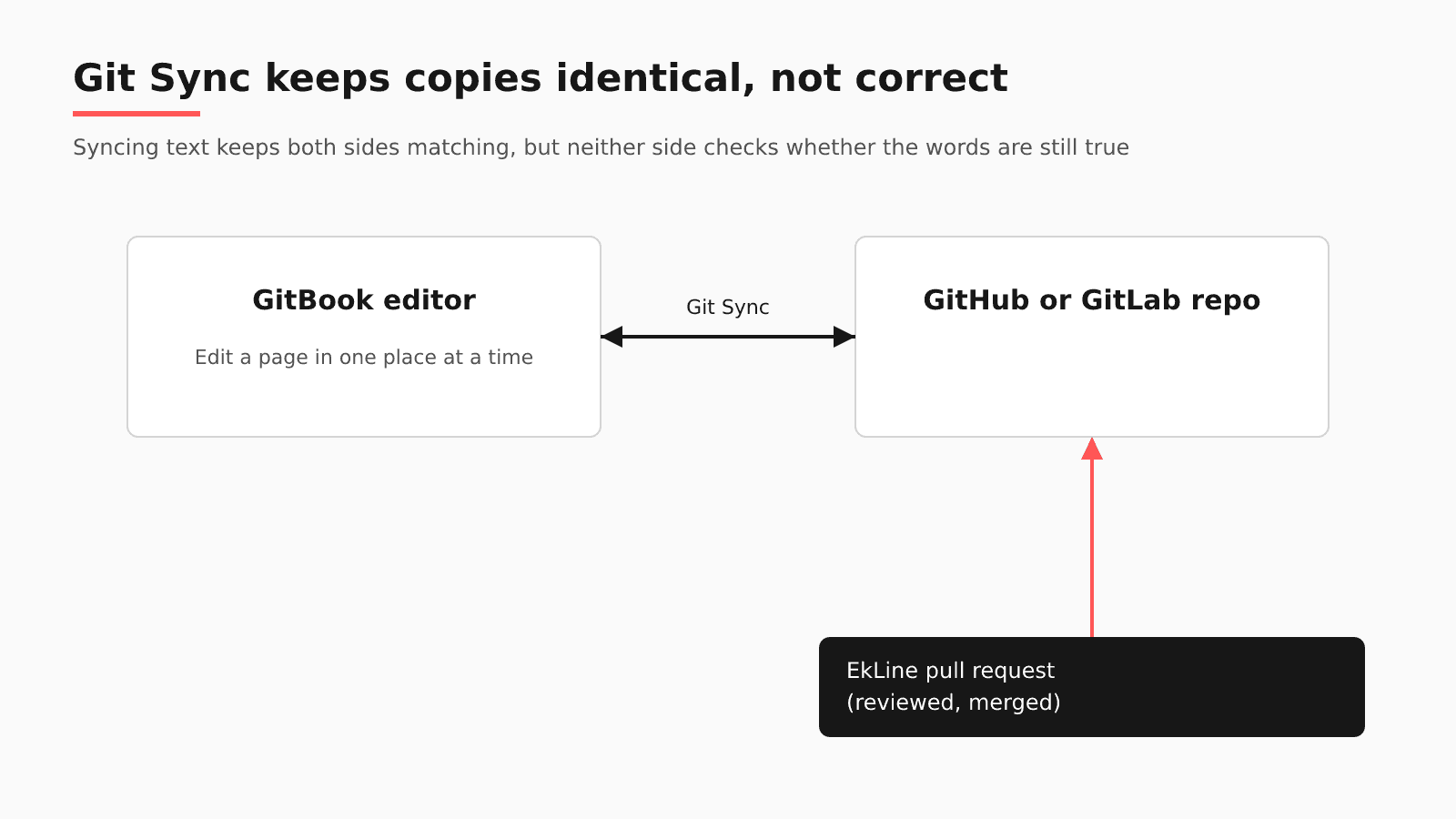
GitBook's Git Sync troubleshooting page is clear that the two sides track work separately: "Creating a pull request in GitHub or GitLab doesn't create a change request in GitBook, and creating a change request in GitBook doesn't create a pull request in your repository." The writer's change request and a pull request on the same page proceed without seeing each other.
Existing repositories add two traps. The same page says GitBook "may create new markdown files instead of using the existing ones," and that creating readme files through the GitBook UI "Creates duplicate README files in your repository." In a June 2025 issue filed against GitBook, marmarmo listed "Loss of documentation with overwrites," called it "a common pitfall in GitHub-synced projects," and reported that "the GitBook space had to be hard reset to remove duplicated instances."
Accuracy is a separate job: Git Sync mirrors the old flag name to both sides. On Hacker News, themast wrote that "writing an OpenAPI spec and then keeping a separate GitBook in sync felt like twice the work."
GitBook Agent covers part of this. GitBook's documentation says it writes docs from a prompt, can "Review change requests" as a docs linter, and can use "support conversations, tickets, and threads from your connected tools" to propose updates. It is free for all plans in beta, with 10 free messages a week outside Pro and trials. For a fix that starts in support, it works inside the editor your writers already use. Its December 10, 2025 launch post said that "Soon, GitBook Agent will be able to connect to" support conversations, Slack threads, GitHub issues, and more, and it describes no reading of pull requests or code diffs, where the flag rename starts.
Is a native setup enough? Yes, if your space syncs from the code repository itself, which site-wide Git Sync allows, and the pull request holds every fact the page needs: a rule that the rename and its doc edit merge together covers you. No, when the reason for the rename sits in a ticket, a Slack thread, a spec, or a separate code repository. In an Ask HN thread about keeping documentation up to date, commenters trade docs-first rules and nightly scripts.
A Git Sync safety checklist for this week
- Choose the first sync direction on purpose, and confirm the repository holds the content you want before you pick GitHub → GitBook.
- Create
README.mdin the repository and avoid creating readme files in the GitBook UI. - Give each page one place of editing during a change: when a pull request touches a page with an open change request, finish one before you merge the other.
- Add your OpenAPI spec by URL so the reference refreshes on the 6-hour check, and click Check for updates after a release.
- Know the recovery path: if Git Sync shows an unexpected error, GitBook says merging a small change request exports all content again, and a small commit imports it again.
Where EkLine fits in a Git-synced space
EkLine works in the repository, so Git Sync has to be on; a space edited only in GitBook has no repository to receive a pull request.
| Question | With GitBook |
|---|---|
| Where your content lives | Your GitBook space, synced to a GitHub or GitLab repository. Docs Agent works with GitHub and GitLab, not Bitbucket. |
| What EkLine watches | Code repositories, which the EkLine GitHub App lists apart from documentation repositories. |
| When it reads a change | Automatic PR review assesses each pull request once, when it opens or moves from draft to ready. A weekly Docs Drift Review sweeps what merged before EkLine was connected or fell below the threshold. |
| Where its pull request lands | The Git Sync repository, as a docs pull request your team reviews. |
| Which CI check runs | Docs Reviewer, which checks each docs change for style, consistency, links, and accuracy, through its GitHub Action; gitbook is one of its five framework values. |
| What stays in GitBook | The editor, change requests, hosting, GitBook Agent, and Git Sync. |
Back to the flag rename. When the engineer opens the pull request, Docs Agent reads its diff, title, and description. A high-confidence result opens a docs pull request in the synced repository that updates the affected page; a medium one leaves a suggestion comment. The writer merges or closes the open change request on that page first, then reviews the docs pull request and merges it through the normal branch, and Git Sync, GitBook's own feature, carries it into the editor. The review reads the pull request alone ("Linked Jira or Linear tickets are not included"), so a rename that starts in a ticket goes through a Docs Agent session that can combine sources. For a feature-by-feature view, read EkLine vs GitBook.
Will your engineers go along with it? P0 Security, a GitBook team, kept "Same GitHub. Same PR workflow. Same GitBook hosting. Same review process." Its case study reports its engineers reclaimed 150+ hours in 6 months.
Will it reach pages that are already stale? ContextQA, also on GitBook, brought 90 of 113 pages up to date in one quarter; the ContextQA case study adds, "The pages doing that answering are the ones EkLine refreshed."
FAQ
No. GitBook keeps the editor, change requests, hosting, and Git Sync. EkLine adds docs pull requests in your synced GitHub or GitLab repository when code changes, plus a Docs Reviewer check with GitBook framework support. Writers keep working in GitBook and see each merged update there.
GitBook's Git Sync overview and troubleshooting pages do not say. They state that pull requests and change requests are separate, and inside GitBook a conflicting change request is settled with Keep primary or Keep changed. Avoid the race: edit a page in one place at a time, and close or merge the change request before merging a pull request on the same page.
Not for the reference, since GitBook checks a spec added by URL every 6 hours. The guides around it need the repository workflow above. If you decide to leave GitBook for a self-hosted, Git-native site, Potluck Docs is EkLine's open source (MIT) Astro + Starlight template.
Partly. In the Ask HN thread, cyanydeez described "a for loop that runs nightly on any files updated the prior day," with local AI revising the Markdown file beside each changed file. When your space syncs from a separate docs repository, the page that documents a flag does not sit beside the code that renamed it. And every nightly rewrite still needs a reader, the cost rstagi named: "it's hard to fact-check everything all the time." EkLine reads the code pull request instead, and its reviewed pull request reaches the editor through Git Sync.
Pick one merged pull request that renamed something your GitBook pages mention, and bring it along. To see what EkLine would change in your GitBook repository, book a demo. Docs Agent is available to all plans, and access is granted on request.
Sources
- GitBook: Git Sync
- GitBook: Enabling GitHub Sync
- GitBook: Git Sync commits
- GitBook: Git Sync monorepos
- GitBook: How to handle merge conflicts
- GitBook: Add an OpenAPI specification
- GitBook: Git Sync troubleshooting
- GitHub issue: Allowing README creation in GitBook UI conflicts with default GitHub integration
- Hacker News: Ask HN: Gitbook Alternatives for API Documentation?
- Ask HN: How do you keep documentation up to date with AI generated code?
- GitBook: GitBook Agent overview
- GitBook blog: Introducing GitBook Agent
- EkLine docs: GitHub App setup
- EkLine docs: Automatic PR review
- EkLine docs: Prevent documentation drift
- EkLine docs: Update and review documentation
- EkLine docs: Docs Reviewer GitHub Action
- EkLine docs: Documentation framework support
- EkLine docs: Combine sources
- EkLine docs: Scheduled Agents
- EkLine blog: EkLine vs GitBook
- P0 Security case study
- ContextQA case study
- Potluck Docs