How to keep Fumadocs docs in sync with your code
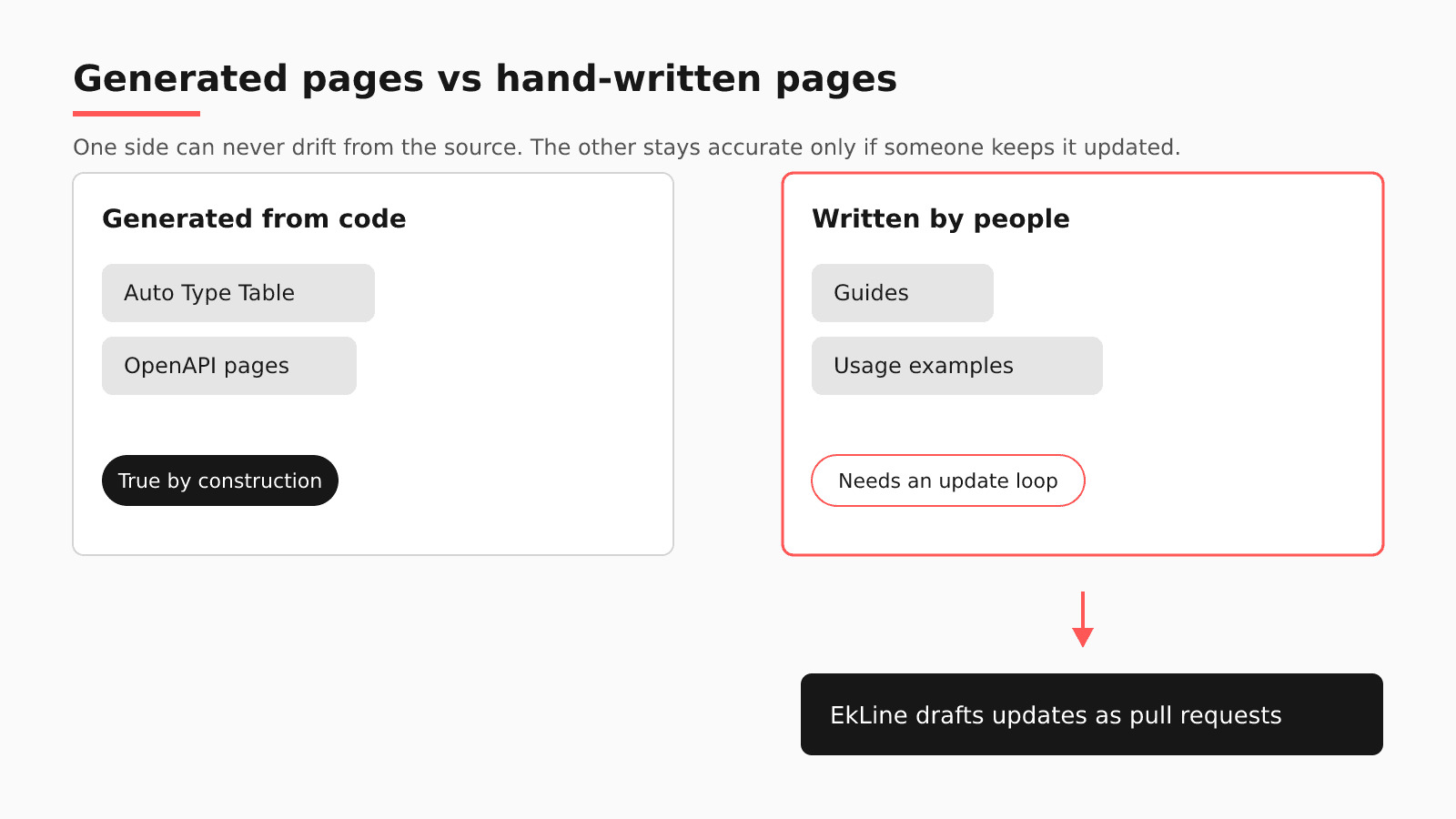
To keep Fumadocs docs in sync with a Next.js app and its API, let Fumadocs generate every page it can from code (OpenAPI reference pages and TypeScript props tables), then give the hand-written guides around those pages an update loop of their own. A generated page changes when its source changes.

- Written by
- Puneet Arora (opens in a new tab)
- Published on
- Read time
- 9 min

To keep Fumadocs docs in sync with a Next.js app and its API, let Fumadocs generate every page it can from code (OpenAPI reference pages and TypeScript props tables), then give the hand-written guides around those pages an update loop of their own. A generated page changes when its source changes. A guide, a migration note, or a usage example changes only when someone edits it.
Take one change: an engineer removes a prop from a TypeScript component. On the next build, Auto Type Table renders the props table without it, while the quickstart's usage example still passes the removed prop. API pages built with generateFiles() stay stale until someone runs the generation script again.
What Fumadocs builds from your source
Fumadocs MDX compiles Markdown and MDX from a directory you configure (content/docs in its examples) and works with Next.js or Vite, so your docs can live in the same repository as the app they describe. Two parts of its toolkit go further and write pages straight from code.
The fumadocs-openapi integration gives you two ways to turn a spec into pages. generateFiles() writes MDX files to disk, and you refresh them by running a script again. staticSource() writes no files: it "generates pages directly to your loader(), hence it allows dynamic content generation, such as re-generating page tree as schema changes."
For components, Auto Type Table "generates a table for your docs based on TypeScript definitions." It comes from the fumadocs-typescript integration, and it "relies on the file system, hence, the page referencing this component must be built in build time."
Where a Fumadocs site still drifts
Test it with your own history: find the latest merged pull request that removed a prop or changed an endpoint. Did anything flag the guide that still uses the old one? Here is what each tool reads:
| Native check | What it verifies | What it does not see | Where EkLine fits |
|---|---|---|---|
| Auto Type Table | Props tables built from TypeScript types at build time | Usage examples typed into MDX | Automatic PR review reads the code pull request and can draft the example fix |
| fumadocs-openapi | API pages from the spec, live with staticSource() or on rerun with generateFiles() | Guides that call those endpoints | Docs Agent edits that hand-written MDX in your docs repository |
| Fumadocs MDX | That your Markdown and MDX compile | Whether a compiled sentence is still true | Docs Agent drafts the correction, and Docs Reviewer checks the MDX in CI, without a Fumadocs framework value |
Generated files are only as fresh as their last run. In March 2026, piersonmarks opened a feature request for an OpenAPI watch mode and described the gap: "The fumadocs-mdx bundler watches for MDX file changes, but nothing watches the upstream OpenAPI spec that produces those MDX files." The maintainer closed the request and replied that, because schemas can also come from URLs and custom functions, a watcher written in your own project is simpler and more flexible than a built-in wrapper. On a generateFiles() setup, keeping the reference current is your job.
Auto Type Table has its own failure case: the docs warn that "Rendering the component on serverless runtime may cause problems," and its setup example sets a cache for serverless platforms.
The bigger gap sits outside generation. In the removed-prop example, the table corrects itself and the usage example does not, because a person typed it. The same holds for the quickstart prose about the prop and the migration note that should name its replacement. The Fumadocs MDX documentation describes no built-in AI writer that would draft those edits.
Why not generate everything?
The strongest answer to drift is to generate more, and on Fumadocs it goes far. If an endpoint or a prop can be described from the spec or the type, generate it and stop maintaining it by hand.
Generation still stops at the type. A type says which props exist. It does not say which two props you combine for a common layout, why the removed prop went away, or what a reader on the old version should change before upgrading. Guides, migration notes, and worked examples carry that knowledge, and none of it can be generated from types.
So generation plus a same-PR rule is enough when the docs sit in the app repository and every fact the guide needs is in that pull request. It falls short when the facts come from a ticket, Slack, a spec, or another repository; in an Ask HN thread on the subject, practitioners write docs first or script nightly passes.
A Fumadocs sync checklist for this week
- Prefer
staticSource()when your spec changes often, so the page tree follows the schema instead of a file someone forgot to regenerate. - Where you need
generateFiles()(for example, to edit the generated MDX), run the generation script in CI on every change to the spec, and fail the job when the committed files differ from fresh output. - Use Auto Type Table for every public component, build those pages at build time, and set the cache the docs ask for if you deploy to a serverless host.
- Keep a list of hand-written pages that mention a generated thing (a prop, an endpoint, a type name), and review that list as part of every release.
Adding EkLine to a Fumadocs repository
EkLine adds the update loop for the hand-written half.
| Question | On a Fumadocs site |
|---|---|
| Where your content lives | MDX in content/docs, inside the Next.js app repository or in a separate docs repository, on GitHub or GitLab. |
| What EkLine watches | The GitHub App separates documentation repositories, where you set the docs path, from code repositories, which it "reviews for documentation impact." Your app repository can be the code repository. |
| Where the pull request lands | A docs pull request (a merge request on GitLab) that edits hand-written MDX. Generated pages stay with Fumadocs; say so in custom instructions, which hold up to 5,000 characters and apply to every new session. |
| Which CI check runs | Docs Reviewer checks MDX for style, consistency, links, and accuracy. Its framework values cover mintlify, astro, fern, docusaurus, and gitbook, with no Fumadocs value, and the CLI docs note that "Without framework awareness, EkLine might skip content inside these components." |
| Which Scheduled Agents check fits | Code Sample Review, which "Verifies that code samples in your docs are accurate and runnable." |
| What stays in Fumadocs | OpenAPI pages, Auto Type Table, the page tree, and your Next.js build and deploy. |
In the removed-prop example, when the engineer opens the pull request (or moves it out of draft), automatic PR review reads the diff, title, and description once. A low-confidence result stays silent, a medium one posts a suggestion comment, and a high one opens a docs pull request that rewrites the quickstart example without the prop. The props table needs no edit, because the next build regenerates it. GitLab merge requests get the same review since May 2026. If the change merged before EkLine was connected or scored below the threshold, the weekly Docs Drift Review audits the last 30 days of GitHub activity and fixes the highest-priority gap. Someone on your team reviews and merges every one of these pull requests.
Will engineers review docs instead of writing them? P0 Security, whose docs are hosted on GitBook, reports "15 integration guides shipped, zero new headcount" with EkLine, and its engineers spent their time "reviewing documentation instead of writing it."
If you move off Fumadocs one day
Keep the docs as MDX in Git, and the move costs the least of your accuracy work: the update loop for hand-written pages keeps working. Potluck Docs, which EkLine maintains, is one option: an MIT-licensed Astro + Starlight template whose OpenAPI references are rendered by Scalar with a client for sending real requests. It adds private and org-scoped docs, and it generates a sitemap and llms.txt on every build. It calls itself "a template, not a hosted product."
FAQ
No. Fumadocs keeps generating your OpenAPI pages and type tables, and your Next.js or Vite build keeps rendering and deploying the site. EkLine works on the MDX you write by hand: Docs Agent drafts updates as pull requests when code changes, Docs Reviewer checks the MDX in CI, and Scheduled Agents review code samples. Your team merges every change.
With staticSource(), yes: the fumadocs-openapi docs say it generates pages directly to your loader(), which allows re-generating the page tree as the schema changes. With generateFiles(), you run the generation script again after each spec change. A March 2026 request for a built-in watch mode was closed, and the maintainer suggested a watcher in your own project, so most teams also run the script in CI.
Build the pages that use it at build time. The Auto Type Table docs say the component relies on the file system, warn that rendering it on a serverless runtime may cause problems, and its setup example sets a cache for serverless platforms such as Vercel.
For the generated half, the maintainer's answer to the watch-mode request was a watcher in your own project. For the hand-written half, cyanydeez described "a for loop that runs nightly on any files updated the prior day," letting local AI revise the Markdown file next to each one. A quickstart in content/docs sits apart from the component it uses. Every rewrite still needs checking, the part rstagi called hard: "it's hard to fact-check everything all the time." EkLine drafts the guide edit as a pull request from the code change, and your team decides.
Pick the last pull request that removed a prop or changed an endpoint, and bring it. Docs Agent is available on all plans, with access granted on request. Book a demo to see what EkLine drafts for the hand-written half of your Fumadocs site.
Sources
- Fumadocs: MDX
- Fumadocs: OpenAPI integration
- Fumadocs: Auto Type Table
- Fumadocs: TypeScript integration
- Fumadocs issue #3155: Watch mode for OpenAPI spec files
- Ask HN: How do you keep documentation up to date with AI generated code?
- EkLine docs: GitHub App setup
- EkLine docs: Custom instructions
- EkLine docs: Documentation framework support
- EkLine docs: CLI integration
- EkLine docs: Scheduled Agents
- EkLine docs: Automatic PR review
- EkLine changelog
- EkLine docs: Prevent documentation drift
- P0 Security case study
- Potluck Docs
- Potluck Docs on GitHub