How to keep Docusaurus docs in sync with your source code
Docusaurus keeps docs in sync with source code through the repository. It gives you three real sync tools: a monorepo, code blocks imported from files, and a build that fails on broken links.
- Written by
- Puneet Arora (opens in a new tab)
- Published on
- Read time
- 9 min

Docusaurus keeps docs in sync with source code through the repository. It gives you three real sync tools: a monorepo, code blocks imported from files, and a build that fails on broken links. All three assume the code lives next to the docs. Answering that exact question in Docusaurus discussion #3722 in November 2020, a maintainer said that with docs and code in separate repositories, keeping them in sync is your job.
Your Docusaurus site lives in its own docs repository, and your SDK lives in another. An engineer renames a configuration option in the SDK. Every guide that names the old option is now wrong, and no Docusaurus tool flags it.
What Docusaurus already does to keep docs and code together
The installation guide suggests a monorepo when you document an existing project: "Then, your contributors can update the docs as they implement features."
Inside one repository, you can import a source file as raw text with raw-loader and render it in a <CodeBlock>. The docs add a warning: "This feature is experimental and might be subject to breaking API changes in the future."
In the configuration reference, onBrokenLinks defaults to throw, so a link to a moved or deleted page fails the build. It has two limits: "The broken links detection is only available for a production build (docusaurus build)." And onBrokenAnchors defaults to warn, so a dead heading link ships with a warning.
Versioning copies the full docs/ folder into versioned_docs/version-[versionName]/ when you create a version, and each copy is edited independently. The docs advise against versioning unless you need it, because it adds build time and complexity.
The docusaurus-openapi-docs plugin generates MDX "using the OpenAPI specification as the source." Palo Alto Networks maintains it under the MIT license, outside the official Docusaurus project.
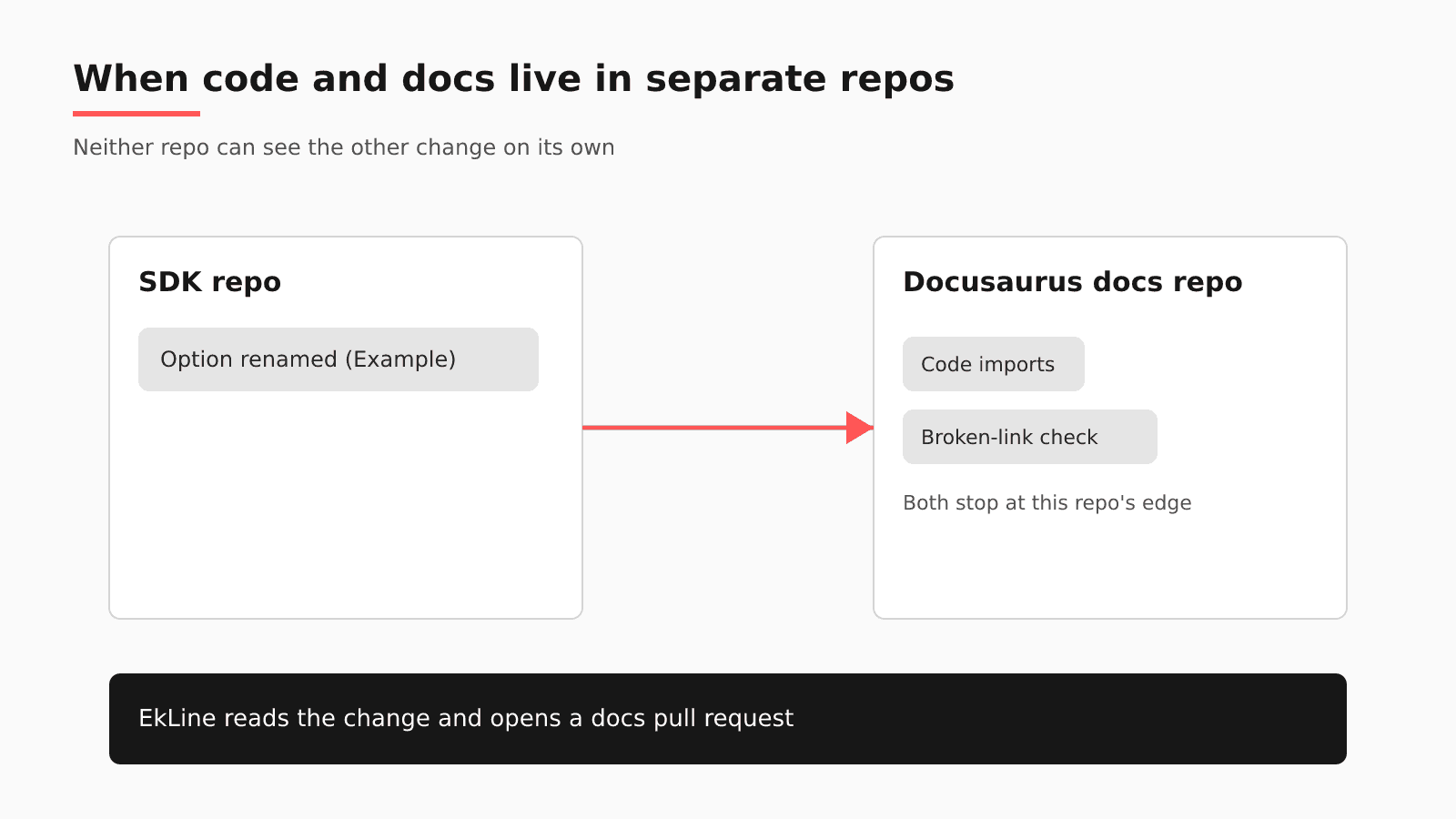
Where the renamed option slips through
Try it on your own site. Open the last merged SDK pull request that renamed an option. Did anything flag the guide that still names the old one? Each Docusaurus check answers a narrower question:
| Native check | What it verifies | What it does not see | Where EkLine fits |
|---|---|---|---|
onBrokenLinks | Links to moved or deleted pages, in production builds | A guide that names a renamed option with every link intact | Automatic PR review treats "renamed configuration" as a high-confidence case |
| raw-loader imports | Code blocks that match a file in the docs checkout | Code in a separate SDK repository | The GitHub App watches the SDK repository and writes to the docs repository |
| docusaurus-openapi-docs | Reference MDX generated from your spec | Guides and samples written around it | The Code Sample Review agent in Scheduled Agents checks those samples |
The raw-loader example imports a relative path such as ./myComponent, so the file has to be reachable from the docs project, which in practice means it sits in the same checkout. A renamed option breaks no link, so onBrokenLinks has nothing to throw on. The build passes, and the guide still tells readers to set the old name.
With versioning on, the page in docs/ belongs to the current version, the frozen copy under versioned_docs/ also names the old option, and each copy changes only when someone edits it.
A build can also fail without failing your deploy. In a Docusaurus 3.9.2 issue about an .md and an .mdx file sharing one name, josh-wong reported that "a site with build errors still goes live instead of failing the deployment." The maintainer traced it to a custom build script whose pipe to tee made it exit with code 0.
A Docusaurus sync checklist for this week
- Move the docs into the code repository if your team can, so the guide edit rides in the same pull request as the rename.
- Replace pasted snippets with raw-loader imports wherever the code shares the docs repository, and treat the experimental label as an upgrade risk.
- Run a full
docusaurus buildon every docs pull request, since link checks run only in production builds, and consider settingonBrokenAnchorstothrow. - Confirm that your build script exits non-zero on a Docusaurus error (a pipe to
teecan hide the exit code), so your deploy job stops. - After each SDK release, search
docs/and everyversioned_docs/folder for renamed options, and decide per version whether the frozen copy changes. - Generate API reference pages from your OpenAPI spec with the community plugin, so review time goes to the guides.
Should you move the docs into the SDK monorepo?
For most teams it is the best native answer, and the Docusaurus installation guide suggests it for documenting an existing project: the guide sits in the same pull request as the rename. It still leaves the prose to whoever opens the pull request. The Docusaurus docs we reviewed describe no check that compares a guide's sentences with the code, and a rename's reason often sits in a ticket or Slack thread outside the pull request.
Here is the line. A monorepo plus a same-PR rule is enough when the pull request carries every fact the guide needs; that is the shared-repository case the maintainer described in discussion #3722. It stops being enough once a fact lives in a ticket, a Slack thread, a spec, or the separate SDK repository. Docs-first habits and nightly scripts are what practitioners describe in an Ask HN thread on keeping docs current.
How EkLine plugs into a Docusaurus repository
| Question | On a Docusaurus site |
|---|---|
| Where your content lives | Your docs repository, added in the EkLine GitHub App as a Documentation Repository, with paths such as docs/ |
| What EkLine watches | Your SDK and service repositories, added separately as Code Repositories: "Source code repositories that EkLine reviews for documentation impact" |
| When it reads a change | Automatic PR review assesses each pull request once, when it opens or leaves draft; a weekly Docs Drift Review audits the last 30 days of GitHub activity |
| Where its pull request lands | Your docs repository, opened by Docs Agent |
| Which CI check runs | Docs Reviewer, through the EkLine GitHub Action, posts inline comments on the pull request, covering style, consistency, links, and accuracy; Docs Reviewer accepts a docusaurus framework value, and "Support for other frameworks is expanding." |
| What stays in Docusaurus | The build, theme, plugins, versioning, previews, and hosting |
When the engineer opens the SDK pull request, automatic PR review lists "renamed configuration" among its high-confidence cases, which "Posts a comment that automatically triggers the docs update flow." Docs Agent drafts the update as a pull request in the docs repository, where your build runs as usual and a reviewer merges or closes it. The assessment reads only the diff, title, and description; when the reason for the rename sits in a Jira ticket or a Slack thread, you can combine those sources in a Docs Agent session and get one pull request.
For snippets that raw-loader cannot reach, use the Code Sample Review agent in Scheduled Agents, which "Verifies that code samples in your docs are accurate and runnable." Docs Agent works with GitHub and GitLab and is available to all plans, with access granted on request.
Worried about engineering time? At P0 Security, which hosts its docs on GitBook, "In 6 months, engineers reclaimed 150+ hours of product development time by reviewing documentation instead of writing it."
If you are starting fresh or leaving Docusaurus
If you do leave, the target that puts the least of your accuracy work at risk keeps your docs as Markdown in Git, because the same pull request loop then works on the new repository. Potluck Docs is one such target: an MIT-licensed Astro + Starlight template maintained by EkLine, with OpenAPI references "rendered by Scalar with a built-in client for sending real requests," private docs behind your SSO, org-scoped docs, and a sitemap and llms.txt generated on every build. It is "a template, not a hosted product." Nothing about EkLine requires the move. Compare EkLine vs Docusaurus, or see Docusaurus alternatives.
FAQ
No. Docusaurus keeps building, versioning, and hosting your site. EkLine adds Docs Agent pull requests in your Docusaurus repository, drafted from changes in your SDK repositories, and Docs Reviewer comments in CI.
Through a shared repository. In discussion #3722, a maintainer replied that code and docs in the same Git repository "remain in sync automatically," and that with separate repositories "you have the responsibility to maintain sync." He linked an example of importing a code block from a source file. EkLine covers that separate-repository case.
Yes, from a file the build can reach. Import it as raw text with raw-loader and render it with <CodeBlock>. The feature is marked experimental, and the import is a relative path, so in practice the file sits in the docs checkout.
You can script part of it. In the Ask HN thread, cyanydeez described "a for loop that runs nightly on any files updated the prior day," and has local AI rewrite the Markdown file that sits next to each one. That pairing assumes the doc sits beside the code, the shared-repository case from discussion #3722; your guides live in a separate Docusaurus repository, and versioned copies multiply them. rstagi named the remaining cost: "it's hard to fact-check everything all the time." EkLine reads the SDK pull request and, when the impact is clear, opens a docs pull request your team reviews.
Bring the last SDK pull request that renamed an option. Book a demo and walk an SDK change through to a Docusaurus pull request.
Sources
- Docusaurus discussion #3722: How does docusaurus sync with the source code?
- Docusaurus: Installation
- Docusaurus: MDX and React (importing code snippets)
- Docusaurus: docusaurus.config.js reference
- Docusaurus: Versioning
- docusaurus-openapi-docs (Palo Alto Networks)
- Docusaurus issue #11890: Builds succeed despite file extension errors
- Ask HN: How do you keep documentation up to date with AI generated code?
- EkLine: GitHub App setup
- EkLine: Automatic PR review
- EkLine: Prevent documentation drift
- EkLine: Update and review documentation
- EkLine: GitHub Action quickstart
- EkLine: Documentation framework support
- EkLine: Combine sources
- EkLine: Scheduled Agents
- P0 Security case study
- Potluck Docs
- Potluck Docs on GitHub
- EkLine vs Docusaurus
- Docusaurus alternatives