How to keep a Pylon knowledge base accurate after every release
Pylon's signals catch what tickets show is missing. A release-time check catches what a release made wrong, before customers or the AI agent see the old answer. A playbook with three cadences and one approver per fix.
- Written by
- Puneet Arora (opens in a new tab)
- Published on
- Read time
- 11 min

A release renames a setting. The help center article that walks customers through it still shows the old name and the old steps. Pylon's AI agent can answer from that article. KB articles are one of the sources Pylon's AI features draw on. The first your support team hears of the problem is a ticket, or an escalation from the AI agent.
Pylon gives you strong tools for that ticket. Its documented signals all start from customer activity: a support agent marks an issue, a common question goes uncovered, the AI agent escalates, a search returns nothing, a reader rates an article. Each signal fires after a customer or the AI agent has already met the wrong answer.
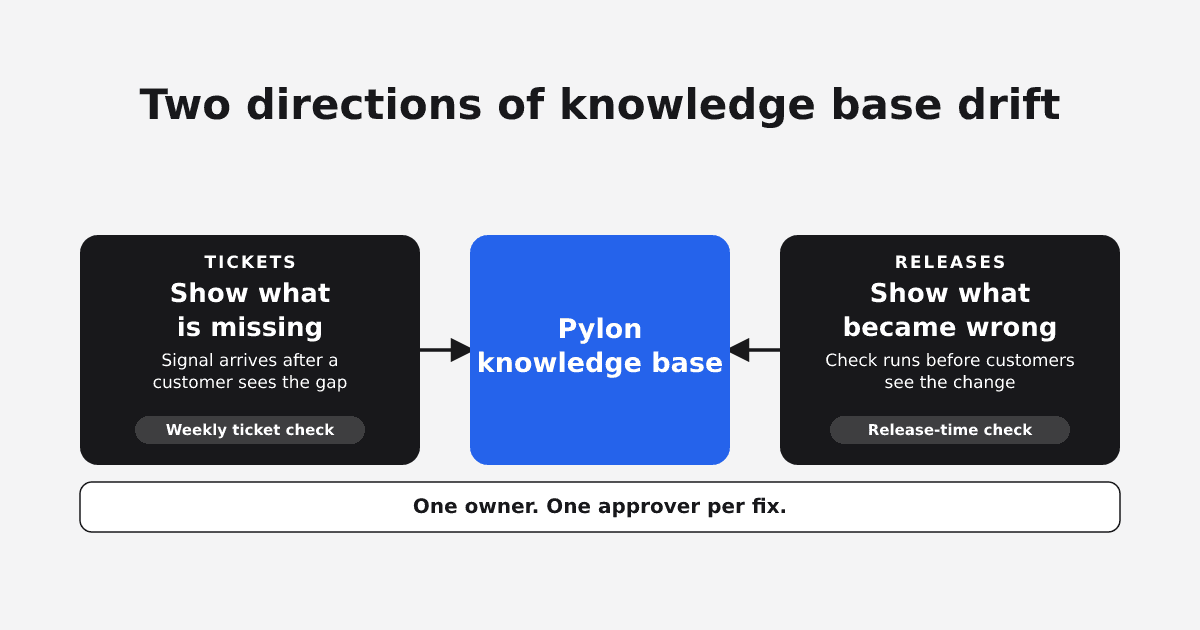
A Pylon knowledge base stays accurate when you check it from two directions. Tickets tell you what is missing. Releases tell you what became wrong. You likely run the first check already. The second starts from what shipped, runs at release time, and gives each fix one named approver. Pylon's own guide sets the bar: "At a minimum, update articles with every significant product release, and audit the full knowledge base quarterly."
TL;DR
- Tickets show you which articles are missing or incomplete. Releases show you which articles became wrong. Each direction needs its own check.
- Pylon covers the ticket direction well. Its signals start from customer activity, so they arrive after someone has seen the stale answer.
- A release-time check starts from the list of user-facing changes, searches the help center for every old name and step, and gives each fix one approver before customers see the release.
- Run three cadences with one owner: a weekly ticket check, a check for every release, and a quarterly sweep.
Tickets show what is missing, releases show what became wrong
A knowledge base fails customers in two ways. In the first, the article was never written, and customers keep asking a question the help center does not answer. Your ticket queue shows this well, because repeat questions are the signal. EkLine has written about how your support tickets are a documentation backlog in disguise.
In the second, the article was right when you published it and a release changed the product underneath it. Nobody files a ticket against a release. The ticket arrives later, when a customer follows the old steps and they fail. With an AI agent answering from the same article, the old steps can reach every customer who asks before anyone on your team notices.
Self-service already struggles. A Gartner customer survey found only 14% of customer service and support issues are fully resolved in self-service. In a Slite survey about internal docs, 41% of the people whose AI tool had surfaced a stale doc said "the wrong info has reached a customer."
Support teams feel the release side as manual work. One team asked its help desk vendor to "Auto-flag Help Center articles that go stale when we ship product updates, and suggest the edits needed," and a reply said it would "reduce our time manually locating existing articles."
What Pylon already does well
Use all of these. The table shows what starts each one and what you get.
| Pylon feature | What starts it | What you get |
|---|---|---|
| Missing Content (under Insights) | A support agent sets an issue's Resource status to "Needs new article" or "Needs article update." | A queue where you select issues and generate article drafts with Copilot. |
| Topics | Common questions "not covered by your connected documentation," once your workspace has logged 300 issues, on select plans. | Topics marked "Missing resources," "Needs update," or "Up to date." |
| Improvements | The AI agent's escalation reason, the issue topic, and how often it comes up. | A suggestion to write or update an article, with "AI suggested edits" you Accept or Reject. |
| Copilot | An issue's conversation. | A draft article "documenting the solution," with duplicate warnings. |
| KB Analytics | Reader traffic, searches, and feedback. | Views, "Top searches with no results," feedback scores, and alerts to Slack or email. |
| Article Review | An author clicks Request Review. | Approvals, requested changes, and inline comments. |
| Synced Blocks | An author embeds a shared block in several articles. | "Edit the block once, and every article that embeds it updates automatically." |
The first five start from customer or AI agent activity; the last two help you approve and apply a fix. Pylon's knowledge base page describes the same flow: Pylon watches every conversation across Slack, Microsoft Teams, email, and in-app chat, then can "Detect missing answers, repeated issues, outdated documentation, and useful knowledge buried inside completed work." The sources Pylon lists for its AI features are public replies, internal notes, issue and account fields, KB articles, call recordings, and training data.
The case for waiting on tickets, and where it stops
A fair objection to a second routine: Pylon already flags gaps, so you can fix articles when tickets arrive. Support agents can mark an issue "Needs article update." Improvements tracks articles as "Needs update" and drafts edits "based on how those related issues were resolved." A new routine costs review time.
For the ticket direction, the objection is right. Pylon handles it, and you should lean on it.
Each of those signals needs a customer or the AI agent to hit the stale answer first. An Improvements suggestion follows an escalation, so the AI agent has already failed to resolve the question. A Missing Content entry follows a ticket. Topic suggestions wait for 300 logged issues and a plan that includes them. A zero-result search catches words your help center lacks, while a customer who finds the article with the old setting name and follows it leaves no trace there. Feedback scores need a reader who rates the page.
Pylon's guide asks you to update articles with every significant release. To update before customers notice, start from the release itself.
How the release-time check works
 (opens the full-size image in a new tab)
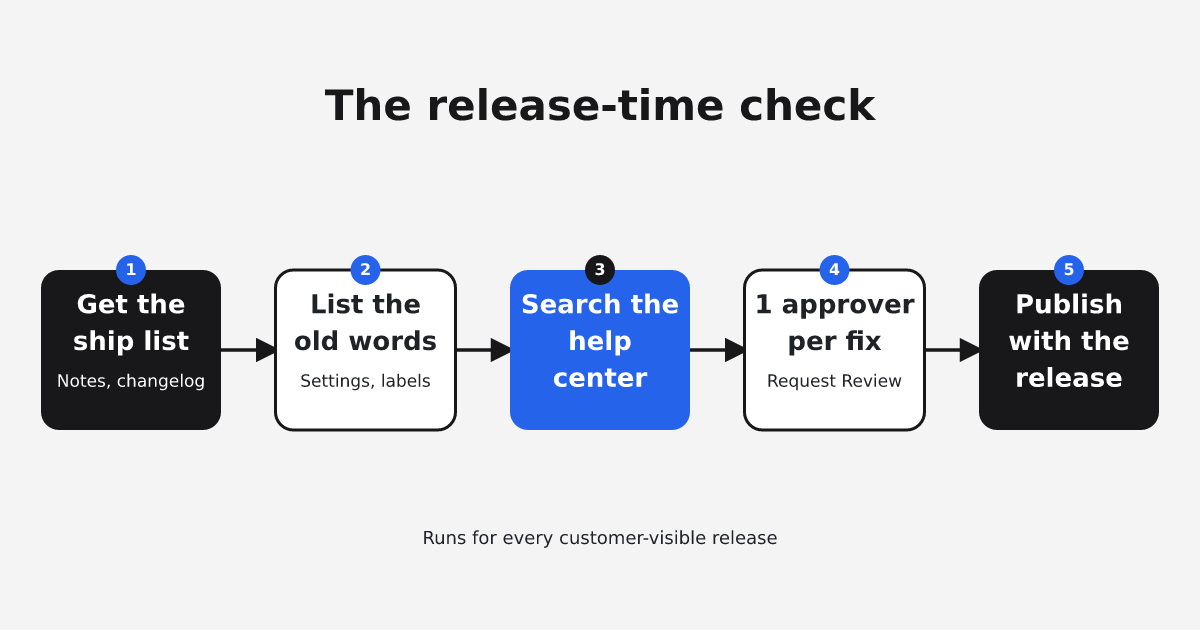
The release check runs in the opposite direction from Pylon's signals. It starts from the change that shipped and looks for every article the change made wrong. Run it for every release a customer can see.
- Get the list of user-facing changes before the release goes out, from the release notes, the changelog, or the product manager. A help desk vendor's own senior knowledge manager, writing in that vendor's community, said product managers bring the knowledge team into the loop before shipping any change, and the team typically gets "at least four weeks' notice to create new content."
- For each change, write down the old words customers would have read: setting names, button labels, menu paths, limits, and steps that moved or disappeared.
- Search your help center for each old word and list every article that contains it. Check your Synced Blocks too, since one edit there updates every article that embeds the block.
- Name one approver for each fix, usually the product manager or engineer who shipped the change, and make sure they are a reviewer in the knowledge base's Review & Publish settings. The author drafts the edit in Pylon and clicks Request Review.
- Publish the approved edits when the release reaches customers. Knowmax's knowledge-ops guidance allows a window: "Any article linked to a product launch, policy change, pricing update, or regulatory shift should be reviewed within 24-48 hours of the change going live." Publishing with the release means customers never see that window.
Teams have done this by hand for years. In an older HelpDocs roundup, Front's support manager met the product team weekly and kept a running list of articles to update, and Wistia's team watched GitHub pull requests. The vendor's knowledge manager quoted in step 1 reported that "13 agents dedicated time to audit and update articles affected by product changes." The method works, and it takes people's time on every release.
Keep the old words from each release on a running list. The next weekly ticket check can then show whether any article slipped through.
Owners, cadence, and checkpoints
You can run the whole routine with Pylon alone. Knowmax puts the first rule plainly: "Every article should have a designated owner." One knowledge base owner runs three checks.
| Check | When | Inputs | Done when |
|---|---|---|---|
| Ticket check | Weekly | Missing Content queue, Improvements suggestions, topics marked "Needs update," top searches with no results, feedback alerts | Each flagged issue has a draft, an approved edit, or a note that it is not knowledge base material |
| Release check | Every release with a user-facing change | Release notes, changelog, or the product manager's ship list | Every article that names a changed setting or step is updated, with one approver per fix, before customers see the release |
| Quarterly sweep | Every quarter | KB Analytics views and feedback scores, plus articles nobody touched since the last sweep | Every article has an owner and has been read against the current product |
The release and quarterly rows follow Pylon's own minimum, and the weekly row turns Pylon's ticket signals into a habit. Only the release row catches a wrong article before a customer does. Knowmax also suggests "rolling review schedules (e.g., every 90 days) for evergreen content," which fits the quarterly sweep.
One worked cycle
Take one illustrative week. On Monday, the ticket check. The support lead opens Missing Content, selects the issues support agents marked "Needs article update," and generates drafts with Copilot. They accept or reject the AI suggested edits in Improvements, then scan the top searches with no results.
On Wednesday, a release ships that renames a setting. Earlier in the week, the product manager sent the ship list. The support lead searched the help center for the old setting name, found the articles that use it and one synced block, and drafted the edits. The product manager approved each through Request Review, and the updated articles went live with the release.
The next Monday, the ticket check doubles as a test of the release check. A ticket that still quotes the old setting name means an article was missed; the support lead fixes it and adds the search term that would have found it.
Where EkLine fits
EkLine's Docs Agent runs both checks as drafts your team approves.
For the ticket side, the "Improve Pylon knowledge base" scheduled agent "Reviews recent Pylon tickets for questions the knowledge base should have answered and drafts the missing or corrected help-center articles for your review." It reads recent closed tickets, checks each question against your knowledge base, and sorts it as covered, missing, outdated or incomplete, or not knowledge base material. It then drafts a capped number of new or corrected articles per run. By default it reports in Slack rather than opening a pull request, and it never publishes.
For the release side, there is no Pylon release template; you write your own prompt and schedule it. A scheduled agent runs a prompt on a recurring cadence, and each run works against the code repository you connect. You can write a prompt that compares recent changes against your Pylon articles and drafts updates. EkLine's docs show a similar prompt: "Compare the 'Billing FAQ' article against the latest pricing page and update any answers that are out of date."
A person approves every change. You review the proposed edits in View All Changes, then click Update KB, which "overwrites the live page immediately." Setup on the Pylon side is a Pylon API token, the knowledge bases you select, and a Default author for new articles.
Before: on each release, the support lead searches the help center by hand for every old setting name, and on each ticket check reads the queue issue by issue. After: scheduled runs draft the new and corrected articles, the approver checks each fix in View All Changes, and the support lead clicks Update KB.
The setup has limits. The Pylon ticket agent reads tickets, not releases or code. The release check sees only what your prompt points it at. Knowledge base management is available on request.
To set this up, read the walkthrough for managing a Pylon knowledge base with EkLine, then request access at support@ekline.io.
FAQ
From two directions. From tickets: a support agent marks an issue "Needs article update," Improvements flags an article "Needs update" after AI agent escalations, or readers rate it unhelpful. From releases: a change renames a setting, label, or step the article still uses. Ticket signals arrive after a customer has seen the old answer; a release check finds the article before that.
View counts show which articles readers open, so they show where a wrong article does the most damage. They do not show whether the steps still match the product. Use high-traffic articles to decide what your quarterly sweep reads first, and use the release check to find what a change broke.
In Pylon, Copilot drafts articles from issues, Improvements suggests edits from AI agent escalations, and topics group uncovered questions. EkLine adds scheduled drafts from tickets, and from releases through a scheduled prompt you write. A person should review each change, because an AI agent repeats whatever the article says.
Sources
- Pylon: What does Pylon's AI use to generate answers?
- Pylon: How to set up a knowledge base
- Pylon: AI Knowledge Base
- Pylon docs: Missing Content
- Pylon help center: Improvements
- Pylon docs: Copilot
- Pylon docs: Analytics
- Pylon docs: Article Review
- Pylon docs: Synced Blocks
- Gartner: self-service resolution survey
- Slite: The Hidden Dangers of Stale Documentation in 2026
- Support community thread on release-time KB updates
- Support community idea: flag articles a release affects
- HelpDocs: keeping a help center updated (2017)
- Knowmax: knowledge lifecycle management
- EkLine: Your Support Tickets Are a Documentation Backlog in Disguise
- EkLine docs: scheduled documentation agents
- EkLine docs: manage a Pylon knowledge base