EkLine vs Swimm: which keeps your docs in sync with code in 2026?
Swimm keeps a snippet in sync with the code it quotes. EkLine keeps the whole page true: it flags the docs a pull request made wrong, checks code samples and screenshots, and covers the help center. Here is how to choose in 2026.
- Written by
- Puneet Arora (opens in a new tab)
- Published on
- Read time
- 11 min

A pull request merges. It changes a default, drops a parameter, or renames a setting. The code is now right and the docs are wrong: the API reference, the quickstart, the help center article, and the AI answers built from those pages all describe the old behavior. Nobody knows which pages the change affected, because the pull request never opened them.
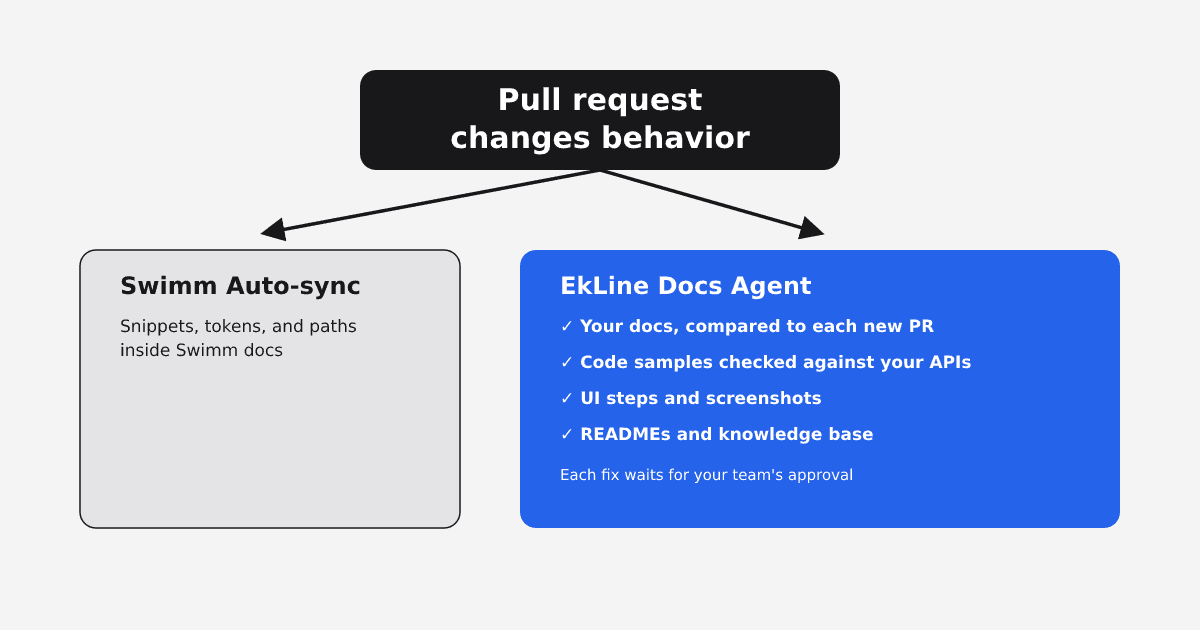
Swimm and EkLine both promise to keep docs in sync with code, and they mean different things by it. Swimm keeps a snippet inside a Swimm doc matched to the code it quotes. EkLine's Docs Agent works on the whole page: it reads each pull request against your existing docs, flags the pages the change likely made wrong, and drafts the fix as a pull request when its confidence is high. For teams whose customer-facing docs live outside Swimm, EkLine covers the pages Auto-sync's documentation does not. Swimm still fits one narrower job: a hard merge gate on code quoted in internal Swimm walkthroughs.
TL;DR
- Choose EkLine when the docs that go stale are customer-facing: product docs, API guides, quickstarts, READMEs, and help center articles. EkLine reviews GitHub pull requests and GitLab merge requests, catches pages a change made wrong without touching, and on a schedule checks code samples against your APIs and SDKs and screenshots against the live product.
- Choose Swimm when your drift problem is internal walkthroughs written in Swimm that quote code, and a hard merge gate on those snippets matters most. Get the docs product's roadmap in writing first, because in 2026 Swimm repositioned itself around modernization services.
- Move past the checklist-only approach once anyone outside the team reads your docs. A pull request template depends on someone remembering, and a page in another repository is easy to miss.
What changed at Swimm in 2026
On March 24, 2026, Swimm launched "Swimm 2.0: the understanding platform for AI modernization." On May 6, 2026, co-founder and CEO Oren Toledano announced the larger change: "Swimm is becoming a service company. From Software as a Service to Service as Software." Neither post mentions documentation sync or Auto-sync. The Swimm homepage now leads with "Agentic modernization, delivered" and lists .NET, Java, monolith-to-microservices, and mainframe work.
The docs product is still there. The Swimm documentation describes it as "an AI coding assistant helping developers quickly understand big, complex codebases," with IDE plugins for VS Code, Open VSX (Cursor and Windsurf), and JetBrains, and no deprecation notice. The Swimm VS Code extension is still listed, now as "Swimm: Application Understanding Platform."
For a buyer, this is a risk to price in. If you plan to run a docs-sync tool for years, note that Swimm's homepage, launch post, and CEO letter all point at modernization. Swimm's pricing page lists no prices, says pricing is "based on the number of lines of code you want to understand," and still lists "Auto-generated documentation" without mentioning Auto-sync. EkLine builds for documentation: its homepage describes a product that "reads every change, finds the pages it touched, and redrafts the docs, the help center article, the release note, and the blog post."
Swimm keeps the snippet in sync. EkLine works on the whole page.
Docs drift in two ways after a pull request.
Code-element drift. A doc quotes a snippet, names a function, or points to a file path, and the code changes. Swimm's Auto-sync is built for this. According to Swimm's VS Code docs, it tracks "code elements (snippets, tokens and paths) within your documentation," and a person accepts the changes Swimm proposes.
Behavior drift. A page describes what the product does in prose, with no snippet coupled to it. A pull request changes a default, and the quickstart on your public site still states the old one. That quickstart may live in a separate docs repository or a help center. Swimm's docs anchor Auto-sync to the code elements a Swimm doc references, so a sentence like that, or a page that lives outside Swimm, is outside what Swimm documents Auto-sync checking.
Behavior drift is the kind readers act on. Customers hit it in a quickstart, and AI assistants repeat it when someone asks how your product works. EkLine's Docs Agent catches it by starting from the pull request and reading it against your docs.
EkLine, Swimm, and the status quo side by side
| Criterion | EkLine Docs Agent | Swimm (code-coupled docs) | Status quo (docs next to code, linter, PR checklist) |
|---|---|---|---|
| What it checks after a pull request | The diff, title, and description against your existing docs | Snippets, tokens, and paths referenced in Swimm docs | Whatever the author and reviewer think to check |
| Pages the pull request never touched | Flags them by comparing the change with your docs | Only if a Swimm doc references the changed code | Only if someone remembers them |
| Code samples | Scheduled Code Sample Review checks that samples are accurate and runnable against your APIs and SDKs | Keeps referenced snippets matched to the code | Manual |
| UI steps and screenshots | Scheduled reviews check UI steps against your current frontend and regenerate stale screenshots from the live product | Outside Auto-sync's documented scope | Manual |
| Help center and knowledge base | Confluence and Pylon knowledge bases, on request | Outside Auto-sync's documented scope | Manual |
| Where it runs | GitHub pull requests and GitLab merge requests, automatically or on an @ekline-ai mention | GitHub App, or the Swimm CLI on other platforms | Your pull request template |
| Merge gate | Comments or opens a docs pull request; does not block | Can block the pull request, by configuration | Only when a reviewer holds it |
| Who approves the fix | Your team, through a docs pull request or a knowledge base edit you publish | A person accepts Swimm's proposed changes | The reviewer |
| Vendor focus in 2026 | Documentation, help center, and release content | Modernization services; docs product still documented | Not applicable |
What EkLine covers beyond Auto-sync's documented scope
It flags the pages the pull request never opened
When a non-draft pull request is opened or marked ready, EkLine's automatic PR review reads the diff, title, and description and compares the change against your existing documentation. Then it acts on its confidence. Refactors get no comment. Behavior changes get a suggestion on the pull request. High-confidence changes, such as a new endpoint or a removed feature, get a drafted docs pull request. The engineer who shipped the change usually doesn't have to hunt for the affected pages. You can scope which pull requests it reviews by branch, title, author, label, or changed files.
It keeps checking after the merge
Some drift never shows up in a single pull request. EkLine's Scheduled Agents run standing reviews from templates, including:
- Docs Drift Review audits recent GitHub activity for customer-facing changes that lack documentation, then fixes the highest-priority gap. It catches changes merged within the lookback window you set (30 days by default), including ones from before EkLine was connected.
- Code Sample Review verifies that code samples are accurate and runnable against the APIs and SDKs they demonstrate, then opens a pull request fixing accuracy issues.
- Doc UI Accuracy Review checks labels, navigation paths, and element placement against your current frontend, then opens a pull request fixing UI drift.
- Doc Screenshot Refresh compares doc screenshots with your live product, then regenerates stale ones and creates missing ones.
- README Review audits your README against the current codebase and fixes inaccurate installation steps, dependencies, configuration, or examples.
A snippet that matches the code can still sit in a sample that no longer works, next to a screenshot of a screen that moved, and EkLine's scheduled reviews check the sample and the screenshot as well as the code.
It covers the help center as well as the repository
Customers also meet stale answers in the help center. EkLine's Docs Agent can keep a Confluence or Pylon knowledge base accurate, updating pages across a space and publishing changes back once you approve them. EkLine enables knowledge base management on request.
It works where your team already ships
Review runs automatically on GitHub pull requests and, as the EkLine changelog notes, on GitLab merge requests too. On GitLab you can also mention @ekline-ai in a merge request comment to have the Docs Agent draft documentation from the change. Your docs stay in the repositories and tools you already use, and every change waits for your team's approval.
The results teams report
At ContextQA, whose own AI testing agents read its documentation, the Docs Agent created or brought 90 of 113 pages up to date in one quarter, and engineers merged 97.5% of what it proposed.
The agent finds the work, does the work, and I just review.
At P0 Security, the engineering team reclaimed 150+ engineering hours in six months.
At Socure, one technical writer merged 348 documentation updates across the full product line in seven weeks, with no added headcount.
Where Swimm still fits
Swimm's strength is a hard gate on code it tracks. Swimm's Auto-sync docs say it "automatically keeps code snippets up to date with routine code changes via your CI." When Auto-sync decides a change needs a person, the verification check fails and, depending on configuration, blocks the commit or pull request until the doc is fixed, or opens an issue. EkLine does not block merges: its assessment is best-effort, runs once per pull request, and leaves the decision to your reviewers, with scheduled audits catching what falls below the threshold.
So if your docs are internal onboarding walkthroughs written in Swimm, dense with quoted code, and a stale snippet must never merge, Swimm's gate is the stronger control for that set of docs.
Why a checklist and a linter are not enough
Teams that keep docs next to the code often rely on a linter plus a checklist. Atomic Object's checklist post describes the practice: "One way to make it easier to remember is to incorporate it into a pull request template."
That works for an internal README edited in the same diff. It breaks in two places. A checklist depends on someone remembering, and one Hacker News commenter wrote that "most teams don't incentivize writing documentation and a lot of them just don't care." And a linter set to check changed files never sees the page the pull request did not touch. Comparing each pull request against existing docs, then auditing on a schedule, narrows both gaps.
Which to choose
- Customer-facing docs, API guides, READMEs, or a help center go stale after releases: choose EkLine.
- Your docs feed AI tools, your own agents or the assistants your buyers ask: choose EkLine, because those tools read your prose pages, which fall outside what Swimm documents Auto-sync tracking.
- Internal Swimm walkthroughs that quote code, where a merge gate is non-negotiable: Swimm can do that job.
- A small, internal-only docs set edited in the same pull request as the code: a checklist may hold until external readers arrive.
FAQ
Yes, for teams whose docs are read outside engineering. Both detect documentation drift caused by code changes. Swimm tracks code elements inside Swimm docs. EkLine compares each pull request against your existing docs and drafts the fix as a pull request when its confidence is high, and its scheduled reviews also check code samples, UI steps, screenshots, READMEs, and Confluence or Pylon knowledge bases.
It can find and draft the updates, and a person should still approve them. EkLine's Docs Agent assesses which docs a pull request affects, drafts the change for high-confidence cases, and waits for your team's approval. Swimm's Auto-sync updates code snippets for routine changes and asks a person to review impactful ones.
You can, once, for a page you already know is wrong. The hard part is knowing which pages the next change affects. A post from Amendary puts the question as "which docs should it update?" EkLine assesses that on each pull request it reviews, and opens the docs pull request when the impact is clear.
Swimm's docs and VS Code extension are still published, and its pricing page still lists "Auto-generated documentation." Swimm also announced on May 6, 2026 that it is becoming a service company focused on modernization. Ask Swimm whether the docs-sync product is sold to new customers and how long it will be supported.
Yes. EkLine reviews GitLab merge requests automatically, as it does GitHub pull requests, and you can mention @ekline-ai in a merge request comment to start a documentation session.
See it on your own pull requests
Pick a recent pull request that changed behavior, and the docs it should have updated. We will run the Docs Agent against it with you and show which pages it flags and what it drafts. EkLine grants Docs Agent access on request. Book a demo.
Sources
- Swimm: "Swimm 2.0: the understanding platform for AI modernization"
- Swimm: "We've stopped asking customers to bet on the right tool"
- Swimm homepage
- Swimm documentation
- Swimm: Application Understanding Platform (VS Code Marketplace)
- Swimm pricing
- Swimm: Keep docs up to date from VS Code
- Swimm: Auto-sync
- Swimm: Continuous integration
- EkLine homepage
- EkLine: Automatic documentation review on pull requests
- EkLine: Control which pull requests EkLine reviews
- EkLine: Scheduled Agents
- EkLine: Manage a Confluence or Pylon knowledge base
- EkLine changelog
- EkLine: Generate documentation from GitLab merge requests
- EkLine: How ContextQA's engineers came to merge 97.5% of what an AI agent wrote
- EkLine: P0 Security case study
- EkLine: How Socure built developer experience into a moat with EkLine
- Atomic Object: Keep Your Documentation Up to Date with a Checklist
- Hacker News: "We have LLMs now. Why are the docs still wrong?"
- Amendary: "We have LLMs now. Why are the docs still wrong?"