Documentation review in CI: a quality gate for docs
How to gate documentation in CI the way you gate code, and how Vale, markdownlint, lychee, and six other doc linters compare with EkLine on what each checks, what it misses, and how it is set up.
- Written by
- Arun Bhalla (opens in a new tab)
- Published on
- Read time
- 12 min

Your repository gates code on every pull request. A linter blocks the merge on a style violation, the test suite fails the build when behavior breaks, a scanner flags a vulnerable dependency. The documentation in that same repository usually ships with none of that. A broken link, a product name spelled three different ways, a heading that jumps from H2 to H4, or an API reference that no longer matches the code all move through review because no job is watching for them.
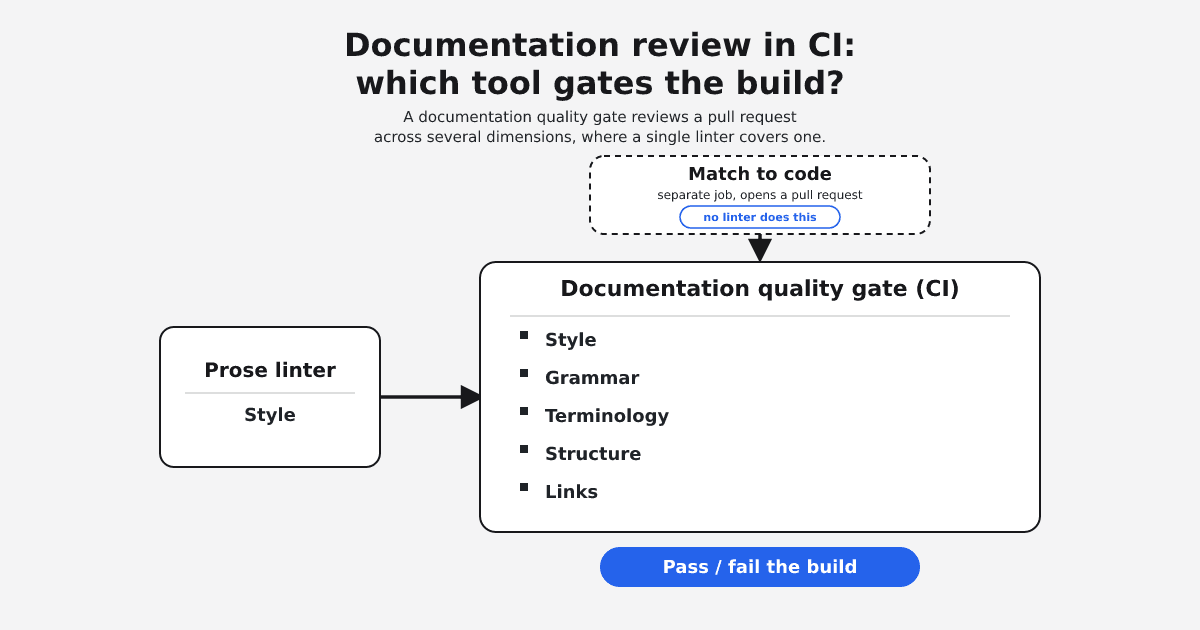
A prose linter in a CI job catches style nits, and that is worth having. A documentation quality gate does more. It also checks links, terminology, and structure, and the harder problem sits one step upstream: catching docs that no longer match the shipped code. Teams that start with a single-purpose linter tend to outgrow it once correctness, not just style, is what should break the build.
If you own the docs-as-code pipeline and decide what gates a pull request, here is how the common open-source doc linters and EkLine compare on what each tool checks and how it is set up, not on measured catch rates. EkLine makes one of the rows below, so read the table as a vendor's survey of its own category. There is no head-to-head accuracy benchmark here, and tool scope was checked in October 2026.
TL;DR
- A documentation quality gate is a CI job that reviews a pull request and can fail the build or post inline comments, the same way a test suite or a code linter does.
- Most open-source doc tools each cover one dimension: Vale checks prose style, markdownlint checks Markdown structure, lychee checks links, cspell checks spelling. Covering more means running several and maintaining several configs.
- None of these tools, open-source or hosted, check whether the prose still matches the code it describes. That is a different job.
- A tuned open-source linter is free, transparent, and good enough for a team with a settled style guide and someone to maintain the rules.
- EkLine runs one CI gate across style, grammar, terminology, structure, and broken links, and reviews OpenAPI specs for quality. Checking docs against shipped code is the Docs Agent's drift workflow, which opens a pull request rather than failing the gate.
How a docs quality gate is wired into CI
A documentation gate works like any other CI check. It runs on each pull request, reviews the changed files, and reports what it finds. Two behaviors decide how strict it is: whether a finding fails the build, and whether findings land as inline comments on the pull request. EkLine's Docs Reviewer runs in the CI/CD pipeline and reviews every pull request across style, grammar, terminology, and structure, posting inline comments on the diff. It supports GitHub Actions, GitLab CI, and Bitbucket Pipelines.
The published GitHub Action quickstart wires it up with a single workflow file:
name: EkLine
on: [pull_request]

jobs:
  docs:
    runs-on: ubuntu-latest
    permissions:
      contents: read
      pull-requests: write
    steps:
      - uses: actions/checkout@v4
      - uses: ekline-io/ekline-github-action@v6
        with:
          content_dir: .
          ek_token: ${{ secrets.EK_TOKEN }}
          github_token: ${{ secrets.GITHUB_TOKEN }}
          reporter: github-pr-review
With that configuration, the github-pr-review reporter posts findings as review comments on the diff, and the workflow does not set fail_on_error. The action's fail_on_error input controls whether findings produce a failing exit code, and it defaults to false. So out of the box a finding shows up as a comment rather than blocking the merge. To make the build fail when the reviewer finds an error, set fail_on_error to true. A level input decides what counts as reportable at all, from informational notes up to errors. That gradient, comment-only to build-breaking, is what lets a team roll a gate out without blocking engineers on day one and tighten it once the signal is trusted.
What a documentation gate should check
Code review covers more than one concern, and so does a documentation review. Four categories catch most of what slips through a pull request, and a fifth is the one no linter solves.
- Style. Active voice, sentence length, readability, and house conventions. This is what prose linters do, and it is where a style guide gets enforced automatically instead of in a reviewer's head.
- Grammar. Spelling, punctuation, and syntax.
- Terminology. One product name, one casing, one spelling across every contributor. This is the category that erodes quietly, because each author is locally consistent and the drift only shows across pages.
- Structure and links. Heading hierarchy and link validity. A broken link is a defect that reaches the reader.
- Match to the code. Whether the documented endpoint, flag, or default still exists in the shipped code. No linter in this comparison checks this, and it is worth being clear about why: a linter reads the document, not the system it describes.
The first four are what a CI gate can enforce on a pull request today. The fifth is a different job, and a fair comparison keeps it separate instead of implying a style checker covers it. For the background on what automated documentation review checks and how it fits a pipeline, that overview is a good starting point.
The tools, compared on scope and setup
These are the tools teams reach for when they wire documentation checks into CI. EkLine makes the last row; every other row is a separate third-party project, described from its own current project page. The comparison is on what each tool checks, what it leaves out, how it is run, and whether it fits a CI job. It is not a measurement of how many real issues each one catches.
| Tool | What it checks | What it misses | Setup model | Runs in CI |
|---|---|---|---|---|
| Vale | Prose and style, markup-aware, via YAML rules you write or adopt | Link checking, Markdown structure, match to code | Open-source (MIT), self-hosted CLI | Yes |
| lychee | Broken URLs and mail addresses in Markdown and HTML | Prose, grammar, structure, terminology, match to code | Open-source, self-hosted binary and GitHub Action | Yes |
| markdownlint | Markdown structure and syntax: heading levels, list indentation, code-fence language | Prose, grammar, links, match to code | Open-source (MIT), self-hosted CLI | Yes |
| textlint | Natural-language text, with rules added per need through plugins | Links, structure, match to code | Open-source (MIT), self-hosted CLI | Yes |
| proselint | English usage and clichés, via fixed heuristics | A configurable house style, links, structure, match to code | Open-source (BSD-3), self-hosted CLI | Yes |
| write-good | Heuristic prose checks such as passive voice and weasel words | Links, structure, terminology, match to code | Open-source (MIT), self-hosted CLI | Yes |
| alex | Inclusive-language word choice | Everything else, including links and match to code | Open-source (MIT), self-hosted CLI | Yes |
| cspell | Spelling in code and docs | Prose style, grammar, links, structure, match to code | Open-source (MIT), self-hosted CLI | Yes |
| LanguageTool | Grammar, spelling, punctuation, and some style | Links, structure, match to code | Hosted API, with an open-source self-hosted option | Yes |
| Several linters paired, for example Vale plus markdownlint plus lychee | Prose, structure, and links, each by its own tool | Match to code; one shared config and one place to tune | Open-source, self-hosted, multiple configs | Yes |
| EkLine | Style, grammar, terminology, structure, broken links, and OpenAPI spec quality, in one review | Match to code is handled by a separate workflow, not this gate | Hosted, configured through one CI step | Yes |
Read down the "what it misses" column and the pattern is plain: each open-source tool covers one dimension well, none of them check documentation against the code, and getting broad coverage from them means running and maintaining more than one.
Where each option wins
Grouping by job makes the choice easier, because these tools are not really competing for the same slot.
If your only concern is Markdown structure, markdownlint is a light, direct fit. If you want to catch dead links and nothing else, lychee does that one job quickly. For spelling, cspell covers code and docs together, and for inclusive-language word choice, alex is purpose-built. For house prose style, Vale is the most capable of the group, provided you are ready to write and maintain the rules. LanguageTool leans toward grammar and punctuation and offers both a hosted API and a self-hosted build.
Once your answer is "more than one of those," the task shifts from picking a tool to assembling and maintaining a toolchain.
The case for staying with open-source linters
A tuned open-source linter in CI is free and auditable, and often good enough, and that case deserves to be made at full strength before anything replaces it. The rules are readable and the tool runs offline, so nothing leaves your pipeline.
Contentsquare's engineering team added Vale to CI "to surface errors to all contributors with every commit," found the full Google style package too noisy, enabled only the rules that fit, and ran it non-blocking, so neither errors nor warnings stopped the build. They advised teams to "resist rolling out every single rule." Scott Lowe, writing up his own setup, found that getting Vale going "isn't hard, but you do need to know where to put the files." For a team with a settled style guide and someone willing to own the configuration, stopping there is a sound decision.
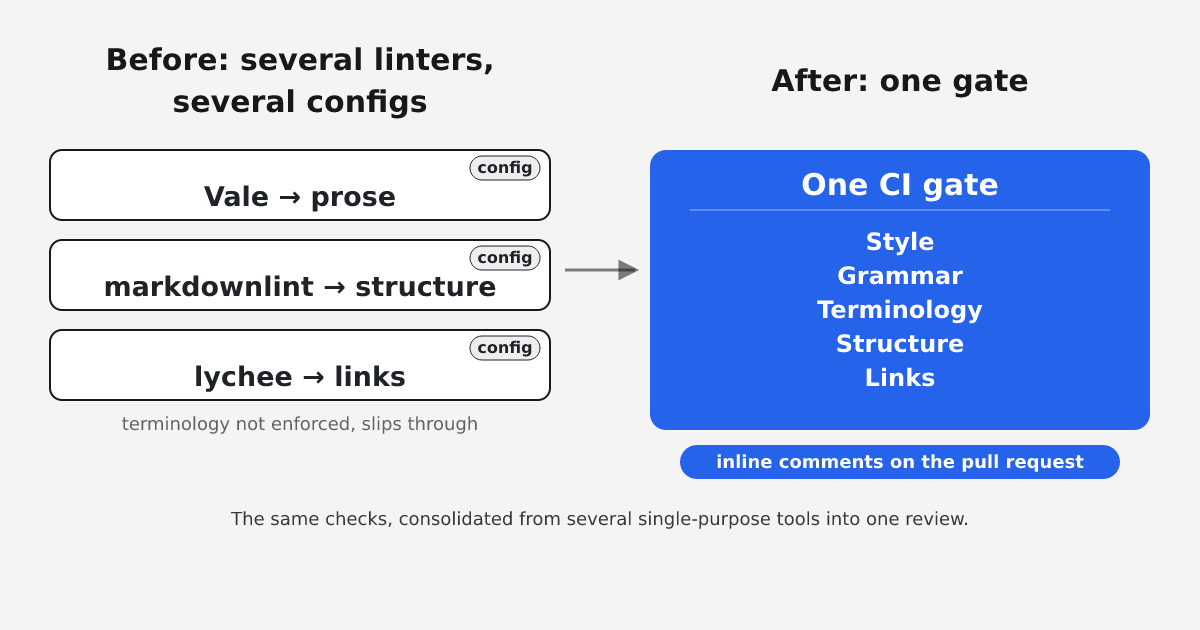
The limit shows up along two lines. The first is coverage: because each tool owns one dimension, a gate that checks prose, structure, and links means Vale and markdownlint and lychee together, each with its own config file and its own place to tune. That is the configuration debt and the separate link checker that a pairing accumulates over time, and keeping the noise down across all of them is its own ongoing task, the kind of false-positive tuning that decides whether engineers trust the gate or route around it. The second is the category none of them reach: whether the docs still describe the code that shipped. When that is the failure you most want to catch, more prose rules do not help. That gap is the argument for treating documentation as one quality gate rather than a stack of single-purpose jobs.
 (opens the full-size image in a new tab)
Where EkLine fits, and where it does not
EkLine's Docs Reviewer is the hosted gate in the comparison. In CI it reviews a pull request for style, grammar, terminology, and structure, and posts inline comments on the diff, with the option to fail the build. Broken-link checking is built into the review as rule EK20001, on by default at severity Error, rather than a second tool bolted on. For API docs, EkLine can also review an OpenAPI spec for description completeness, security constraints, and structure such as unused components and broken references. That last check is about the quality of the spec itself, not about whether the prose matches running code.
In practice the before-and-after looks like this. Before, an engineer wires Vale for prose, markdownlint for structure, and lychee for links, each with a config file and a CI step, and a renamed product still slips through because terminology is not enforced consistently across contributors. After, one CI step reviews the same pull request across style, grammar, terminology, structure, and links, and leaves its findings inline where the author is already looking.
Be clear about the boundary. The Reviewer does not check whether the documentation matches the shipped code, and it should not be sold as if it did. That job belongs to the Docs Agent, whose drift workflow flags pull requests with documentation impact and can open a pull request with the fix for a person to review. That is upstream of the gate and produces a pull request, not a pass or fail check inside it. And where you need only one dimension, a lighter tool wins: if Markdown structure is your whole concern, markdownlint alone is less to run, and if a fully self-hosted, offline toolchain is a hard requirement, the open-source pairing is the better fit.
A recommendation by situation
- One concern, settled. Pick the single tool for it: markdownlint for structure, lychee for links, cspell for spelling, Vale for a maintained house style.
- Several concerns, a maintainer on hand. Pair the open-source tools and accept the configuration cost. For many teams this is a reasonable, transparent place to land, and it brings docs into the same pipeline discipline as code.
- One gate across style, grammar, terminology, structure, and links, without stitching configs. This is where a hosted reviewer such as EkLine earns its place.
- Docs that match the shipped code. No CI linter does this. Treat it as a separate workflow that opens a pull request, not as something you can add to the gate.
Count the dimensions you need to gate, including whether correctness as well as style belongs on that list. One prose linter fits a single dimension and falls short across several.
To see what the gate flags on your own pull requests, read the Docs Reviewer documentation and add it to your pipeline.
FAQ
A documentation quality gate is a CI job that reviews each pull request and can fail the build or post inline comments, the same way a test suite or a code linter does. A useful gate checks style, grammar, terminology, structure, and links.
It depends on how many dimensions you need to gate. For one concern, pick the single tool for it: markdownlint for Markdown structure, lychee for links, cspell for spelling, alex for inclusive language, or Vale for a maintained house style. For several concerns, either pair the open-source tools and maintain their configs, or use a hosted reviewer such as EkLine that covers style, grammar, terminology, structure, and links in one CI step.
No. None of the tools compared here check whether the prose still matches the shipped code, including EkLine's Docs Reviewer. A linter reads the document, not the system it describes. EkLine handles that job with the Docs Agent, which flags pull requests with documentation impact and can open a pull request with the fix for a person to review.
No. With the published quickstart, the github-pr-review reporter posts findings as review comments, and the fail_on_error input defaults to false. Set fail_on_error to true to fail the build when the reviewer finds an error.
Sources
- EkLine Docs Reviewer overview
- EkLine GitHub Action quickstart
- EkLine GitHub Action inputs (
action.yml) - EkLine rule EK20001: check for broken links
- EkLine OpenAPI spec review
- EkLine Docs Agent
- EkLine: prevent documentation drift
- Vale
- lychee
- markdownlint
- textlint
- proselint
- write-good
- alex
- cspell
- LanguageTool
- Contentsquare Engineering: Using Vale to help engineers become better writers
- Scott Lowe: Using Vale to improve my writing