What Is NVIDIA OpenShell, and What Does It Add Beyond a Container?
NVIDIA OpenShell is a policy layer on top of Docker, Podman, Kubernetes, or a microVM. What it controls beyond a hardened container, which defaults and approvals widen an agent's access, and a checklist to run before you adopt it.
- Written by
- Puneet Arora (opens in a new tab)
- Published on
- Read time
- 15 min

Your coding agent runs in a container. The user is non-root, the mounts are deliberate, and egress goes through a firewall. Now try to list exactly which files, processes, network destinations, and credentials the agent can reach right now. The image, the compose file, the firewall script, and the secrets manager each hold part of the answer, and none of them holds all of it.
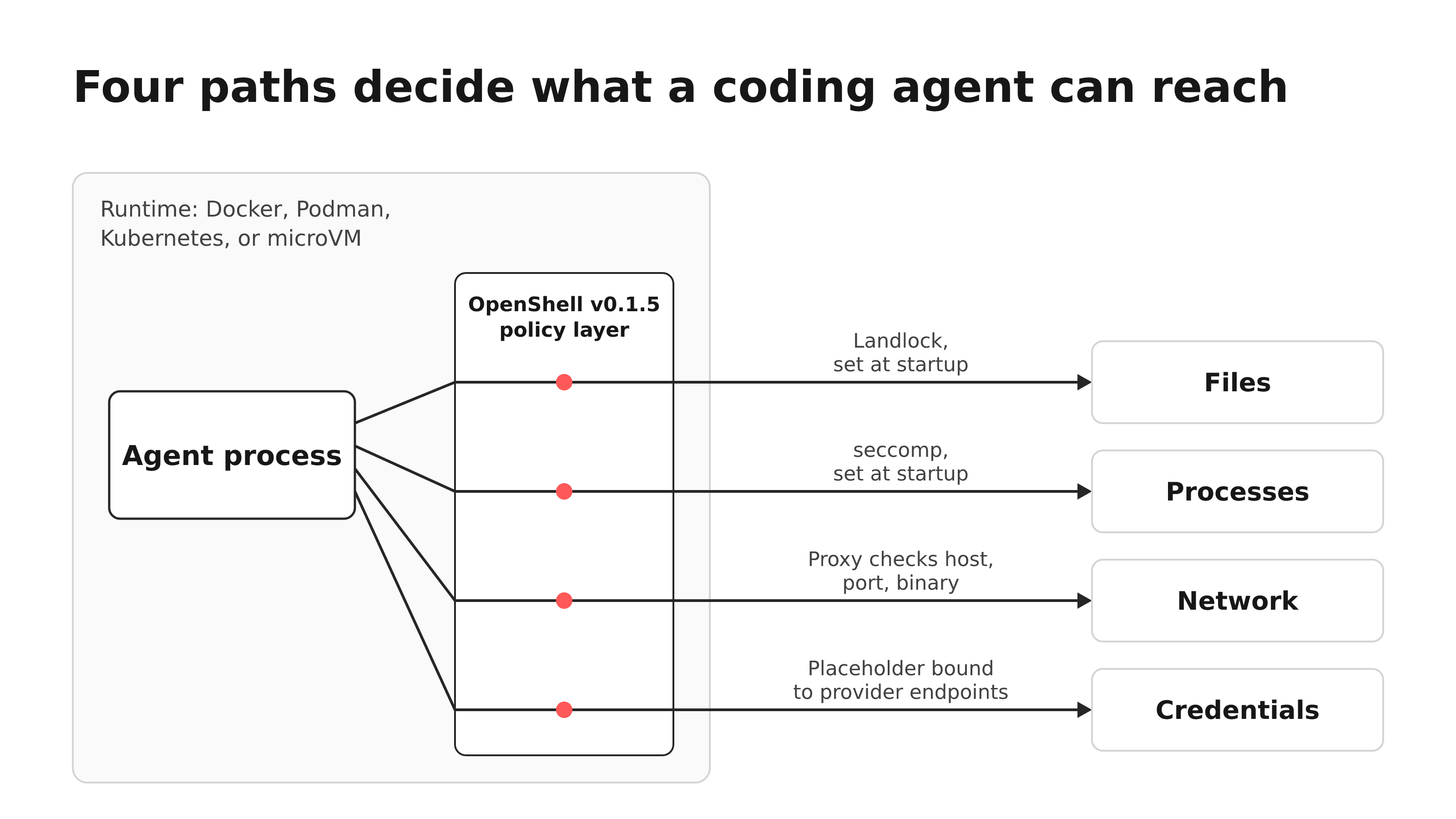
NVIDIA OpenShell is a policy layer that runs on top of a container or VM runtime. It does not replace the runtime: its support matrix lists Docker, Podman, Kubernetes through a Helm chart, and microVM-backed sandboxes. On that runtime it adds egress rules keyed to the calling binary and optional rules on HTTP method and path. It also adds placeholder credentials that cannot widen network policy, Landlock filesystem confinement inside the workload, and one revisioned policy with a proposal, prover, and approval path.
A team can assemble similar controls around containers. The difference is who owns them: with OpenShell, per-binary scoping, request rules, approvals, and the check that a change loaded sit in one declared policy. Without it, your team builds and maintains each piece. Credential injection alone is no differentiator, because Docker Sandboxes also keeps the session token for a Claude subscription on the host.
Everything here describes OpenShell v0.1.5, published 2026-10-20. v0.1.6 followed on 2026-10-27. Its release notes add required gateway authentication and new audit events, and list no change to the policy controls described here. We did not run OpenShell, test its security, or measure latency or cost. Every example is conceptual, and every command is a reference command from NVIDIA's docs.
TL;DR
- OpenShell sits on Docker, Podman, Kubernetes, or a microVM. You still pick and run the isolation boundary.
- It adds per-binary egress, opt-in request rules, endpoint-bound placeholder credentials, Landlock inside the workload, and an approval workflow for policy changes.
- Several defaults are looser than "deny everything" suggests: request rules start in audit mode, Landlock in best-effort mode, and on the Kubernetes driver user namespace isolation is off.
- Every approved expansion permanently widens the running sandbox, and each allowed endpoint stays a possible exfiltration path.
- Adoption needs Landlock ABI 3 (Linux 6.2 or newer, or a qualified backport) and tolerance for a fast-moving dependency.
Who this is for, and the setup we compare against
If your agents can write to repositories, call external services, or use credentials that cost money or data if misused, the fair comparison is a hardened container: a non-root user, the default seccomp profile, dropped capabilities, deliberate mounts, an egress firewall or proxy, and secrets injected at runtime. Comparing OpenShell with a bare docker run would flatter it.
What a hardened container already controls
Containers have real controls for all four questions. Docker's default seccomp profile "disables around 44 system calls out of 300+" unless you override it. Per the Docker Engine security docs, Docker drops all capabilities except those it needs, user namespaces are available but off by default, and the daemon needs root unless you opt into rootless mode.
Anthropic's Claude Code dev container is a careful network reference. Its firewall script resolves allowlisted domains to IP addresses with dig, loads them into an ipset, and sets a default-drop OUTPUT policy. That filters by destination IP and port. It cannot tell which process made the call or which HTTP method and path it used. Anthropic's docs state the limit directly: with --dangerously-skip-permissions, the dev container does not stop a malicious project from exfiltrating anything inside it, including the Claude Code credentials in ~/.claude.
Mounts decide which host files the container sees, and runtime injection decides which secrets enter it. These controls decide what the container can reach, and every process inside inherits that decision.
What OpenShell adds, control by control
NVIDIA documents four enforcement layers in its security best practices. The policy schema reference labels the network sections "Live" and the filesystem and process sections "Startup." In the Docker driver, the architecture page says the supervisor runs in its own container with workload networking turned off.
Network: per binary, then optionally per request
A CONNECT proxy and the Open Policy Agent (OPA) engine enforce network rules at the gateway, and you can change them while the sandbox runs. A connection passes only when a network_policies entry matches the destination host, the port, and the calling binary. OpenShell pins each binary to the SHA256 digest it first observes (trust on first use) and denies a later mismatch, per the security best practices. An IP allowlist cannot express that per-process check.
Request rules are opt-in. Per the network rules page, an endpoint without a protocol field allows any HTTP method and path. The read-only preset permits GET, HEAD, and OPTIONS.
Filesystem and process: fixed at startup
Landlock, a Linux security module, enforces filesystem rules at the kernel level, inside the workload, on top of whatever the mounts expose. Seccomp BPF and a privilege drop enforce process rules. Changing either means recreating the sandbox. NVIDIA's runtime filter blocks calls such as ptrace and setns, and allows internet sockets only through OpenShell's broker. You cannot tune that filter, and OpenShell always rejects root as run_as_user.
Credentials: placeholders bound to endpoints
Network policy, profile endpoint binding, and proxy substitution enforce provider credentials, all changeable at runtime. The agent sees an opaque placeholder. Per the profiles page, a credential binding cannot widen network policy, and a placeholder sent outside its binding gets HTTP 403 with credential_endpoint_mismatch. NVIDIA also lists gaps: credential verification on create is not implemented, and detaching a provider does not remove values already in the environment or undo requests already sent.
Effective permissions, as four separate questions
OpenShell splits "what can the agent reach?" into four questions. Each has a default to know before you trust the answer.
- Files. Landlock compatibility defaults to
best_effort, which may skip unavailable paths. If no filesystem rules apply, the sandbox runs without them and logs a high-severity finding;hard_requirementfails startup instead. The release's policy source confirms the best-effort default. Per the default policy page, the working directory is read-write, and a policy without afilesystem_policysection gets one withinclude_workdir: true. - Processes. The seccomp filter is fixed. On the Kubernetes driver, user namespace isolation is off by default.
- Outbound network. The default policy denies all outbound access, but it applies only when no global, saved, or image policy exists. Creating a sandbox without
--policydoes not guarantee the default, because the image orOPENSHELL_SANDBOX_POLICYcan supply one. Request rules default toaudit, which logs violations and forwards the traffic. Audit covers only an endpoint's allow and deny rules, so a destination with no matching entry is still denied. - Credentials. Which placeholders exist, which endpoints each binds to, and which network rules those providers contribute.
NVIDIA documents how to read the answer in Manage Sandbox Policies: openshell policy get my-sandbox --full shows the effective policy, and openshell policy list my-sandbox shows each revision and whether the sandbox loaded it. The page warns: "A successful exit does not always mean your change is active." The default policy page adds that runtime-granted paths such as /run/openshell-supervisor-ca do not appear in either view.
Practitioners report that the CLI can understate reach. In issue #4927, openshell rule get lists only advisor proposals and policy get omits the policy body by default, so a sandbox whose policy allowed registry.npmjs.org:443 reported no network rules. The report covers v0.1.5 on WSL 2 with Docker and had no maintainer reply when we read it.
 (opens the full-size image in a new tab)
What widens when you relax a permission
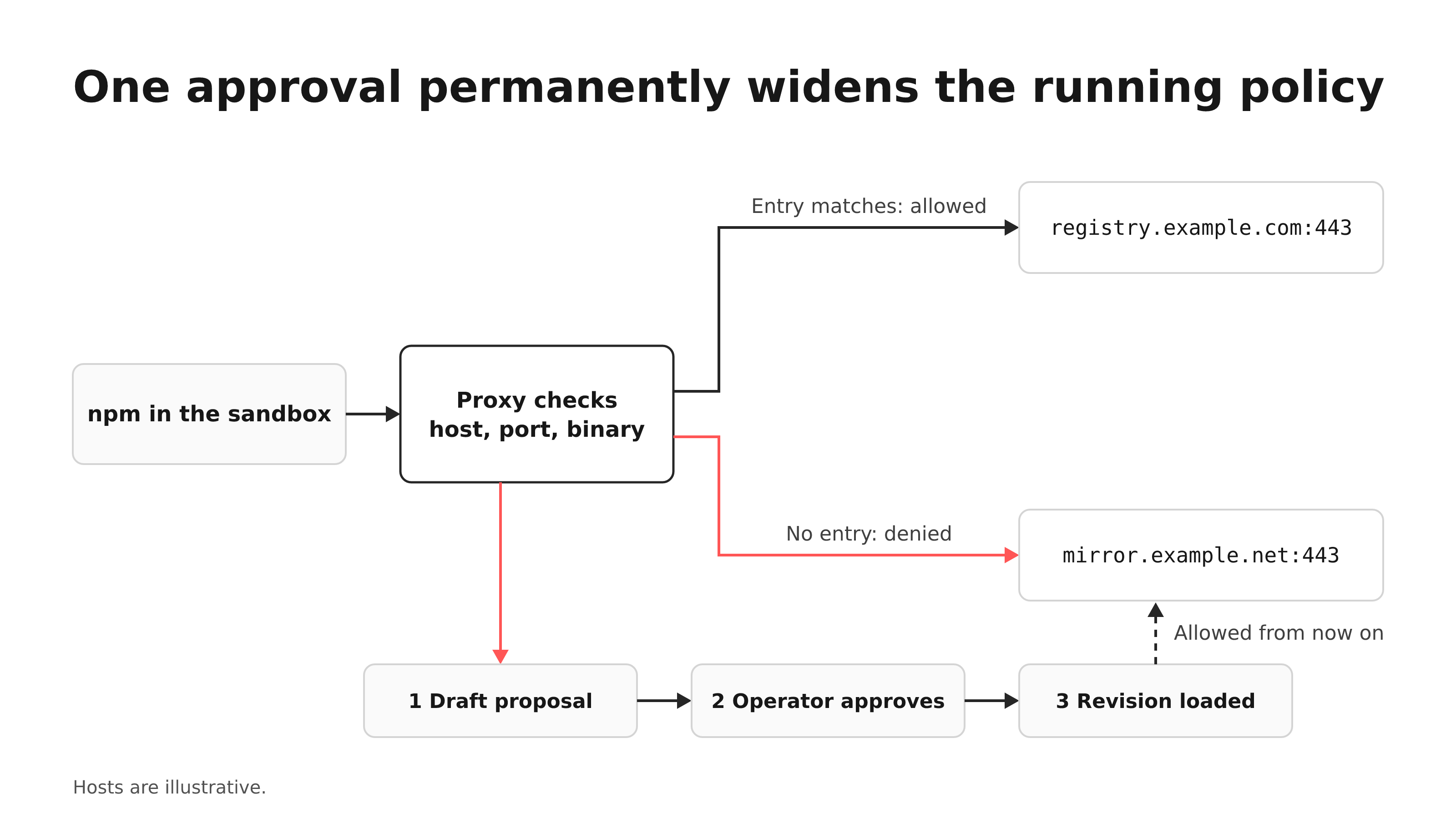
Relaxing a permission involves four stages, and each needs its own check:
- Intent: the agent tries something the policy blocks.
- Proposal: a draft rule that would allow it.
- Approval: a human, or automatic mode, accepts the draft.
- Enforcement: the sandbox loads the revision that contains the rule.
NVIDIA documents this path through the policy advisor. When OpenShell blocks a connection, it drafts a proposal for one binary to reach one host and port, and the blocked request stays denied until a rule is approved and loaded. With the advisor on (it is off by default), the agent can submit its own scoped proposal. Operators review with openshell rule get <sandbox-name> --status pending and approve with openshell rule approve. In automatic mode, a proposal passes without review only when the prover's risk check finds nothing; any finding or flagged destination goes to a human. NVIDIA warns that automatic mode can give binaries access to public hosts with no provider credential, without your review.
The policy prover uses an SMT solver (an automated logic checker) to check a candidate policy against a boundary, and ships as a standalone openshell-prover CLI. A pass does not mean the policy is as narrow as possible or enforced by a running sandbox. GraphQL, MCP, WebSocket, and JSON-RPC return unsupported, the prover does not resolve hostnames, and it does not add provider rules, so you still check the effective policy.
NVIDIA names the settings that widen effective permissions:
- "Approving an endpoint permanently widens the running sandbox's policy."
- Broad binary globs such as
/**let any leaf or ancestor executable authorize the endpoint. tls: skipdisables placeholder credential rewriting and L7 (HTTP request) inspection.allow_uninspected_credentialsremoves L7 visibility.- A wildcard host can expose a DNS-label exfiltration channel.
- Automatic approval mode.
A conceptual workflow: one repo, one registry, one credentialed API
- Repository. The working directory is read-write through
include_workdir. Sethard_requirementif startup should fail when Landlock rules cannot apply. - Registry. One
network_policiesentry for the registry host on port 443, bound to the package manager's exact binary path. A/**glob would let any executable use it. Add aprotocoland theread-onlyaccess preset, and set enforcement toenforce; at the default, violations are only logged. - API. The provider gives the agent a placeholder bound to the API endpoint. The effective policy must also allow that endpoint, because the binding cannot widen it. Avoid
tls: skip, which turns off the placeholder rewriting. - Relaxation. Mid-task, the agent tries a second registry. OpenShell blocks it and drafts a proposal. Approving it widens the running policy permanently, so decide whether that registry belongs in the base policy or should be rejected.
Hardened container or OpenShell: who owns each control
| Control | Hardened container: enforced by | Hardened container: owned by | OpenShell v0.1.5: enforced by | OpenShell v0.1.5: owned by |
|---|---|---|---|---|
| Files | Mounts and container user | Your team | Landlock in the workload (startup) | Your team writes policy |
| Processes | Seccomp, capabilities, non-root user | Your team, from Docker defaults | Seccomp BPF, privilege drop (startup) | NVIDIA; filter is fixed |
| Outbound network | Firewall or proxy, by IP and port | Your team | Gateway proxy and OPA, by host, port, binary (live) | Your team writes policy |
| Method and path | An L7 proxy you add | Your team | Same proxy, opt-in per endpoint | Your team; default audit |
| Credentials | Runtime injection | Your team, secrets manager | Placeholder, binding, substitution (live) | Your team, provider profiles |
| Changes | Your change process | Your team | Proposal, prover, approval, revision | Your team approves |
| Proof a change loaded | Your own checks | Your team | Revision list with load status | Your team reads it |
OpenShell moves process enforcement and the change workflow into NVIDIA's code, while your team still writes and reviews every rule that grants access.
The strongest case for staying with containers
A well-run team already sets mounts, a non-root user, seccomp, dropped capabilities, an egress proxy, and secret injection. Practitioners in the Hacker News thread argued both sides. One commenter asked whether the point is that containers do not combine seccomp and Landlock with checks against an externally applied policy. Another replied that a sidecar and some Docker networking can do that, and a third noted that OpenShell still needs Docker or other virtualization underneath.
The objection holds when agents run one trusted toolchain, the egress list rarely changes, and you already verify firewall changes. It weakens when several binaries share a container with different needs, when you need method and path rules, or when nobody can show which policy revision is live. One commenter named a harder constraint: "the hardest is not setting up the security rules, but knowing in advance everything your agent needs access to." The proposal path is built for that problem, and the judgment still sits with your team.
Layering is another option. A Kubernetes team running agents in a restricted pod with port-based NetworkPolicy plans OpenShell as an inner fence, with NetworkPolicy as the outer one. Their open concerns are support in the cluster's network plugin (CNI), Landlock ABI v3 on nodes, and cold-start cost. The plan is at Phase 0, with no results.
Limits and residual risk
NVIDIA documents the residual risk itself: "Each allowed endpoint is a potential data exfiltration path," and the sandbox does not scrub application output. OpenShell constrains where data can go. It does not judge what an agent sends to an allowed destination, and none of the NVIDIA pages we read claims it stops prompt injection.
Practitioners report a gap that egress policy cannot close. An Ask HN thread on sandboxing agents notes that a filesystem sandbox does not stop git reset --hard inside the project, because the project is what the agent may write.
What adoption costs to operate
NVIDIA documents these requirements:
- Kernel: the support matrix requires Landlock "ABI 3 or newer, introduced in Linux 6.2, with Landlock enabled." Startup fails without it, and a kernel version alone does not establish support.
- Platforms: Windows with WSL 2 is experimental, per the OpenShell README.
- Upgrades: v0.1.0 brought breaking changes for deployments, sandboxes, policies, APIs, and SDKs, and the upgrade guide says local 0.0.x installations cannot be upgraded in place.
- Patch releases: v0.1.5 bound hostname-based network policy to supervisor-controlled DNS and made the network broker deny operations it cannot verify. v0.1.6 then made gateways refuse to start unless authentication is configured, and asks you to upgrade supervisor and sandbox binaries together. Experimental interfaces may change in a patch release.
- Support: security updates cover the latest minor release and the one before it.
- Telemetry: on by default, per the README. Turn it off with
OPENSHELL_TELEMETRY_ENABLED=falseon the gateway orserver.telemetryEnabled=falsefor Helm.
Practitioners report two operational issues. Issue #4098 was reported on v0.1.2 and is still open. The process restrictions stop Chromium from starting its own namespace sandbox. The reporter stopped using OpenShell for now, citing this issue and missing virtioFS support in the microVM runtime. The issue is accepted, with a contributor RFC. The second is the visibility gap in issue #4927.
Recommendation by situation
Based on NVIDIA's documented controls, we recommend the following.
- Stay with your hardened container if each container runs one toolchain, egress rarely changes, and you can already show the live firewall and secret configuration.
- Evaluate OpenShell if several binaries share a sandbox with different network needs, if you need method and path rules, or if policy changes are frequent enough to need approvals and revision history.
- Layer it inside pod-level policy if you already run Kubernetes NetworkPolicy and want per-binary rules within it.
- Look at Docker Sandboxes if your main need is a microVM boundary with network presets and a host-side session token.
- Wait if your agents need nested sandboxes such as Chromium's, or your hosts cannot meet the Landlock ABI 3 baseline.
Pre-adoption checklist
We recommend these checks on one real agent workflow before you commit:
- Write down intended file, process, network, and credential access, then compare it with
policy get --full, provider rules, and runtime-granted paths. - Confirm the latest revision shows as loaded in
policy listafter every change, and check whether a global, saved, or image policy replaced the default. - Set request rules to
enforcewhere you rely on them, and decide whether Landlock should behard_requirement. - Run one allowed action and one action you intend to deny, and keep the log entry for each.
- Search the policy for broad binary globs, wildcard hosts,
tls: skip, andallow_uninspected_credentials. - Name an owner for every exception and approved proposal, and decide whether automatic mode is allowed.
- Keep a fallback to your current container setup until a minor-version upgrade has gone through cleanly.
Run the pre-adoption checklist on one agent workflow, with NVIDIA's OpenShell security best practices as the reference for each setting, and note which permission boundary your team cannot explain today.
FAQ
No. OpenShell runs on Docker, Podman, Kubernetes through the Helm chart, or microVM-backed sandboxes. You still choose and operate the isolation boundary, and OpenShell adds a policy layer on top.
Docker Sandboxes runs agents in isolated microVMs with Open, Balanced, and Locked Down network presets, and keeps a Claude subscription's session token on the host. OpenShell centers on a declared policy: per-binary egress, optional method and path rules, endpoint-bound placeholders, and approved changes. Both keep a credential out of the workload.
None of the NVIDIA pages we read claims it does. OpenShell limits where an agent can connect and which credentials it can use there. NVIDIA states that each allowed endpoint is a potential exfiltration path and that the sandbox does not scrub application output.
NVIDIA's docs point to openshell policy get <sandbox> --full for the effective policy and openshell policy list <sandbox> for revisions and load status. Runtime-granted paths do not appear in the policy views. Practitioners report that openshell rule get lists only proposals, not the rules in the policy document.
Sources
- OpenShell security best practices
- OpenShell support matrix
- OpenShell architecture
- OpenShell network rules
- OpenShell default policy and baseline paths
- Manage OpenShell sandbox policies
- OpenShell policy advisor
- OpenShell policy prover
- OpenShell provider profiles
- OpenShell policy schema reference
- Upgrade to OpenShell 0.1.0
- OpenShell README
- OpenShell v0.1.5 release notes
- OpenShell v0.1.6 release notes
- OpenShell v0.1.5 policy source
- OpenShell issue #4927 on policy visibility
- OpenShell issue #4098 on Chromium nested sandboxes
- agent-orca OpenShell integration plan
- Hacker News discussion of OpenShell
- Ask HN on sandboxing AI agents
- Docker seccomp security profiles
- Docker Engine security
- Docker Sandboxes getting started
- Claude Code development containers
- Claude Code dev container firewall script