What Is LFM2.5-24B-A2B, and Can It Run Your Agent Locally?
LFM2.5-24B-A2B uses 2.45B parameters per token, but runtimes normally keep all 24B weights in memory. What hardware it needs, how its tool calls work, and a worksheet for deciding whether to adopt, test or defer it for a local agent.
- Written by
- Puneet Arora (opens in a new tab)
- Published on
- Read time
- 15 min

Liquid AI released LFM2.5-24B-A2B on October 13, 2026, calling it "a 24B-parameter reasoning model with just 2B active parameters, built for fast, private agents on-device." If your product has a local or customer-hosted option, someone has probably asked whether this model can power it. So far the evidence is vendor benchmarks and a handful of user reports on speed and reliability.
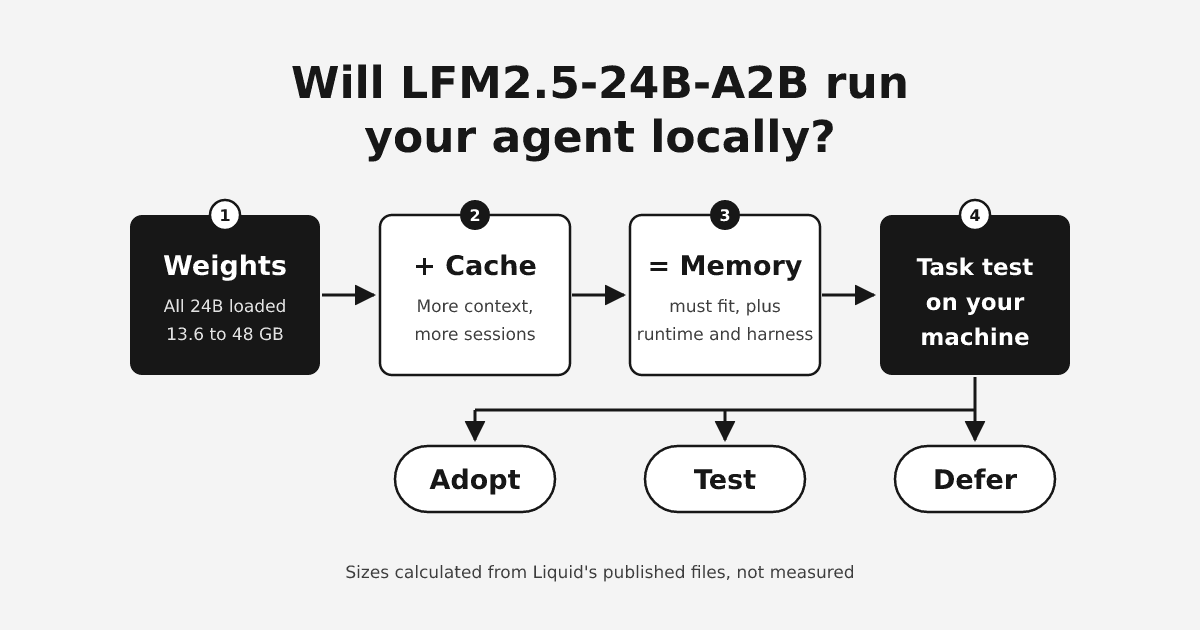
Here is the short answer. By our arithmetic, a 4-bit build needs about 14 to 17 GB for the weights plus the conversation cache, at 32K to 131K tokens of context. That is before runtime overhead, the operating system and your agent harness. A machine with 24 GB available to the model has room for it. On a 16 GB machine, almost nothing is left for the rest.
Only a test on your own hardware shows whether it runs your agent. Today's evidence is vendor-run benchmarks and launch-week anecdotes, and we found no independent reproduction. So the sensible verdict for now is to test it. Base the decision on four checks on the target machine: memory at your real context length and concurrency, runtime support, tool-call reliability, and completed tasks.
TL;DR
- Memory follows all 24.0B weights plus a cache that grows with context length and parallel sessions. The 2.45B active count does not shrink it.
- Our calculation: a 4-bit file plus a 16-bit cache comes to 14.27 to 17.18 GB for one session at 32,768 to 131,072 tokens of context, before overhead.
- Runtime builds matter. MLX, Ollama and llama.cpp each have a version or flag requirement for this model family.
- Tokens per second on a short prompt says little about finished tasks. A worksheet of real tool-using tasks on the target machine, with failure traces, tells you much more.
- Local inference keeps the model on the device. Retrieval, web search, MCP servers, other tools and harness telemetry are separate data paths.
What the model is
Liquid calls it "the largest and final model in the LFM2.5 family." The model card lists 24.0B total parameters and 2.45B active. The launch post rounds the active count to 2B. The context window is 131,072 tokens.
It is a mixture-of-experts model. Each block holds 64 experts, and each token runs through 4 of them. That keeps compute per token small, and Liquid credits the model's speed to that small active count. Thirty of its 40 layers are short convolution blocks and only 10 are attention layers. That split matters for memory, as the next section shows.
The active count describes compute, and memory is a separate bill. The next token can route to different experts, so runtimes normally keep every expert loaded. Plan memory for all 24B weights.
How much memory it needs (our calculation)
Memory has three parts, and each moves for a different reason. We calculated the figures below with Python from Liquid's published files and config. We did not measure them on hardware.
Weights and quantization
Quantization stores each weight in fewer bits, and it is the biggest lever you have. Liquid's official GGUF files are the format llama.cpp and Ollama load. They range from 13.6 GB at 4 bits to 48 GB at BF16, the full 16-bit precision. The MLX 4-bit files, for Apple's MLX runtime, are about the same size as the 4-bit GGUF. File size sets the floor for runtime memory. Everything else comes on top.
Cache, context length and parallel sessions
The KV cache is the memory that holds the conversation so far. It grows with every token in the context and with every session that runs in parallel. Only the 10 attention layers keep one, which is why this model's cache stays small. If all 40 layers were attention layers, the cache at full context would be four times as large.
Four parallel sessions at 32,768 tokens need the same cache as one session at 131,072 tokens. Count sessions as carefully as context length.
For implementers: the config.json gives 8 KV heads, a hidden size of 2048 and 32 attention heads. It lists no head dimension, so we assumed 64 (2048 divided by 32). At 16 bits per value, that is 2 (K and V) × 10 layers × 8 heads × 64 × 2 bytes, or 20,480 bytes per token.
Runtime overhead
We did not estimate runtime overhead or compute buffers. We also left out the operating system, other apps, the agent harness, the small fixed convolution state, and any embedding or tool server. Measure those on the target machine.
| Weights file | File size (GB) | Weights + 16-bit cache, 32,768 tokens (GB) | Weights + 16-bit cache, 131,072 tokens (GB) |
|---|---|---|---|
| QAD-Q4_0 | 13.6 | 14.27 | 16.28 |
| Q4_K_M | 14.5 | 15.17 | 17.18 |
| Q5_K_M | 17 | 17.67 | 19.68 |
| Q6_K | 19.7 | 20.37 | 22.38 |
| Q8_0 | 25.5 | 26.17 | 28.18 |
| BF16 | 48 | 48.67 | 50.68 |
| Context length (tokens) | 16-bit cache, one session (GB) | 8-bit cache, one session (GB) |
|---|---|---|
| 8,192 | 0.17 | 0.08 |
| 32,768 | 0.67 | 0.34 |
| 131,072 | 2.68 | 1.34 |
Assumptions for both tables: head dimension 64 (derived), decimal GB, one session, and about 1 byte per value for the 8-bit cache. They exclude runtime overhead, the operating system and the harness. We calculated these figures and did not measure them.
Read the tables this way: quantization moves the total by tens of gigabytes, and context length moves it by about 2 GB at 4 bits.
A third-party calculator on llmrun.dev adds an overhead term and lands close to our figures, at 17.4 GB for Q4_K_M at full context. Neither the launch post, the model card nor the docs page gives a minimum RAM or VRAM figure. Liquid's agent-harness guide suggests that memory-constrained machines "serve a smaller window such as 32K tokens, which is usually plenty for a single agent task." Its worked example uses a smaller LFM2.5 model.
Runtime support and version gates
Liquid's docs page for the model covers Transformers, vLLM, SGLang, llama.cpp and MLX. The model card also lists LM Studio. Neither names Ollama, but Liquid has a separate Ollama page with a version note for its mixture-of-experts models.
| Runtime | What Liquid states | Note |
|---|---|---|
| Transformers | transformers>=5.0.0 | |
| vLLM | pip install -U vllm | No minimum version given |
| SGLang | sglang>=0.5.10 | Served with --tool-call-parser lfm2 |
| llama.cpp | A recent release, run with --jinja | No minimum build given; older builds fall back to a generic tool-call parser |
| MLX | mlx-lm>=0.32.0 | Earlier versions route the experts incorrectly |
| Ollama | v0.17.1-rc0 or later for LFM MoE models | v0.17.0 fails to load the lfm2moe architecture |
| LM Studio | Listed on the model card | No version guidance found |
The Ollama page says "To run any LFM MoE model you specifically need v0.17.1-rc0 or later." The models it names as affected are older LFM2 MoE models, and the page is undated. The gate covers any LFM MoE model, and this model's config declares lfm2_moe. Plan for the gate, and confirm it on the exact build your customers will install.
A runtime can also break the agent loop by itself. One Hacker News commenter ran Ollama on an AMD Ryzen 7 8745HS and found it was not caching the prompt, so every turn reprocessed the whole prompt. They concluded it would not work in an agentic loop in that state. Record the runtime build as carefully as the model file.
How tool calls work and what your parser must handle
The model card says that by default "LFM2.5 writes Pythonic function calls (a Python list between <|tool_call_start|> and <|tool_call_end|> special tokens)." You can ask for JSON function calls in the system prompt instead. The chat template places tool definitions in the system prompt and opens every assistant turn with a <think> block. The card says the model always reasons before it answers, so your harness sees a reasoning block on every turn.
Liquid's llama.cpp function-calling guide says --jinja is mandatory, because it renders tool definitions through the chat template and turns on tool-call parsing. Its examples use a smaller LFM2.5 model. From the same guide, your harness needs to handle:
- several tool calls in one turn, because "LFM2.5 may request several calls at once"
- unknown tool names and malformed arguments, returned to the model as an error in the tool result instead of crashing
- a limit on the number of steps
- a short tool list, since every tool adds prompt tokens on every turn. The guide prefers 3 to 8 well-described tools over 30 vague ones.
Six things "good enough" can mean
"Good enough for agents" bundles six separate properties. Launch-week reports mostly measure token throughput, which is the property least tied to finished tasks.
| Property | What it tells you | Evidence today |
|---|---|---|
| Token throughput | How fast text appears once decoding starts | Vendor figures with the laptop test settings unstated; user reports with unstated quantization |
| Latency to completed work | Time to a correct, finished task, including prompt processing, retries and tool calls | No measurement found; one report of a runtime reprocessing the prompt each turn |
| Tool-call schema correctness | Whether calls parse and match the tool definitions | Vendor-run BFCLv4: 65.01 versus 65.00 for Qwen3.6-35B-A3B |
| Recovery from failed tools | Whether the agent corrects course after a tool error | No measurement found; Liquid advises returning errors to the model |
| Multi-step task success | Whether the whole task finishes | No independent benchmark found; one user reports it "got stuck on a lot of tool calls" |
| Coding quality | Whether it writes and edits code well | Liquid says larger models keep an edge on coding benchmarks such as SWE-Bench Verified (OpenCode) |
The case for adopting now, and its limits
The case for adopting has real evidence behind it. Liquid reports the model "decodes 184 tokens/s on an Apple M5 Max and 114 tokens/s on an AMD Ryzen AI Max+ 395."
On agentic benchmarks that Liquid ran itself, it scores 27.69 on AutomationBench, against 8.72 for Qwen3.6-35B-A3B. The card recommends it for agents that reason, call tools and run on the device. Hacker News commenters also report high local decode speeds, such as 200 to 320 tokens per second on a 5070 Ti in llama.cpp.
Each piece has a limit. Liquid does not state the prompt length, runtime or quantization behind the laptop figures. Its separate GPU throughput test used 1,024 input tokens and up to 256 output tokens, far shorter than an agent's accumulated context. The benchmarks are vendor-run, and we found no independent reproduction. The same post says larger models keep an edge on knowledge-heavy and coding benchmarks. The card calls the model "not recommended for knowledge-heavy tasks on its own" and suggests pairing it with retrieval or web search. User reports split between speed and reliability. This evidence puts the model on your test list. Shipping it needs results from your own tasks.
The evaluation worksheet
Run each task several times on the target machine and fill in every column. Hold these constant across comparisons: tasks, prompts, tool definitions, runtime build, quantization, context setting, sampling settings and machine. If one of them changes between runs, you are comparing setups, not models.
The rows below are illustrative examples to adapt to your product. They are not results. The measured columns stay empty until you run the tasks.
| Task | Required tool | Expected output | Pass/fail criteria | Retries | Latency to completed task | Peak memory | Failure trace |
|---|---|---|---|---|---|---|---|
| Answer from a local file | File read | Answer matching the file | Reads the right file; no invented content | Up to 2 | Record | Record | Raw output and parser result |
| Fetch two records in one turn | Lookup, twice | Both records in one reply | Harness runs both calls; reply uses both | Up to 2 | Record | Record | Raw tool-call list |
| Recover from a bad argument | Tool that returns an error | Corrected call or clear stop | Fixes it or stops within the step limit | Step limit | Record | Record | Error result and next turn |
| Long session near 32K tokens | Your usual tools | Completed task | No repetition loop; task completes | Up to 1 | Record | Record | Last turns before failure |
| Knowledge-heavy question | Retrieval or search | Answer from retrieved text | Calls search instead of answering from memory | Up to 2 | Record | Record | Whether search was called |
Record peak memory with your harness and tool servers running, because that whole stack has to fit. Keep failure traces whole. They show whether the model, the parser or the runtime broke.
Local inference does not make the agent local
Running the weights on a laptop or a customer server keeps inference there, and only inference. The card suggests pairing the model with retrieval or web search, and each of those is a data path. So is every MCP server and tool the harness calls, and any telemetry the harness sends. We did not review any harness's telemetry, so check each harness's own documentation.
If the agent calls hosted services, it still needs credentials for them, and the questions in OAuth for AI agents still apply. One Hugging Face user reported the model insisting it was a cloud model while it used local tools, so do not rely on the model to tell you where your data goes.
License: read the revenue threshold
The card lists the license as lfm1.0, the LFM Open License v1.0. It defines "Threshold" as "annual revenue of 10 million United States dollars ($10,000,000) or more." Commercial use by a legal entity above that threshold is not licensed under the agreement. The page shows no effective date.
One Hacker News commenter called it "a questionably-enforceable non-commercial use clause," which does not match the revenue-threshold wording. For a customer-hosted option, ask who the licensee is and whose revenue counts. Have counsel read the license before you ship. This is not legal advice.
What early reports cannot establish
Launch-week reports show which questions to test. They cannot show how often a problem occurs or how the model performs on your workload.
- Speed reports come from single users who did not state the quantization. One reported 94.74 tokens per second on an M4 Pro Mac mini with 64 GB, from a single prompt.
- Reliability reports mix runtimes, and none states the quantization. One user on a 32 GB M5 MacBook Pro reported repetitive loops around 32,000 tokens while using about 16 GB of RAM. The runtime and quantization were not stated.
- Some reports use hosted endpoints. The stuck tool calls report ran through OpenRouter in OpenCode, so it says nothing about a local quantization.
- Vendor speed figures come without full test settings, and we found no independent reproduction of the benchmarks.
For another model launch read with the same caution, see Gemini 4 Argon: what it does and where it falls short. Treat each early report as a row to add to your worksheet.
Adopt, test or defer
Set your pass rate and memory headroom before you run the worksheet. Then apply these criteria.
| Verdict | Criteria |
|---|---|
| Adopt | Every must-pass task meets your pass rate across repeated runs on the target machine. Peak memory fits with headroom at the context and concurrency you will ship. The runtime build is pinned, counsel has read the license, and every external data path is reviewed. |
| Test (the default today) | The memory arithmetic fits and a supported runtime exists, but you have no task-suite results yet. Or the failure traces point to fixable parser, prompt or runtime issues. |
| Defer | Memory does not fit at the context and concurrency you need. Or your customers' runtime fails the version gate, your core tasks are knowledge-heavy or coding-heavy, counsel finds the threshold excludes you, or loops and stuck tool calls survive fixes. |
If your local option runs agent loops with a short tool list on a machine with 24 GB or more available to the model, put the model in your test queue now. If it mainly needs coding or broad knowledge without retrieval, keep the model you run today until independent results appear.
FAQ
Neither the launch post, the model card nor the docs page gives a minimum. By our calculation, a 4-bit GGUF file plus a 16-bit cache needs 14.27 to 17.18 GB for one session at 32,768 to 131,072 tokens of context. That excludes runtime overhead, the operating system and your harness. It points to a machine with about 24 GB available to the model at 4 bits. The BF16 weights alone are 48 GB.
It is worth testing. Liquid's speed figures and vendor-run agentic benchmarks are promising. We found no independent reproduction, and early user reports split between speed and reliability. Run a representative tool-using task suite on your target machine before you decide.
One Hugging Face user reported the model insisting it was a cloud model while it used local tools. The same user saw repetitive loops around 32,000 tokens. It is a single report, with runtime and quantization unstated. What the model says about itself does not tell you where your data goes.
By default the model writes Pythonic function calls as a Python list between special tokens. You can ask for JSON in the system prompt instead. In llama.cpp, Liquid says the --jinja flag is mandatory. Your harness should handle several calls in one turn and return an error for malformed arguments.
Your next step
Before you choose a deployment, write five or six representative tool-using tasks from your product. Run them on the target machine with a pinned runtime build, and record the failure traces. Liquid's guide to running local agents with LFMs shows how to point a harness at a local endpoint.
Sources
- LFM2.5-24B-A2B: Built for fast on-device agents, Liquid AI, October 13, 2026
- LFM2.5-24B-A2B model card, Hugging Face
- config.json, Hugging Face
- Chat template, Hugging Face
- Official GGUF files, Hugging Face
- Official MLX 4-bit files, Hugging Face
- LFM2.5-24B-A2B, Liquid AI docs
- Ollama, Liquid AI docs
- Function calling with llama.cpp, Liquid AI docs
- Run local agents with LFMs, Liquid AI docs
- LFM Open License v1.0, Liquid AI
- LFM2.5-24B-A2B: Built for fast on-device agents, Hacker News discussion
- Model is convinced it's a cloud model, Hugging Face discussion
- LFM2.5 24B A2B hardware requirements, llmrun.dev