Tools That Automatically Update Documentation When Code Changes in 2026
Compare seven tools that detect code or product changes, find affected documentation, draft updates, and route those changes through review.
- Written by
- Puneet Arora (opens in a new tab)
- Published on
- Read time
- 15 min

Summary
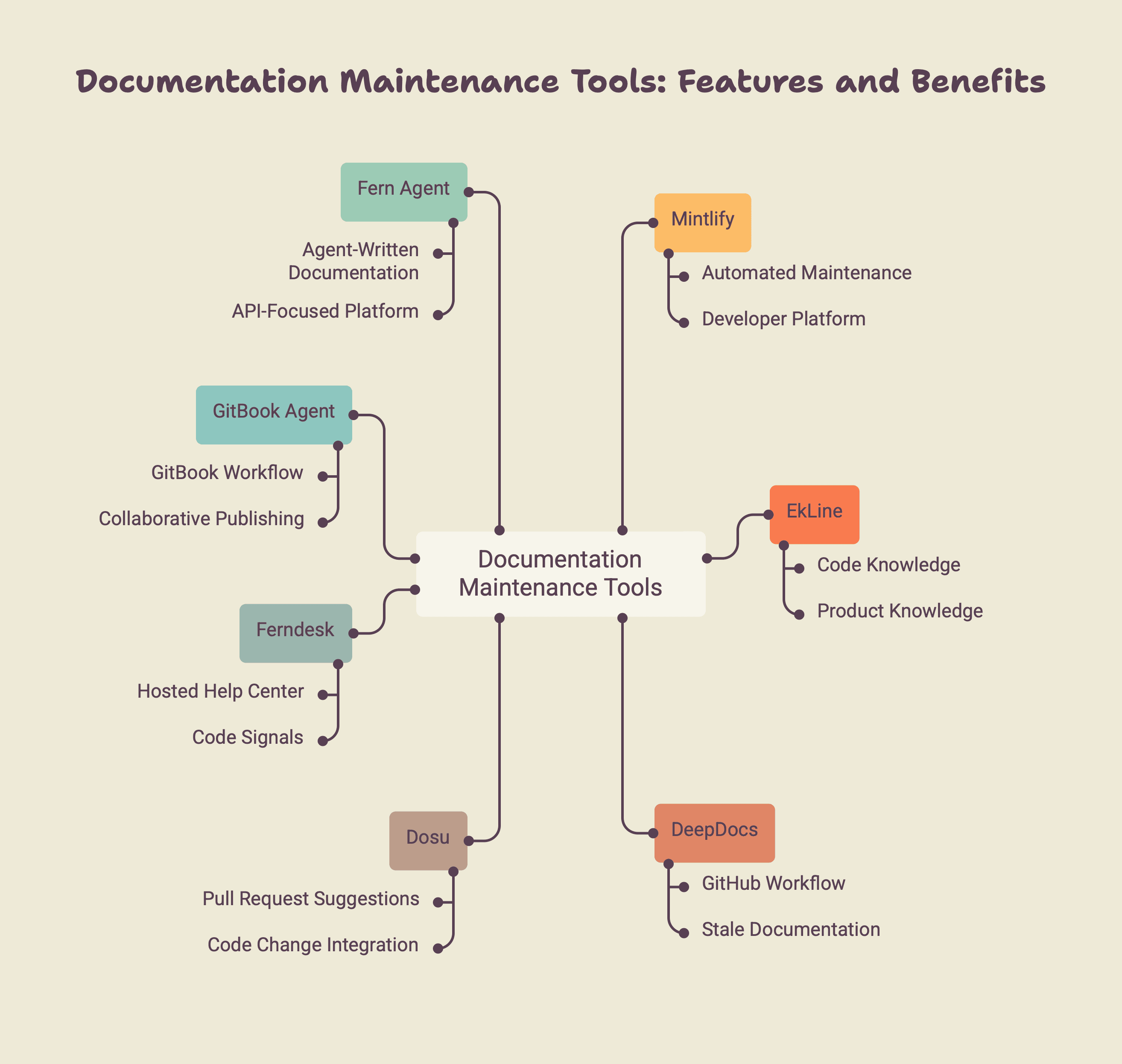
- The strongest tools do more than generate text. They detect a change, identify affected pages, draft an update, and provide a review path.
- Mintlify combines automated maintenance with its developer-documentation platform.
- EkLine works across any documentation platform, proactively reviews every pull request without prompting, and pairs code-aware drafting with automated review at an AI documentation acceptance rate of around 97 percent.
- DeepDocs offers a focused GitHub workflow that scans for stale documentation and opens pull requests.
- Dosu places documentation suggestions inside the pull request that introduced the code change.
- Ferndesk maintains a hosted help center using code, support, and product signals.
- GitBook Agent proposes updates inside GitBook's collaborative publishing workflow.
- Fern Agent supports agent-written documentation within Fern's API-focused platform.
- No tool can infer every product decision from code. Human review remains essential.
A feature ships on Monday. By Friday, the documentation is already wrong.
The code now expects a different authentication field, but the quickstart uses the old one. A configuration option has been removed, but it still appears in three guides. Support has explained the change to five customers, yet nobody has updated the public documentation.
The problem is not writing speed. The problem is that documentation maintenance happens separately from product development.
A conventional AI writing tool can rewrite a page when someone gives it instructions. A documentation maintenance tool goes further. It notices that something changed, identifies the documentation that may be affected, and prepares an update for review.
That creates a more useful buying question: which tools can start documentation work from the code change itself?
What makes a documentation tool truly automatic?
"Automatic documentation" can describe several different capabilities.
A publishing platform may automatically deploy documentation after a writer commits new content. An API generator may rebuild reference pages when an OpenAPI file changes. A writing assistant may create a guide after receiving a prompt.
All three automate work, but none necessarily detects that an existing explanation has become inaccurate.
A complete maintenance workflow has four stages:
- Trigger: A commit, pull request, release, ticket, or other event starts the process.
- Detection: The system decides whether documentation may be affected.
- Drafting: It identifies the relevant pages and prepares targeted changes.
- Review: A person inspects, edits, approves, or rejects the proposal.
| Automation type | What it automates | What remains manual |
|---|---|---|
| Automatic deployment | Builds and publishes committed documentation | Recognizing and writing the update |
| Specification generation | Rebuilds structured API references | Maintaining tutorials and explanations |
| Prompted AI writing | Creates content from instructions | Noticing that an update is required |
| Change detection | Reviews code or product events for documentation impact | Confirming whether the finding is correct |
| Automatic drafting | Prepares changes to affected pages | Technical and editorial approval |
| Automatic publishing | Publishes qualifying changes | Managing the risk of incorrect updates |
For most teams, the practical goal is not unsupervised publishing. It is automatic detection and drafting with a reliable human review gate.
How were these tools evaluated?
This guide compares seven products that use code changes or connected product signals to create or propose documentation updates.
Each product was evaluated using six questions:
- What triggers the maintenance workflow?
- Can it determine which documentation is affected?
- What context can it use beyond a code diff?
- Does it produce a targeted update?
- Where does review happen?
- Does it work with an existing documentation stack?
This is not a numerical ranking. The products serve different audiences and content types. A GitHub-native agent, an API-documentation platform, and a hosted customer help center should not be treated as identical products.
Features and packaging can change. Confirm current integrations, permissions, and availability with each provider.
Which tools can update documentation from code changes?
| Tool | Trigger or source | Output | Review location | Best for | Main limitation |
|---|---|---|---|---|---|
| Mintlify | Repository pushes, schedules, and configured automations | Documentation edits in a pull request or deployment branch | Git pull request and preview | Teams using Mintlify for developer documentation | Its broadest value depends on using Mintlify's platform |
| EkLine | Every pull request automatically, plus codebases, API and SDK changes, comments, and connected sources such as Jira and Linear | Researched updates to API docs, guides, and READMEs, with navigation changes | Pull requests and automated review | Engineering teams adding proactive maintenance across any documentation platform | It is a maintenance and review layer, not a documentation host |
| DeepDocs | Commits and pull-request activity | Updates on a separate branch and a documentation pull request | GitHub | GitHub-based code and documentation | Official documentation currently identifies GitHub as its supported code host |
| Dosu | Pull-request activity and repository monitoring | Targeted updates connected to published Documents | Original pull request | Teams that want the code author involved in documentation review | The workflow varies according to where the documentation is stored |
| Ferndesk | Code, support tickets, changelogs, videos, and product sources | Staged help-center articles and updates | Ferndesk | Customer-support teams that need a maintained help center | Maintenance is connected to adopting its help-center platform |
| GitBook Agent | GitHub issues, support conversations, Slack, Linear, and prompts | GitBook change requests | GitBook | Cross-functional teams already publishing with GitBook | Some automatic suggestion features have been described as early access |
| Fern Agent | Requests and schedules inside Fern | Documentation pull requests | Git workflow | API-first teams publishing with Fern | It works most naturally inside Fern's platform |
The central difference is not which product can produce the best-looking paragraph. It is which product detects the events that cause your documentation to become inaccurate.
When should you choose Mintlify?
Mintlify combines developer-documentation hosting with an AI maintenance agent.
Its agent can read existing documentation, connected repositories, pull requests, Slack threads, and attached files. It researches the request, plans the work, writes the changes, validates that the documentation builds, and opens a pull request.
Mintlify Automations can run after a repository push or on a schedule. A workflow can inspect code changes and update corresponding documentation. Other workflows can generate changelogs, check links, or audit outdated examples.
The advantage is consolidation. Hosting, previews, search, API references, editing, and automated maintenance can live in one platform.
The tradeoff is that maintenance and publishing become part of the same platform decision. Teams satisfied with their existing documentation host should consider whether the automation benefits justify migration.
Best for: Teams that want a hosted developer-documentation platform and automated maintenance together.
When should you choose EkLine?
EkLine combines an AI documentation agent with automated documentation review, and it works across every documentation stack instead of replacing yours.
Docs Agent can generate and update API documentation, guides, and READMEs from codebases, pull requests, and connected sources such as Slack, Notion, Jira, and Linear. When a ticket drives the work, it researches the Jira or Linear issue in depth to understand the full context, applies the Diataxis framework to decide which type of documentation the change calls for, writes the draft, and updates navigation and other structural components to wire the new content into the site. Its GitHub integration can also create documentation from pull-request comments.
EkLine is proactive rather than prompt-driven. It reviews every pull request automatically, without anyone asking it to, and periodically re-checks API and SDK changes so drift surfaces before your customers hit it. Across these suggestions, EkLine sees an AI documentation acceptance rate of around 97 percent.
Docs Reviewer checks proposed content for style, grammar, terminology, and structure in continuous integration before it merges. Together, the two products address two separate problems: determining what should change, and verifying the proposed documentation before publication.
EkLine connects to the tools your team already uses. It reviews pull requests in GitHub, GitLab, and Bitbucket, runs in continuous integration, works inside the VS Code editor and the command line, and pulls context from project and knowledge sources such as Jira, Linear, Slack, Notion, and Confluence. Because it works from diffs, tickets, and specifications rather than parsing one programming language, it stays language- and stack-agnostic across any codebase.
Because EkLine is a maintenance and review layer rather than a host, it operates on top of whatever platform you already publish with, including Mintlify, ReadMe, Redocly, Fern, Docusaurus, and MkDocs. It does not replace hosting, navigation, search, or design, which makes it a fit for teams that want to keep their existing publishing stack and add comprehensive, automatic maintenance across all of it.
Best for: engineering-led teams that want proactive, code-aware updates and automated review across any documentation platform.
When should you choose DeepDocs?
DeepDocs is a focused GitHub agent for continuous documentation.
Teams select which source-code paths DeepDocs should monitor and which documentation files it should maintain. Code activity triggers a scan. If the system identifies outdated content, it creates an update on a separate branch and opens a pull request.
The accompanying report explains which documentation changed, why DeepDocs proposed the change, and which commit caused it.
DeepDocs can work with documentation in the code repository or in a separate documentation repository. Its narrower focus may be attractive to teams that want a GitHub-native workflow without adopting a complete documentation platform.
Its official documentation currently identifies GitHub as the supported code host. GitLab and other repository users should confirm availability.
Best for: GitHub-based teams seeking a direct code-to-documentation pull-request workflow.
When should you choose Dosu?
Dosu places documentation maintenance inside the pull request that changes the code.
Its Self-Documenting PR workflow examines a pull-request diff, finds related published Documents, and drafts targeted updates. A knowledge-review comment allows contributors to accept, edit, or decline each suggestion.
When the code merges, approved changes can update the Dosu Library or synchronize back to imported repository documentation. With manual review enabled, the author of the code change can be assigned to the corresponding documentation pull request.
This keeps the person with the freshest technical context close to the documentation decision.
Teams should examine where their documentation is stored. Content in a Dosu Library, a Git repository, Notion, or Confluence may follow different update paths.
Best for: teams that want documentation review to happen beside the code review.
When should you choose Ferndesk?
Ferndesk combines automatic maintenance with a hosted customer help center.
Its agent, Fern, can use codebases, support conversations, changelogs, product videos, and other connected sources to find missing or outdated information. It can draft articles, stage updates, create screenshots, and organize help-center content.
This broader model can find gaps that are invisible in code. A repeated support question, for example, may show that a technically accurate page still fails to explain the product clearly.
The main decision is whether the team also wants Ferndesk as its help-center platform. This may be useful when hosting and maintenance both need improvement, but it is a larger change when the existing site already works well.
Best for: Support and product teams that want a hosted help center maintained from both code and customer signals.
When should you choose GitBook Agent?
GitBook Agent operates inside GitBook's collaborative authoring and publishing workflow.
It can draft content, revise existing pages, review changes, and follow an organization's style guide. Connected sources such as GitHub issues, support conversations, Slack, and Linear can help it identify recurring questions or documentation gaps.
Proposed work appears in a GitBook change request. Contributors can inspect the changes, collaborate, preview the result, and approve publication.
This makes GitBook suitable for teams with both technical and nontechnical contributors. Developers can work through Git, while writers, support teams, and product managers use the browser editor.
Buyers should confirm which automatic suggestion sources are generally available because GitBook has described some of these capabilities as early access.
Best for: Teams already using GitBook that want AI-assisted maintenance within its review process.
When should you choose Fern Agent?
Fern Agent creates and updates documentation within Fern's developer-documentation platform.
It can write documentation and open a pull request containing the changes. Work can begin from a direct request or a configured schedule. Fern also generates API references from structured definitions, helping API-first teams align part of their documentation with the specification.
Fern's strongest fit is a company already using its system for API references, SDKs, and authored developer guides.
Buyers should distinguish scheduled or requested agent work from automatic analysis of every product-code change. These workflows may solve different maintenance problems.
Best for: API-first organizations that want agent-assisted updates inside the Fern ecosystem.
What can these tools miss?
Code is evidence of what changed, but it rarely explains the entire user impact.
A diff may not reveal:
- Why the feature changed
- Whether the change is publicly available
- Which users are affected
- What migration steps existing customers need
- Which screenshots are now incorrect
- How the feature should be taught
- Whether legal or security review is required
- What support has learned from actual users
| Source | What it reveals | What it may miss |
|---|---|---|
| Code diff | Implementation and behavior changes | Product intent and audience impact |
| Pull-request description | Engineering rationale | Every affected page |
| API specification | Endpoints, schemas, and parameters | Tutorials and migration guidance |
| Product ticket | Requirements and acceptance criteria | Final implementation details |
| Support conversation | User confusion and missing guidance | Whether the answer applies to everyone |
| Internal discussion | Decisions and context | Whether the information is approved for publication |
The strongest tools combine multiple sources and allow reviewers to trace each proposed change back to evidence.
How should you test an automatic documentation tool?
Give each shortlisted product the same test set:
- A pull request that changes visible product behavior
- An internal refactor that should not affect public documentation
- A renamed field mentioned across several pages
- A broken code example
- A new API endpoint
- A support question that cannot be answered from code alone
- An accurate page that has not changed recently
- Documentation stored in a separate repository
Then compare the results.
| Evaluation question | What it measures |
|---|---|
| Did the workflow start without a manual prompt? | Trigger automation |
| Did it ignore the internal refactor? | Relevance |
| Did it identify every affected page? | Coverage |
| Did it leave accurate content unchanged? | False-positive control |
| Did it cite the source of the recommendation? | Traceability |
| Was the proposed update correct? | Draft quality |
| Could a reviewer edit or reject it? | Human control |
| Did it preserve the existing style and structure? | Editorial consistency |
| Did it support the actual repository setup? | Operational fit |
| How long did review take? | Practical value |
A convincing test should show both a correct update and a change that the system correctly decides not to document.
Does generating more documentation improve the product?
Not necessarily.
An agent can increase documentation output without improving accuracy or helping users complete their work. Blog traffic can improve website visibility without improving the product experience.
| Output metric | Meaningful outcome |
|---|---|
| Documentation pull requests created | Accurate updates approved |
| Pages generated | Important workflows covered |
| Words produced | Readers completing tasks |
| Faster drafting | Less time between product and documentation changes |
| Higher blog traffic | Better product discovery |
Measure update time, approval rates, affected-page coverage, false positives, search success, support outcomes, and user task completion.
The objective is not to produce more documentation. It is to reduce the time during which the product and its documentation disagree.
Which tool should you choose?
Begin with the point where the current process fails.
| Primary requirement | Start by evaluating |
|---|---|
| Hosting and automated developer-documentation maintenance | Mintlify |
| Proactive, code-aware drafting and automated review across any documentation platform | EkLine |
| Focused GitHub-to-documentation pull requests | DeepDocs |
| Documentation review inside the originating pull request | Dosu |
| A hosted help center maintained from code and support signals | Ferndesk |
| AI-assisted maintenance inside GitBook | GitBook Agent |
| Agent-assisted documentation in an API-first platform | Fern Agent |
If nobody notices documentation impact, prioritize automatic triggers and detection. If writers lack technical context, prioritize source coverage and citations. If reviews cause the delay, prioritize pull-request integration and clear approval controls. If the existing site is also a problem, consider a combined hosting and maintenance platform.
The best tool is the one that closes the actual workflow gap without creating unnecessary migration, security, or review burdens.
Frequently asked questions
Yes. Several tools can use commits, repository pushes, or pull-request activity to trigger an analysis and draft documentation updates. Some open pull requests, while others stage changes inside a hosted platform.
Generated documentation comes from code, a specification, or a prompt. Self-updating documentation also includes an ongoing trigger that notices later changes and starts the maintenance process again.
Human review is safer for most customer-facing documentation. Automatic publication is most appropriate when the output is deterministic, generated from a trusted structured source, and protected by reliable tests.
Some can, including repository-based products such as DeepDocs, Mintlify, and EkLine. Support varies by provider and configuration, so teams should test their actual repository structure.
No. Code does not contain every product decision, customer effect, or approved explanation. The best workflows combine code with tickets, discussions, specifications, support knowledge, and human review.
No. They automate detection, research, repetitive drafting, and some quality checks. Technical writers and subject-matter experts still decide what users need, verify accuracy, resolve conflicting information, and approve publication.
Track the time between code and documentation updates, affected-page coverage, false-positive rates, approval rates, reviewer effort, unsuccessful searches, repeated support questions, and documentation-related incidents.
EkLine is a maintenance and review layer rather than a host, so it works across any documentation stack, including Mintlify, ReadMe, Redocly, Fern, Docusaurus, and MkDocs. It reviews every pull request automatically and periodically re-checks API and SDK changes, so it adds proactive maintenance without replacing your existing publishing platform.
EkLine reviews pull requests in GitHub, GitLab, and Bitbucket, runs in continuous integration, and works inside the VS Code editor and the command line. It also pulls context from project and knowledge sources such as Jira, Linear, Slack, Notion, and Confluence. Because it works from diffs, tickets, and specifications rather than parsing one programming language, it stays language- and stack-agnostic across any codebase.