How to keep VitePress docs in sync with your code
To keep VitePress docs in sync with your code, import every code sample from your source files and leave dead-link checking on, so the build fails when a linked page goes missing and, on the VitePress 2.0 alpha line, when an imported file goes missing. Then review the sentences next to those samples on each release, because no VitePress setting checks that prose against the code.
- Written by
- Puneet Arora (opens in a new tab)
- Published on
- Read time
- 9 min

To keep VitePress docs in sync with your code, import every code sample from your source files and leave dead-link checking on, so the build fails when a linked page goes missing and, on the VitePress 2.0 alpha line, when an imported file goes missing. Then review the sentences next to those samples on each release, because no VitePress setting checks that prose against the code.
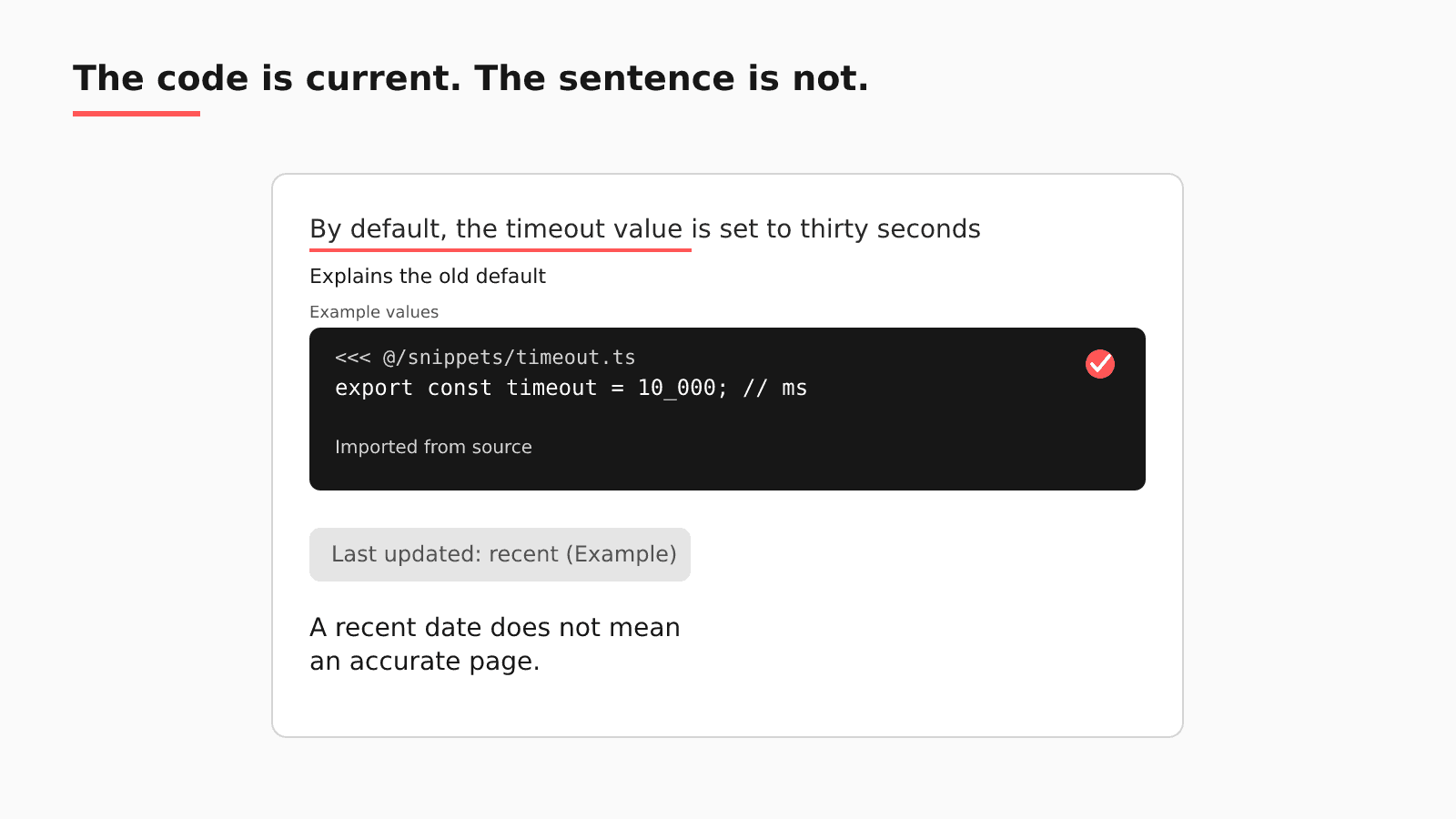
Say a function's default value changes. The snippet you import with <<< @/ shows the new code on the next build. The paragraph above it still explains the old default, and the page's last-updated date looks recent because someone fixed a typo last week.
What VitePress keeps in sync for you
Its getting started guide says "Markdown files outside the .vitepress directory are considered source files." These tools act on those files, as described in the 2.0.0-alpha.20 docs. The stable release on npm is still the 1.6.x line, and missing-file handling differs between the two, as noted below.
- Code snippet imports. The Markdown guide shows how to pull a code block from a file with
<<< @/filepath, where "The value of@corresponds to the source root." Import one VS Code#regioninstead of the whole file, and the page shows only the lines that matter. - Markdown includes.
<!--@include: ./file.md-->inserts one Markdown file into another, with line ranges or a region, so shared steps live in one file. - Missing-file errors. According to the same guide, "Importing a file or region that does not exist throws a build error," and "Including a missing file, region, heading anchor, or an out-of-range line selection throws a build error." On 2.0 alpha releases, rename a source file or delete a region marker and the build stops; setting
markdown.snippet.silentormarkdown.include.silenttotrueturns that error into a warning. The VitePress changelog for 2.0.0-alpha.17 notes that includes previously "silently ignored errors when files did not exist," so on the stable 1.6.x line, check the rendered output. - Dead links. In the site config reference,
ignoreDeadLinksdefaults to false, and the description reads: "When set totrue, VitePress will not fail builds due to dead links." - Last-updated dates.
lastUpdatedcontrols "Whether to get the last updated timestamp for each page using Git," and with the default theme, "enabling this option will display each page's last updated time."
Where the prose falls behind
Run this check against your repository. Open the newest merged pull request that changed a default, a parameter, or a return value. Did anything flag the paragraph that explains it? The import did its job, and the build passes because every file and region it references still exists. Nothing in that pipeline compares the sentence that names the default with the code below it, so the page now contradicts itself.
| Native check | What it verifies | What it does not see | Where EkLine fits |
|---|---|---|---|
<<< @/ imports | The code block matches a file the build can read | The sentence above the block, and code in another repository | Automatic PR review reads the code pull request and can draft the prose fix |
ignoreDeadLinks left off | Markdown links point at pages that exist | Sidebar entries, per issue 3244, and prose that went stale | Docs Reviewer checks links and writing rules on each pull request through the GitHub Action |
lastUpdated | When a commit last touched the page | Whether the page still matches the product | A weekly Docs Drift Review audits changes that merged without docs |
Sidebar entries are a second gap. In a VitePress issue titled "Dead links in sidebar not reported," koebi wrote in November 2023 that a sidebar link to a missing page "builds even if Bar doesn't exist." The issue was still open when we checked in October 2026, so treat sidebar entries as unchecked.
The @ alias resolves to the source root, so a snippet stays current only when the build can read the file; code in a separate repository is outside that build unless you check it out or copy it in. A sample pasted by hand from a separate SDK repository is a copy that nothing in the build compares with its original.
That sets the boundary. Imports, the dead-link check, and a same-PR rule are enough when the code sits inside the docs build and every fact the paragraph needs is in the pull request. When the facts live in tickets, Slack threads, specs, or a separate SDK repository, nothing ties them to the page; an Ask HN thread on keeping docs current collects docs-first habits and nightly scripts.
Does lastUpdated tell readers a page is current?
A fair objection: lastUpdated shows when a page last changed, so readers can judge its age for themselves. The date comes from Git, so it reflects a real commit and is honest metadata.
But it records that a commit touched the file, which is a different fact from the page matching the product. In the example, the typo fix moved the date forward while the paragraph about the default stayed wrong. Show the date to readers, and keep it out of how you decide which pages need review.
A VitePress sync checklist for this week
- Find every hand-pasted code block that has a source file in the repository, and replace it with a
<<< @/import of a#regionin code your tests already exercise. - Confirm that
ignoreDeadLinksis unset or false in your site config, and, on 2.0 alpha, that no one has setmarkdown.snippet.silentormarkdown.include.silent; on 1.6.x, open the rendered pages that import code. - Check sidebar entries on their own: after any page rename or deletion, open each sidebar link in a local build or preview.
- Turn on
lastUpdatedfor readers, and track review status somewhere else. - On each release, list the code changes that alter defaults, parameters, or behavior, and read the paragraphs around every imported snippet for those files.
The last item costs the most, because someone has to connect each code change to the right page.
Adding EkLine to a VitePress repository
EkLine works on that last item, and VitePress keeps building the site.
| Question | On a VitePress site |
|---|---|
| Where your content lives | Markdown outside .vitepress, in a GitHub or GitLab repository |
| What EkLine watches | Code repositories, which the GitHub App lists apart from documentation repositories; GitLab merge requests too, per the May 2026 changelog |
| When it reads a change | Each pull request when it opens or leaves draft, once; a weekly Docs Drift Review sweeps what already merged |
| Where its pull request lands | Your docs repository, as a pull request your team reviews |
| Which CI check runs | Docs Reviewer, which checks each docs change for style, consistency, links, and accuracy, through the GitHub Action; its framework list has no VitePress value, so it reviews the Markdown without VitePress-specific handling |
| Samples that are not imported | The Code Sample Review agent in Scheduled Agents, which "Verifies that code samples in your docs are accurate and runnable" |
| What stays in VitePress | The build, imports and includes, the dead-link check, lastUpdated, theme, and hosting |
In the example, the engineer opens the code pull request that changes the default. Docs Agent assesses it from the diff, title, and description; at high confidence it starts a docs pull request, and at medium confidence it leaves a suggestion comment. The draft rewrites the paragraph about the default and leaves the import line alone. You review and merge it, and the VitePress build runs as today. Automatic review reads the pull request alone, so for a change decided in a ticket, start a Docs Agent session from that ticket.
Do reviewers end up rewriting what it drafts? At ContextQA, whose docs are hosted on GitBook, the team reviewed EkLine's updates from April 7 to July 6, 2026, and "Two-thirds merged as a single commit," which the ContextQA case study reads as "the page was right the first time."
If your team leaves VitePress
Should you move, pick a target that keeps the docs as Markdown in Git, because that way the pull request loop you build here keeps working after the move. Potluck Docs is one such target, an open-source Astro + Starlight template under the MIT license that EkLine maintains. Its OpenAPI references render with Scalar and include a client for real requests; private docs and org-scoped docs are built in; and each build writes a sitemap and llms.txt. The project describes itself as "a template, not a hosted product."
FAQ
No. VitePress still builds and serves your site, and its imports and link checks keep working. EkLine adds the prose check: Docs Agent drafts Markdown updates from code pull requests and opens them in your docs repository for your team to approve.
Yes, for links in your Markdown. ignoreDeadLinks defaults to false, and setting it to true stops VitePress from failing builds on dead links. Sidebar links are a separate case: a 2023 issue reports one to a missing page that still builds.
Partly, since the imports already keep code blocks current. For the prose, cyanydeez described "a for loop that runs nightly on any files updated the prior day," and has local AI update the Markdown file beside it. On VitePress, the paragraph that explains a default sits on a page that imports the source file, not beside it. Each nightly rewrite needs a reader, which rstagi summed up as "it's hard to fact-check everything all the time." EkLine drafts that paragraph fix as a pull request from the code change, and your team approves it.
Choose one pull request from your last release that changed a default, and bring it. To see Docs Agent draft prose fixes on your own VitePress repository, book a demo. Docs Agent is available to all plans, and access is granted on request.
Sources
- VitePress changelog (2.0.0-alpha.17)
- VitePress: Getting started
- VitePress: Markdown extensions
- VitePress: Site config
- VitePress issue 3244: Dead links in sidebar not reported
- Ask HN: How do you keep documentation up to date with AI generated code?
- EkLine docs: GitHub App setup
- EkLine docs: Changelog
- EkLine docs: Automatic PR review
- EkLine docs: Prevent documentation drift
- EkLine docs: Update and review documentation
- EkLine docs: GitHub Action quickstart
- EkLine docs: Documentation framework support
- EkLine docs: Scheduled Agents
- ContextQA case study
- Potluck Docs
- Potluck Docs on GitHub