How to keep Mintlify docs up to date when code changes
Mintlify already automates the structural half of keeping docs current: it builds API reference pages from your OpenAPI spec, checks links, validates builds, syncs with GitHub, and can draft pull requests when code merges. The half that slips is the prose and the examples whose facts live in other repositories, tickets, and threads.
- Written by
- Puneet Arora (opens in a new tab)
- Published on
- Read time
- 9 min

Mintlify already automates the structural half of keeping docs current: it builds API reference pages from your OpenAPI spec, checks links, validates builds, syncs with GitHub, and can draft pull requests when code merges. The half that slips is the prose and the examples whose facts live in other repositories, tickets, and threads. That half needs a review step, and it is where an EkLine pull request fits.
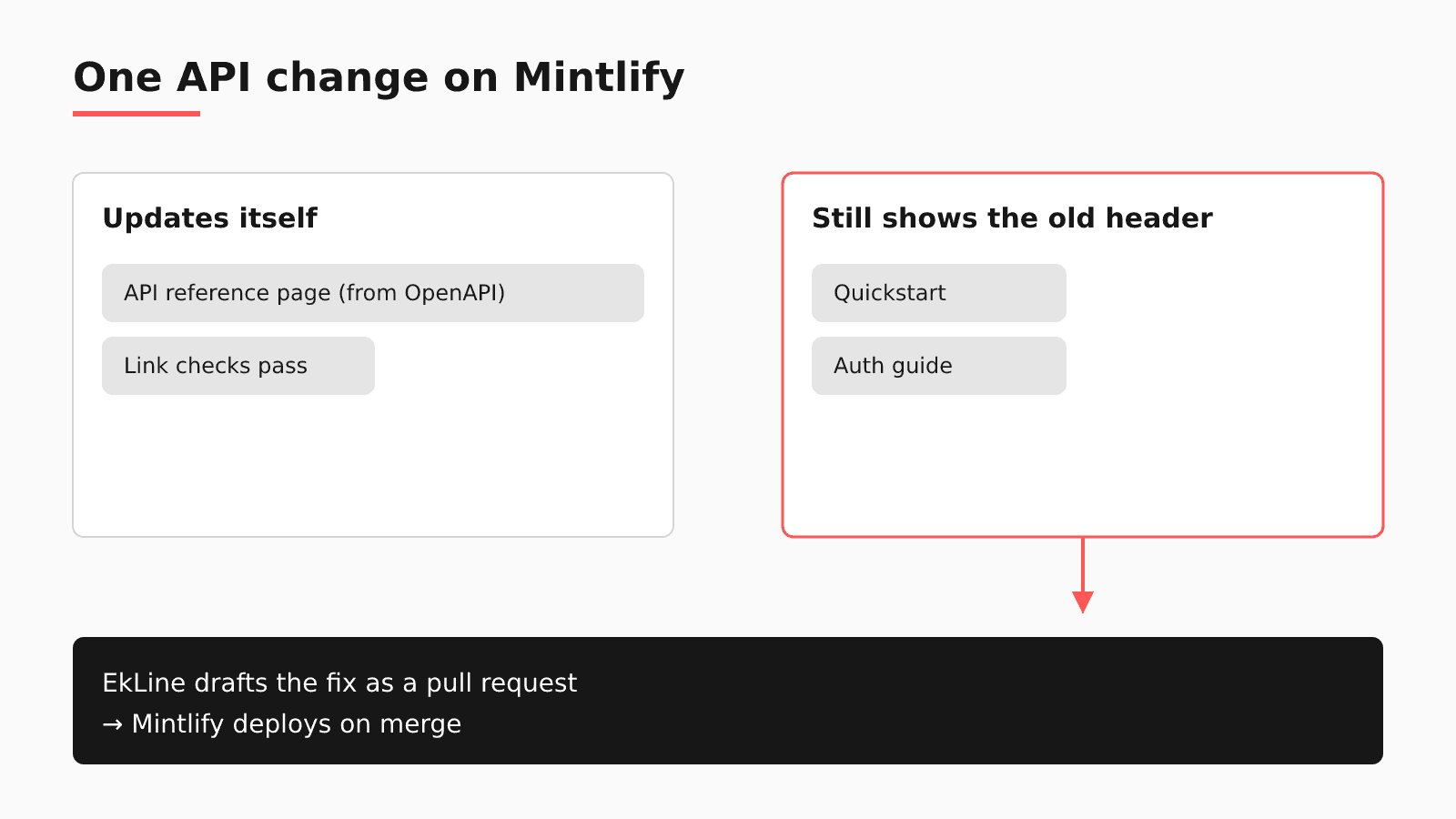
Follow one change through this post: an endpoint's auth header changes. The reference page generated from your spec updates. The quickstart and a guide still show the old header, and mint broken-links passes, because every link on those pages still resolves.
TL;DR
- Mintlify regenerates API reference pages from your OpenAPI spec; a spec hosted at a URL needs a Trigger deployment call.
- The Mintlify CLI checks links and build warnings, so an outdated header in valid MDX passes.
- Mintlify automations draft pull requests after code merges, and Mintlify's own guidance still keeps review and sign-offs.
- EkLine reads each code pull request as it opens and lands its docs pull request in the repository Mintlify deploys from.
What Mintlify already keeps current
Generated API pages. Mintlify's OpenAPI setup lets you "Reference any number of OpenAPI specifications in the navigation element of your docs.json to create pages for your API endpoints." When the spec lives in your repository, a spec change is a Git push and the site redeploys. When you host the spec at a URL, Mintlify warns that "changes to the spec don't trigger a Git push, so your docs won't redeploy automatically," and tells you to call the Trigger deployment API endpoint in the same CI action that generates or updates the spec.
Link and build checks. In the Mintlify CLI, mint broken-links checks internal links; --check-anchors also validates anchor links against heading slugs, and --check-external also checks external URLs. mint validate "Validate[s] your documentation build in strict mode. Exits with an error if there are any warnings or errors."
Git sync. Mintlify "uses a GitHub App to automatically sync your documentation with your GitHub repository" and deploys when you push. In a monorepo, you can "specify a subdirectory if your docs are not at the repository root."
Drafted updates. Mintlify automations include a code change trigger that "Runs when a pull request merges in one or more connected source code repositories." The agent "reads your project content and any connected repositories, then follows the prompt to make updates." Automations require a Pro or Enterprise plan, "Each run that updates your docs costs 250 credits," and each automation can run up to 500 times per day. If the auth header change merges in a connected repository, this feature may already cover it, so check it before you add another tool.
Mintlify still keeps people in the loop. Its maintenance guide says "Update docs in the same pull request as the code change" and "Require a docs sign-off before closing any ticket that changes user-facing behavior," then sets monthly, quarterly, and annual reviews. A June 18, 2026 Mintlify article on stopping documentation drift adds that "pull request review is the safer setup for user-facing documentation."
Where the auth header change still slips through
Test your own repository. Open the last merged pull request that changed how your API authenticates or what a request must send. Did anything flag the quickstart or guide that shows the old request? If nothing did, the reason is in what each Mintlify check reads.
| Native check | What it verifies | What it does not see | Where EkLine fits |
|---|---|---|---|
mint broken-links | Internal links, plus anchors and external URLs with flags | A working link on a page whose sample sends the old header | Automatic PR review reads the API pull request and can start the docs fix |
mint validate | The build in strict mode, failing on any warning or error | Valid MDX that describes old behavior | Docs Reviewer comments on the docs change, with Mintlify component support |
| OpenAPI pages | Reference pages generated from your spec | Quickstarts and guides written by hand in MDX | Docs Agent edits those pages in your documentation repository |
Two gaps sit outside every check: a migration note that lives in a ticket or a Slack thread, and hand-kept files. In a Mintlify-based repository, drewdrewthis reported on August 21, 2026 that llms-full.txt "is maintained by hand, which means it drifts silently and there is no signal when it does."
So when are native tools enough? When your API code and docs share a repository and every fact the guide needs is in the pull request, Mintlify's checks plus the same-PR rule from its maintenance guide cover the change. When the facts live in tickets, Slack, specs, or a separate code repository, the rule depends on memory; practitioners in an Ask HN thread on keeping docs current describe docs-first habits and homemade nightly scripts.
A Mintlify upkeep checklist for this week
You need write access to the docs repository and its CI. None of these steps needs EkLine.
- If your OpenAPI spec is hosted at a URL, call the Trigger deployment endpoint in the CI action that updates the spec.
- Run
mint broken-linkswith--check-anchorsand--check-externalbefore you publish; renamed headings change their slugs. - Add
mint validateto CI so a warning fails the build before readers see it. - When a header, parameter, or endpoint name changes, search the whole docs repository for the old string, including hand-maintained files such as llms-full.txt. The link checks pass on this failure.
- Adopt the two process rules from Mintlify's maintenance guide: docs in the same pull request as the code, and a docs sign-off before closing any ticket that changes user-facing behavior.
- If you run automations, keep their pull requests on review. Mintlify's drift article calls review the safer setup.
How EkLine plugs into a Mintlify repository
EkLine works in the repository Mintlify already deploys from, so your publishing path stays as it is.
| Question | On Mintlify |
|---|---|
| Where your content lives | The repository Mintlify's GitHub App deploys from, at the root or in a monorepo subdirectory. |
| What EkLine watches | The code repositories you select in the EkLine GitHub App, which lists them apart from your documentation repository. Docs Agent also reviews GitLab merge requests. |
| Where its pull request lands | Your docs repository. Mintlify deploys on merge, as it does today. |
| Which CI check runs | Docs Reviewer, which checks each docs change for style, consistency, links, and accuracy, with the mintlify framework value, set in its configuration or with --framework. The framework support page says "Mintlify currently has the most comprehensive component support." |
| What stays in Mintlify | docs.json, generated API pages, hosting, deploys, and any automations you run. |
Walk the auth header change through Docs Agent. When the engineer opens the API pull request, or marks a draft ready, automatic PR review reads the diff, title, and description once and scores the documentation impact. A low score stays silent, a medium score leaves a suggestion comment, and a high score starts a docs pull request in your Mintlify repository for the pages that need the new header. You review and merge it, and Mintlify deploys. Automatic PR review reads the pull request alone and leaves linked tickets out. When the migration note sits in a Jira ticket or a Slack thread, open a Docs Agent session and combine the sources; if they disagree, "the agent flags the conflict in the chat so you can decide." A weekly Docs Drift Review sweeps what merged before you connected EkLine or scored below the threshold, and the Code Sample Review agent in Scheduled Agents "Verifies that code samples in your docs are accurate and runnable."
If your doubt is whether reviewers will trust drafts they did not write: over one quarter, April 7 to July 6, 2026, ContextQA's engineers "merged 97.5% of what the agent proposed, 79 updates, and set aside only two." ContextQA hosts its docs on GitBook, so read this as an EkLine result on another platform.
The limits: the assessment runs once per pull request, you cannot customize its confidence thresholds, and Docs Agent works with GitHub and GitLab. Docs Agent is available to all plans, and EkLine grants access on request.
FAQ
No. Mintlify keeps your docs.json, generated API reference, hosting, and deploys. EkLine adds a step before them: it reads code pull requests as they open, drafts docs pull requests into the repository Mintlify deploys from, and runs a Docs Reviewer check that handles Mintlify components. For a feature-by-feature view, read EkLine vs Mintlify.
Mintlify's own guidance keeps the review step. Its drift article says Mintlify "can be configured to automerge workflow pull requests, but pull request review is the safer setup for user-facing documentation," and its maintenance guide still asks for docs sign-offs and scheduled reviews. An automation drafts the change; a reviewer decides whether it is right before it goes live.
You can, and the Ask HN thread shows one version: cyanydeez described "a for loop that runs nightly on any files updated the prior day," with local AI revising the Markdown file next to each one. On Mintlify, when the quickstart lives in a separate docs repository, nothing sits beside the changed API file to revise. Someone also has to check each nightly rewrite, and rstagi named that cost in the same thread: "it's hard to fact-check everything all the time." EkLine reads the API pull request and, at high confidence, opens a docs pull request for the pages that need the change, so the check happens in review.
Bring one recent API pull request, such as the last auth change, and see what EkLine would have changed in your quickstart. Book an EkLine demo to walk through your own Mintlify setup.
Sources
- Mintlify: OpenAPI setup
- Mintlify: CLI commands
- Mintlify: GitHub
- Mintlify: Automations overview
- Mintlify: Maintenance guide
- Mintlify: How to stop documentation drift
- Ask HN: How do you keep documentation up to date with AI generated code?
- drewdrewthis: llms-full.txt is hand-maintained and silently out of sync
- EkLine: GitHub App setup
- EkLine: Changelog
- EkLine: CLI integration
- EkLine: Documentation framework support
- EkLine: Automatic PR review
- EkLine: Combine sources
- EkLine: Prevent documentation drift
- EkLine: Scheduled Agents
- EkLine: ContextQA case study
- EkLine vs Mintlify