How to keep Astro Starlight docs accurate after a green build
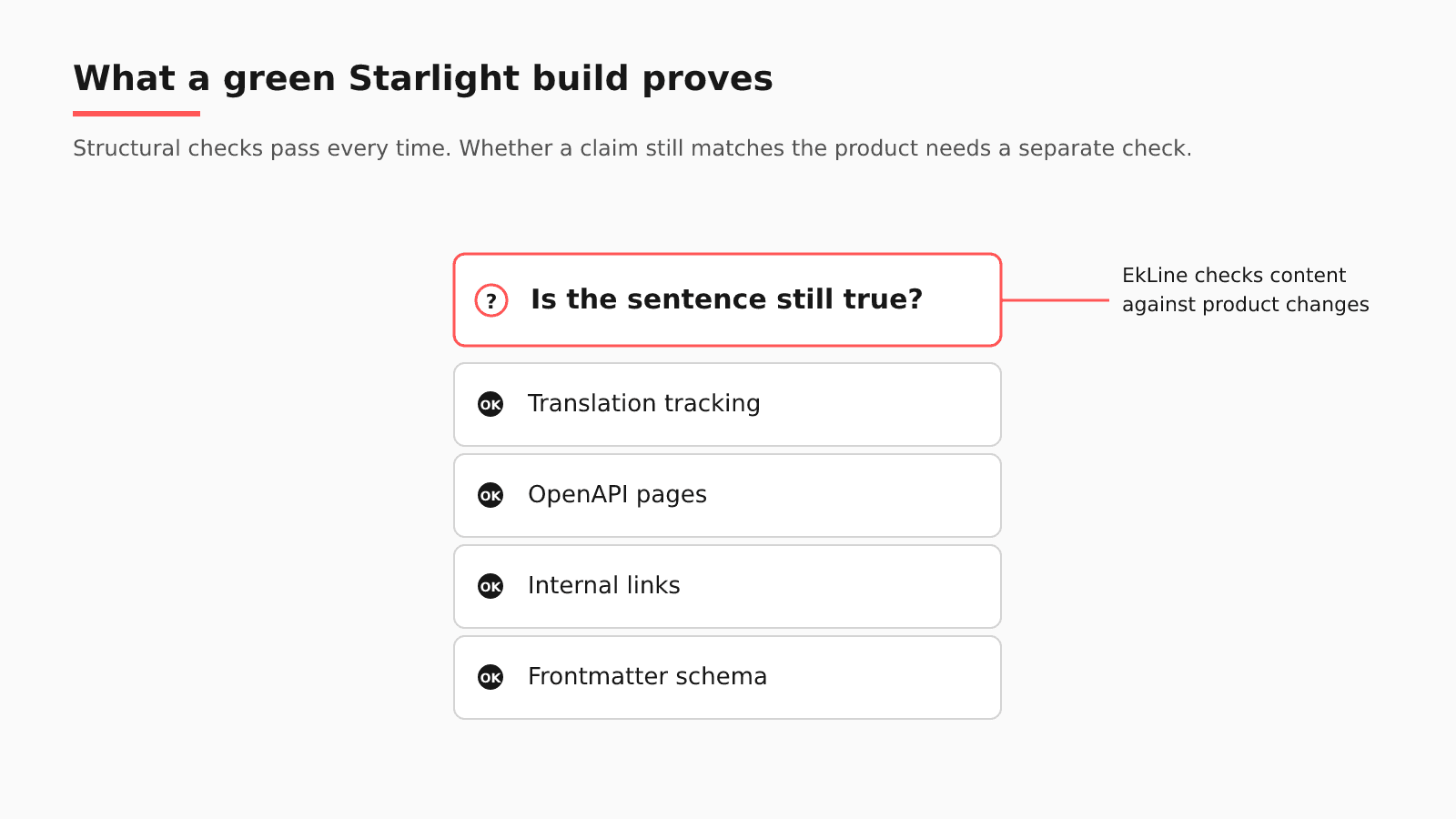
A green build tells you the site is well-formed: frontmatter matches its schema, internal links resolve once you add a validator, and API pages render from your spec. It cannot tell you whether a sentence in a how-to is still true, which takes a content check driven by what changed in the product.
- Written by
- Puneet Arora (opens in a new tab)
- Published on
- Read time
- 9 min

"My Starlight build is green. How do I know the docs are still right?" A green build tells you the site is well-formed: frontmatter matches its schema, internal links resolve once you add a validator, and API pages render from your spec. It cannot tell you whether a sentence in a how-to is still true, which takes a content check driven by what changed in the product.
Take one change: your product renames a component prop. The frontmatter schema passes, the links validate, the starlight-openapi pages regenerate from the updated spec, and the English how-to still shows the old prop. Every translation of that page now repeats the mistake.
TL;DR
- Starlight's schema, link, and OpenAPI checks prove the site is well-formed; none reads a how-to against the product.
- Translations inherit English errors, and Git-based tracking can flag them once the English page is fixed.
- A content check driven by product pull requests closes the gap, with Starlight unchanged.
What Starlight and its plugins already check
Starlight pages live in an Astro content collection, and Astro validates them. In the words of the content collections guide, "Schemas enforce consistent frontmatter or entry data within a collection through Zod validation," and "If any file violates its collection schema, Astro will provide a helpful error to let you know." Starlight's docsSchema() helper takes an extend option that can make built-in fields required or add fields of your own, so a page missing something you care about surfaces as an error.
Link checking came from the community. In June 2023, Starlight issue #247 asked for "basic tooling to ensure the integrity of internal links," and the thread pointed to starlight-links-validator, an MIT-licensed plugin by HiDeoo. Its getting started page describes "A Starlight plugin to validate internal links in Markdown and MDX files," and the check runs during a production build.
The API reference can come from the spec. starlight-openapi, also by HiDeoo under MIT, is a "Starlight plugin to generate documentation from OpenAPI/Swagger specifications," so endpoint pages follow the spec your engineers maintain.
Translations have two tools. Starlight's i18n guide handles missing pages: when a translation does not exist yet, readers get the default-language page with the notice "This content is not available in your language yet." Tracking stale translations belongs to a separate project, Lunaria, which describes "a custom tracking system that keeps track of your source and localized content changes powered by Git." Lunaria's May 2024 launch post lists Astro and Starlight among the projects using it to track translations.
Where the renamed prop slips through
Try this on your docs. Pick the most recent merged pull request that renamed a prop or changed what a component does. Did anything flag the how-to that shows it? Run the rename past each check:
| Native check | What it verifies | What it does not see | Where EkLine fits |
|---|---|---|---|
| Collection schema | Frontmatter against its Zod schema | The page body, where the old prop sits | Automatic PR review reads the product pull request |
| starlight-links-validator | Internal links in Markdown and MDX, in production builds | A how-to whose links resolve and whose example is out of date | Docs Agent opens an MDX edit in your docs repository |
| starlight-openapi | Endpoint pages generated from the spec | Hand-written how-tos around those pages | Docs Agent drafts their fixes, and Docs Reviewer checks their writing with the astro framework value |
| Lunaria | Which translations predate a change to the English source | An English page that is wrong and unchanged | A merged English fix gives Lunaria a change to track |
The i18n guide describes no outdated-translation check, and once a translated page exists, the fallback notice has no reason to appear, so translated readers see the old prop with no warning. Until someone notices the English error, nothing in the stack flags it.
A checklist you can run this week without EkLine
- Extend
docsSchema()with an owner or last-reviewed field, so every page names who answers for it and when someone last checked it. - Add starlight-links-validator to the production build your CI already runs, and confirm in your own pipeline how a broken link is reported.
- Generate the API reference with starlight-openapi from the spec your engineers ship, and stop hand-editing endpoint pages.
- Track translations with Git-based tooling such as Lunaria, so a change to an English source page can show up against each locale.
- After each release, reread your most-visited how-to pages against what shipped, starting with pages that show code.
Is a same-PR docs rule enough for a small team?
For most small teams it is: when the engineer who renames the prop also edits the how-to in the same pull request, the docs stay right without new tooling. Practitioners on Ask HN describe docs-first and docs-in-the-PR habits: "Update the documentation first ... Followed by the code changes," and "every AI-heavy PR still needs a human owner, reproducible tests, and docs explaining the behavior change." Starlight's authoring guide describes no built-in AI writer, so a second layer here would not overlap with a platform agent.
Draw the line here. The same-PR rule and Starlight's checks are enough when the product and the docs share a repository and every fact the how-to needs is in that pull request. They fall short once those facts sit in a ticket, a Slack thread, a spec, or a repository the docs team does not watch, or when each how-to has translations to keep in step.
How EkLine fits a Starlight repository
| Question | On a Starlight site |
|---|---|
| Where your content lives | src/content/docs in a GitHub or GitLab repository. |
| What EkLine watches | Your code repositories. The GitHub App lists Code Repositories separately from Documentation Repositories, so the product and the docs can live in different repositories. |
| When it reads a change | Automatic PR review assesses each pull request once, when it opens or leaves draft, from the diff, title, and description. GitLab merge requests get the same review, per the May 2026 changelog. A scheduled Docs Drift Review sweeps what merged. |
| Where its pull request lands | Your docs repository, as an edit to the MDX that your team reviews and merges. |
| Which CI check runs | Docs Reviewer, which checks each docs change for style, consistency, links, and accuracy, set to the astro framework value in its config or CLI. |
| What stays in Starlight | Your Astro build and preview, plugins, schema, and translation workflow. |
Take the prop rename again. When it opens as a pull request in the product repository, automatic PR review assesses it. At high confidence, Docs Agent opens a docs pull request that edits the English how-to; at medium, it leaves a suggestion comment; at low, it stays silent. That assessment uses the pull request alone: "Linked Jira or Linear tickets are not included." If the rename merged before you connected EkLine or scored below the threshold, the Drift Review catches it, using a default prompt that starts "Audit the last 30 days of GitHub activity for customer-facing changes that lack documentation." The framework page says "Mintlify currently has the most comprehensive component support" and "Support for other frameworks is expanding," so test your custom components. If the old prop also appears in samples across other pages, the Code Sample Review agent in Scheduled Agents "Verifies that code samples in your docs are accurate and runnable." Docs Agent "is available to all plans, but we grant access on request."
Worried about volume once every product change gets a docs check? At Socure, "One technical writer merged 348 documentation updates in seven weeks" using EkLine, "with no added headcount." The case study does not name Socure's docs platform.
Moving to Starlight, or starting fresh
If you are moving to Starlight from another framework, the path that puts the least accuracy work at risk keeps your docs as Markdown and MDX in Git, so the pull request loop you run today works on the new site too. EkLine maintains Potluck Docs, an open-source Astro + Starlight template under the MIT license, for that kind of start. It ships "Three example OpenAPI references, rendered by Scalar with a built-in client for sending real requests," private docs for signed-in readers and org-scoped docs for each org's members, and a sitemap and llms.txt "generated on every build." By its own description, it is "a template, not a hosted product." Use it to start a site or as a reference; EkLine does not require it.
FAQ
No. Starlight keeps building, previewing, and serving your site, and your schema, plugins, and translation workflow stay where they are. EkLine adds a content layer on top: Docs Agent proposes MDX edits as pull requests when a product change makes a page wrong, and Docs Reviewer checks those pages in CI with its astro framework value.
Starlight's answer to the 2023 request for link checking, issue #247, was a community plugin: starlight-links-validator by HiDeoo. It validates internal links in Markdown and MDX files during a production build. External URLs are outside its stated scope, and its pages do not say outright that a broken link fails the build, so confirm the behavior in your own CI before you treat it as a gate.
To a point. In the Ask HN thread, cyanydeez described "a for loop that runs nightly on any files updated the prior day," with local AI revising the Markdown next to each one. A Starlight how-to lives in src/content/docs, apart from the component it documents, and each translation adds pages to pair. Each rewrite also needs a reviewer, the gap rstagi named: "it's hard to fact-check everything all the time." EkLine reads the product pull request and proposes the English edit for review.
Open one product pull request from your last release and bring it along. To see what Docs Agent would flag in your Starlight repository after your next release, book a demo with EkLine.
Sources
- Astro: Content collections
- Starlight: Frontmatter reference
- Starlight issue #247: Add support for checking for broken links
- starlight-links-validator on GitHub
- starlight-links-validator: Getting started
- starlight-openapi on GitHub
- Starlight: Internationalization (i18n)
- Introducing Lunaria
- Starlight: Authoring content
- Ask HN: How do you keep documentation up to date with AI generated code?
- EkLine: GitHub App setup
- EkLine: Automatic PR review
- EkLine: Changelog
- EkLine: Prevent documentation drift
- EkLine: Documentation framework support
- EkLine: CLI integration
- EkLine: Scheduled Agents
- Socure case study
- Potluck Docs
- Potluck Docs on GitHub