Claude Code mods: what they are and when to build one
Claude Code mods are small TypeScript or JavaScript plugins that draw panes, guard tool calls, and add commands inside Claude Code. What they are, why hooks were not enough, creative first mods, and when to skip one.
- Written by
- Puneet Arora (opens in a new tab)
- Published on
- Read time
- 9 min

An hour into a Claude Code session, you scroll back through the transcript to answer three questions: what changed, how much context is left, and whether Claude ran something you would have stopped. The answers are in there, buried under every tool call.
Mods, which Anthropic launched on October 1, 2026, let you put those answers where you already look. The Claude Code mods overview defines a mod as "a plugin that changes how Claude Code looks and behaves," built from JavaScript or TypeScript handlers that run on events such as a tool call or a submitted prompt and "can watch the event, change it, or take it over."
Build one when it shows a signal you keep scrolling for (context left, a risky command, what changed) in the place you already watch the agent work. When a settings hook, a status-line script, or a skill already does the job, skip the mod.
TL;DR
- A mod is a plugin whose functions run inside Claude Code on events such as tool calls and prompts.
- Good first mods are small: a context band, a guard on risky commands, a replay of the last turn's edits.
- Mods run with your permissions, aren't sandboxed, and draw nothing in the VS Code extension's chat panel.
What a Claude Code mod is
A mod is a plugin with code in it. The Create a mod guide says the modules key in a plugin's hooks/hooks.json "is what makes the plugin a mod," and a small mod has three files: plugin.json, hooks.json, and register.js.
 (opens the full-size image in a new tab)
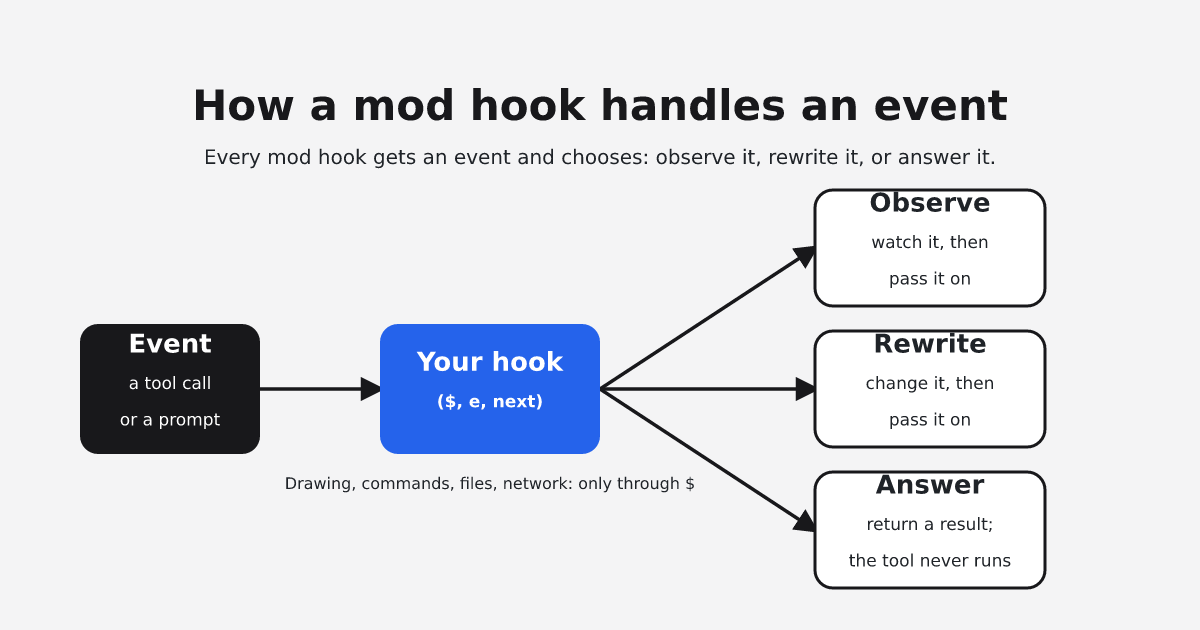
Each function in register.js is a hook that takes ($, e, next): the mods API, the event, and the next handler. A hook can observe an event, rewrite it, or answer it so the usual behavior never runs. Drawing, commands, model calls, files, and network access all go through $: "A hook has no other way to do those things, which is why Claude Code can list what a mod does before you install it." The overview's worked example uses two hooks to count tool calls and show "Thinking · tool calls: 3…" on the spinner, in about a dozen lines without comments. "Mods require Claude Code v2.1.287 or later, and they're on by default."
Why mods exist: what hooks could not do
Claude Code already had hooks, which the mods docs call settings hooks: a shell command, HTTP request, or prompt in a settings file that runs on a lifecycle event. Anthropic's launch post names their limit: "Hooks helped give users some of this control, but hooks can't rewrite events, draw new UI, or replace features. Mods can."
The overview lists five things a mod can do that settings hooks, skills, status lines, and MCP servers cannot:
- Draw a pane beside the transcript or a band above the prompt.
- Redraw Claude Code's own interface, such as the spinner.
- Step into a tool call, for example to hold it while it asks you a question.
- Run "a
/commandthat runs your function at once, with no Claude turn, even while Claude is working." - Share data between hooks, so "one hook can count tool calls while another shows the count beside the spinner."
Where the hype came from
Mods began as a GitHub proposal for "function hooks," opened September 3, 2026, and now titled "Mods - make Claude 10x more extensible." On September 9 the thread settled the name: "we are going to be calling this functionality 'Claude Mods.'" On October 1 it posted "We're live!"
Many early shared mods are playful or meter-style. OneWave, promoting its own set, open-sourced ten, including "burn-meter," "boss-fight," and "code-pet," and describes mods as changing "what you see while it works." On Reddit, Claude Fables retells the latest moment of a session "as a short art scene in the band above the prompt."
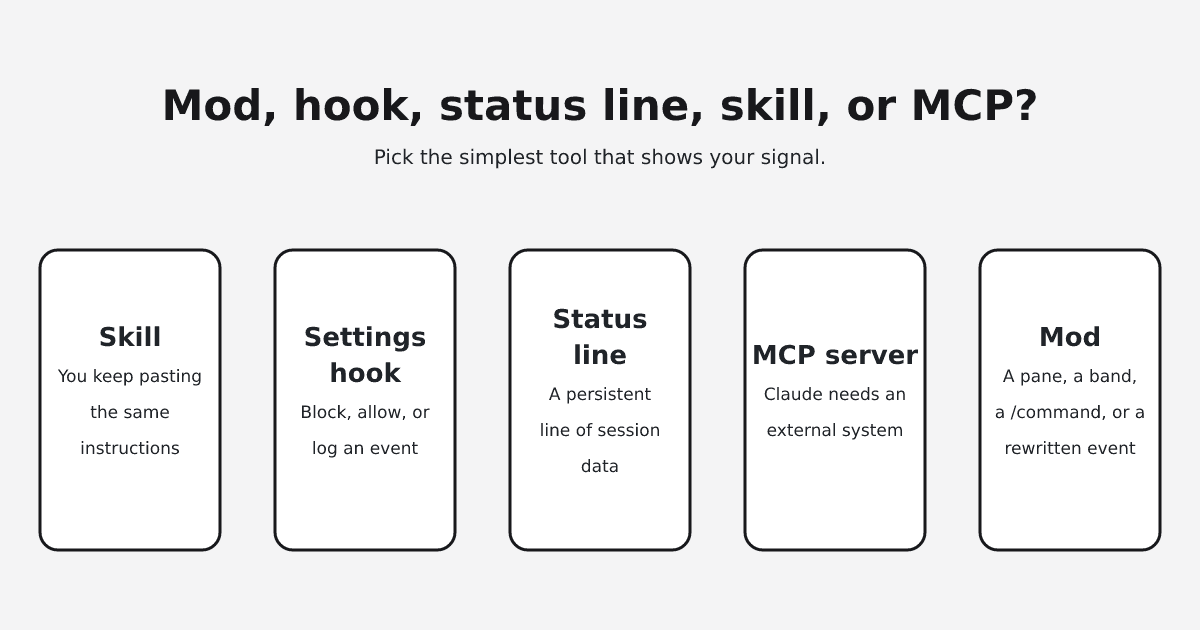
Mod, settings hook, status line, skill, or MCP server?
Pick the simplest option that delivers your signal. Quotes come from the overview's table and the status line docs.
| Pick | When you want | What it cannot do |
|---|---|---|
| Mod | "a pane, a band above the prompt, a custom command, or to rewrite an event" | Draw in the VS Code extension's chat panel, claude -p, or cloud sessions |
| Settings hook | "to block, allow, or log an event with a script you already have" | Draw in the interface |
| Status-line script | A persistent line of session data, such as context usage or cost | Draw a pane or buttons, or hold, change, or answer a tool call |
| Skill | To stop pasting "the same instructions into chat" | Draw in the interface |
| MCP server | Claude "needs to reach an external system" | Draw in the interface |
Only a mod draws panes, bands, or buttons, or runs a command with no Claude turn, and "A plugin can hold all of them," so you can combine them. For the skills side of documentation work, see this ranking of Claude skills for documentation.
The case that mods are cosmetic
One objection is that mods are cosmetic: settings hooks, MCP servers, and skills already cover anything that changes what the agent does. The evidence partly supports it: the docs send you to a settings hook to block, allow, or log. The built-in status line already "receives JSON session data on stdin and displays whatever your script prints," including context usage and cost. An open, undecided proposal in the Codev project rates a mod for role injection "No gain; keep the flag (cross-harness)" and says "shell hook, role flag and render gate remain the cross-harness floor."
The objection fails on control flow. The docs' comparison table says a settings hook can decide whether a tool call goes ahead and can change its arguments. A mod can also hold the call while it asks you a question, answer it without running the tool, and run a /command while Claude is still working. The status line reruns on events such as "A new assistant message arrives," so it can show state but cannot hold, change, or answer a tool call. If your status line and CLAUDE.md show what you need, keep them, and build a mod for the signal they cannot reach.
Creative uses: first mods to try
Anthropic shares its samples "as they are, without support," and MindStudio's mods setup guide warns that stacking several mods clutters the interface, so build the one that solves a real workflow problem.
A context band
One developer's first mod, written up on dev.to, began with "I wanted one thing: to see my context window without typing /context." Anthropic's token-weather sample "draws a forecast of your context window above the prompt."
A guard on risky commands
The blast-radius sample "holds a risky shell command, such as rm -rf or a force push, and shows what it would change, with buttons to proceed or cancel." A guard mod shared on r/claude "asks me to confirm before any commit, push or deploy" and "redacts API keys from tool output before the model reads it."
A replay of the last turn
The replay-theater sample "adds a /replay command that steps through the file edits Claude made in the last turn," which answers what changed without scrolling.
FAQ
A mod is a plugin whose hooks/hooks.json has a modules key. A hook is a function inside the mod that Claude Code calls on an event. A settings hook is the older kind: a script in a settings file that can block, allow, or log an event, or change a tool call's arguments, but cannot draw in the interface.
No. Describe the mod in a session and "Claude works from a built-in skill named plugin-authoring," writes it under ~/.claude/dev-mods/, and Claude Code asks whether to enable hot reloading. That mod "loads only in the session that made it," so copy its folder out to keep it. The dev.to author still hit silent failures and a PATH mismatch: "This cost me twenty confused minutes."
"A mod is code that runs with your permissions," and "Mods aren't sandboxed." A mod can "approve a tool call before you're asked," "Read your secrets," and "Spend your usage," but cannot change the permission prompt. Before installing, run claude plugin validate on its folder: the "hooks: and calls: lines" list what it does without running it.
Install it like any plugin from a marketplace, for example /plugin install token-chart@your-org. To turn mods off, disable one in /plugin, start with --safe-mode for one session, or set "disableAllHooks": true to stop every mod you installed in every session. That setting also stops your settings hooks and custom status line; built-in and organization-managed mods keep running.
Hooks run there, but what a mod draws does not appear in the extension's chat panel, claude -p, or cloud sessions. It appears in the terminal, including an editor's integrated terminal and the JetBrains plugin, and in the Desktop app's Code tab, except in WSL sessions and for terminal-only elements. Open issue #99423 (October 4, 2026) reports that in the extension "a mod that loads and hot-reloads correctly draws nothing."
Yes. Administrators can restrict mods through managed settings, including allowManagedModsOnly. On Team and Enterprise plans and on machines with managed settings, the built-in cc-plugin-sec-default mod loads ahead of every mod a user installs and "Guards what your organization manages from the mods a user installs."
Yes. The Create a mod guide says "The events and methods can change between releases, so trust these files over any page, this one included, when they disagree." Re-validate your mods after you update Claude Code.
Where to start
Pick the one thing you scrolled for in your last long session and ask Claude for a mod that shows it.
If that thing is whether the agent left the docs behind, you could build a tool.call hook that notices edits to .md or .mdx files and shows "docs touched: 3 files, not reviewed" above the prompt, or a /docs-check command that runs a docs linter. EkLine does not ship that mod; it is an idea. EkLine's Docs Agent covers the pull-request side: when a pull request opens on GitHub, it decides whether your documentation needs updating and, depending on its confidence, stays silent, posts a suggestion, or triggers an update. It is available on all plans by request; read how automatic documentation review on pull requests works.
Sources
- Claude Code docs: mods overview
- Claude Code docs: create a mod
- Claude Code docs: status line
- Anthropic launch post on mods
- Original mods proposal issue
- VS Code drawing issue #99423
- Codev mods adoption discussion
- A first mod, on dev.to
- Guard mod thread on r/claude
- Claude Fables on r/ClaudeAI
- OneWave open-source mods
- MindStudio mods setup guide
- Best Claude skills for documentation
- EkLine automatic PR review docs