The 10 best Claude skills for documentation, ranked
I read the source of 10 Claude skills for docs, API docs, and SDK references, scored them on a five part rubric, and picked a winner: Anthropic's doc-coauthoring.
- Written by
- Evan Shamoon (opens in a new tab)
- Published on
- Read time
- 9 min

Every list of Claude skills for documentation has the same problem. The author read the skill descriptions, not the skills.
So I read the skills.
I pulled the source of every documentation skill I could find across four active repos: Anthropic's official skills repo, GitHub's awesome-copilot collection, wshobson's plugin library, and Firecrawl's skills. All four had commits in the past week, so this is the current state of things. I read every SKILL.md and every reference folder behind the ten strongest candidates, then scored them.
The spread surprised me. The best skill on this list, Anthropic's doc-coauthoring, is 375 lines of careful workflow with a built in review step. The worst, create-readme, is 21 lines that tell Claude to take a deep breath. They sit next to each other on the same marketplaces, described with the same confidence.
What are Claude skills?
A Claude skill is a folder of instructions, templates, and scripts that loads when your task matches its description. It teaches Claude to do one job a specific way. Skills work in Claude Code, the Claude apps, and the API, and the format is an open spec anyone can publish to.
That last part is the problem this post solves. Anyone can publish one. The directories list them side by side, and a description tells you nothing about whether there is real work inside.
How I scored them
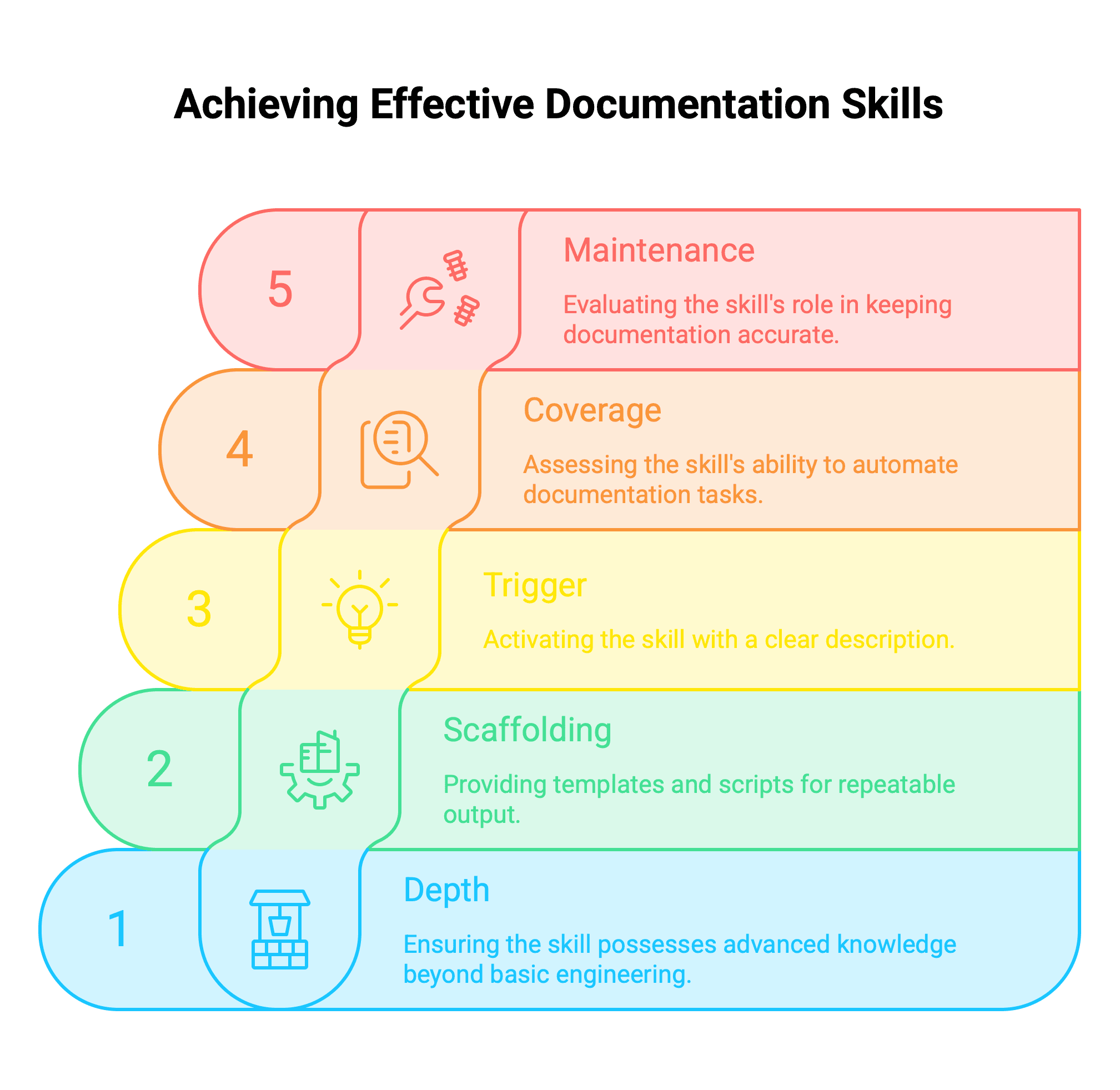
Five things, 1 to 5 each, 25 points possible.
Depth. Does the skill know something a competent engineer doesn't, or is it a persona and some adjectives?
Scaffolding. Templates, reference files, scripts, checks. Prose is what Claude already does. Scaffolding is what makes the output repeatable.
Trigger. Skills load off their description. A vague description means the skill sits installed and never fires.
Coverage. How much of a real documentation job it takes off your plate.
Maintenance. Whether it helps keep docs correct after they exist. Hold that thought. This column is where the story is.
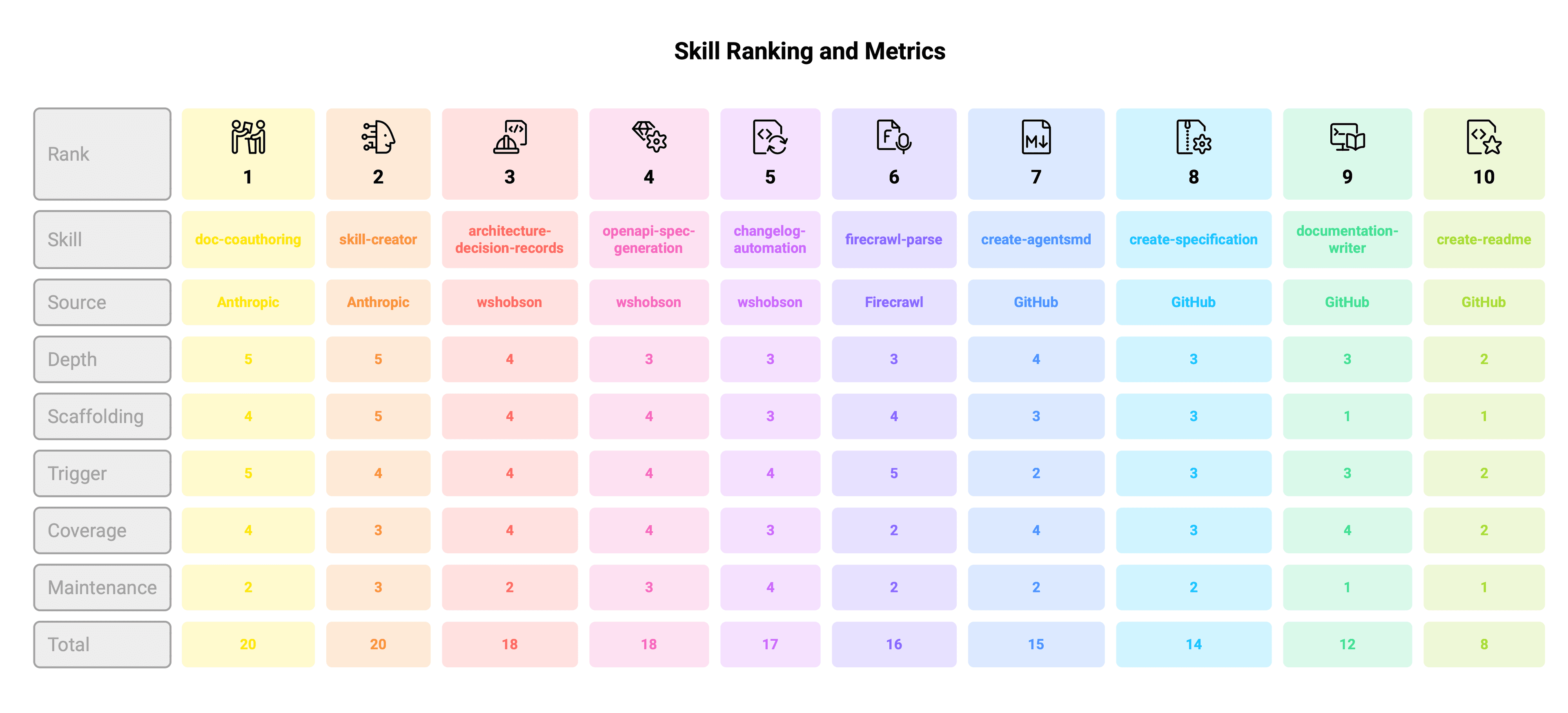
The scoreboard: all 10 skills ranked
| Rank | Skill | Source | Depth | Scaffolding | Trigger | Coverage | Maintenance | Total |
|---|---|---|---|---|---|---|---|---|
| 1 | doc-coauthoring | Anthropic | 5 | 4 | 5 | 4 | 2 | 20 |
| 2 | skill-creator | Anthropic | 5 | 5 | 4 | 3 | 3 | 20 |
| 3 | architecture-decision-records | wshobson | 4 | 4 | 4 | 4 | 2 | 18 |
| 4 | openapi-spec-generation | wshobson | 3 | 4 | 4 | 4 | 3 | 18 |
| 5 | changelog-automation | wshobson | 3 | 3 | 4 | 3 | 4 | 17 |
| 6 | firecrawl-parse | Firecrawl | 3 | 4 | 5 | 2 | 2 | 16 |
| 7 | create-agentsmd | GitHub | 4 | 3 | 2 | 4 | 2 | 15 |
| 8 | create-specification | GitHub | 3 | 3 | 3 | 3 | 2 | 14 |
| 9 | documentation-writer | GitHub | 3 | 1 | 3 | 4 | 1 | 12 |
| 10 | create-readme | GitHub | 2 | 1 | 2 | 2 | 1 | 8 |
The winner: doc-coauthoring
Anthropic's doc-coauthoring is the best Claude skill for documentation, and it wins because of its last stage. I haven't seen the idea anywhere else.
The skill walks you through three stages. First it interviews you. Audience, intent, format, then it tells you to dump everything you know without organizing it. Then it builds the doc with you section by section, so you shape each piece instead of fighting one big generated blob. Good process. Not why it wins.
Then stage three: it spins up a fresh Claude that has seen none of your conversation and tests the doc on it. Can a reader with zero context follow this? What questions would they ask? Which ones does the doc fail to answer? Every docs team knows this failure. The page was clear to the person who wrote it because the person who wrote it already understood the thing. This skill catches that before a reader does. It reviews the doc.
It's overkill for a quick page, and its maintenance score is a 2 like almost everything else here. For the docs that matter, your spec, your launch guide, the README that sells the repo, nothing published comes close.
Second place ties it on points. skill-creator is also Anthropic's, and it has the best scaffolding of the ten: validation scripts, an eval harness, packaging. But it writes no documentation. It builds skills. I ranked it second for that reason and I still think every docs team should install it, because the most valuable docs skill is the one nobody can publish for you. Your style guide, your terminology, your templates, packaged so Claude follows them every time. An afternoon with skill-creator gets you that.
The other eight, quickly
Numbers 3 through 5 are all from wshobson's plugin library, and all three are worth having.
architecture-decision-records
441 lines with full MADR templates and a table I liked a lot: when a decision deserves an ADR and when it's noise. New framework, yes. Minor version bump, no. Its gap is discipline. Nothing prompts the ADR at the moment you make the decision. Install it anyway.
openapi-spec-generation
Keeps its main file to 66 lines and pushes almost a thousand lines of worked OpenAPI 3.1 examples into reference files that load on demand. Structurally it's how skills should be built. The content is correct rather than opinionated. You get valid specs, not API design taste. If you write API docs, install it.
changelog-automation
The best maintenance score on the board, and it earned it by hooking something real: your git history. Releases happen whether anyone feels like documenting or not, so this one runs on a real event instead of waiting for a mood. It also ships with a broken code fence in its own SKILL.md that traps the pointer to its reference file inside an example block. It still works. But nobody at any marketplace caught it, which tells you how much review these listings get.
firecrawl-parse
The best written small skill I read. 49 lines, and every line works: it scopes exactly which commands it can run, guards against flooding your context window with parsed output, and defines what done means. It converts PDFs and Word files to clean markdown, that's it, and it needs the Firecrawl CLI plus paid credits. Worth it for a docs migration. Skip it otherwise.
create-agentsmd
Writes your AGENTS.md, the docs page whose reader is a coding agent, following the open agents.md format. The guidance inside is solid, 249 lines of it. The description field is six words. On a marketplace where skills load off their descriptions, that's shipping a product with no name on the box. Install it, but expect to invoke it by hand.
create-specification
Produces AI readable spec files with enforced naming and frontmatter. Useful structure, fill in the blanks depth. Fine.
Now the uncomfortable two.
documentation-writer
The most recommended docs skill in every directory I checked. It's 45 lines. A summary of the four Diátaxis quadrants, a persona, and a clarify, outline, draft workflow. The workflow is right and the framework is the right framework. But there's no scaffolding at all, and you could get the same result by pasting the Diátaxis homepage into a prompt. It coasts on the framework's reputation.
create-readme
21 lines. It tells Claude it's a senior engineer, links four Azure sample READMEs as taste, and its first instruction opens "Take a deep breath, and review the entire project and workspace." A skill this thin doesn't beat plain Claude with no skill at all. It's on every top ten list I found. That one entry is the whole reason I read the source instead of the descriptions.
The one I cut
My own earlier shortlist had Anthropic's brand-guidelines on it, and I described it the way the directories do: a skill for keeping voice and style consistent. Then I opened it. It's Anthropic's visual identity. Hex colors and font pairings for slide decks. Nothing about written voice at all.
I cut it and kept the lesson. Skill descriptions are marketing copy. The SKILL.md is the product.
Now look at the maintenance column
Go back to the scoreboard and read one column: Maintenance. It never goes above 4, and it averages 2.2 across the ten skills. Nine of these ten skills only run when somebody asks Claude for a document.
Think about what that means for the docs you already have. Your pricing changed in March. Which of these skills notices? None. A skill can't know the product changed, and nobody asks for a doc they don't know is wrong. The one exception proves the point: changelog-automation gets the top maintenance score because it hooks an event, a release, instead of an intention.
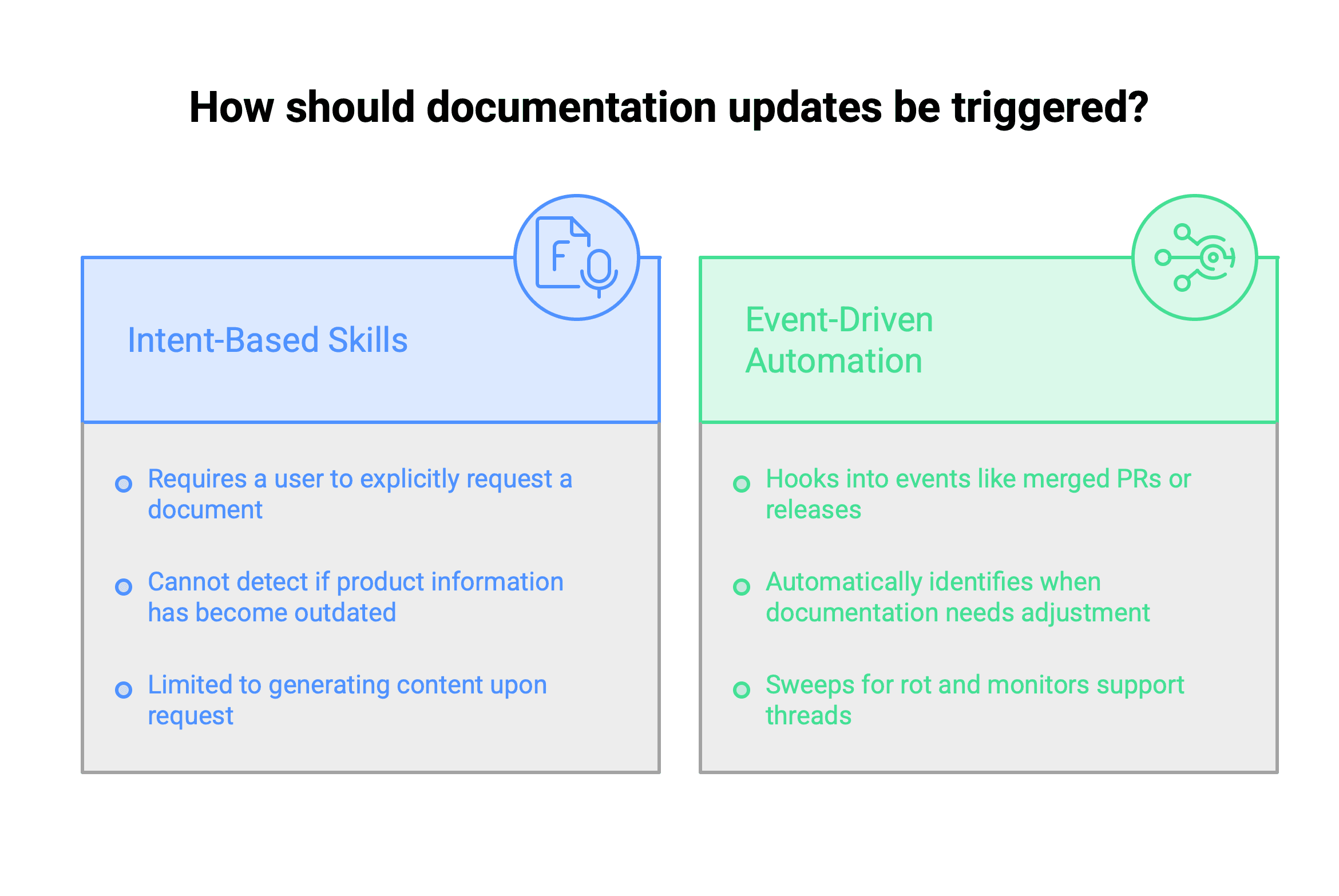
That gap is what we build at EkLine. Docs work triggered by the change itself: a merged PR that alters behavior, a support thread that exposes a missing page, a scheduled audit sweeping for rot. I've written before about what outdated documentation costs and why your knowledge base is a growth channel now that buyers ask AI before they ask you.
Install the top five: doc-coauthoring, skill-creator, architecture-decision-records, openapi-spec-generation, and changelog-automation. They fix the writing. Nothing on any marketplace fixes the noticing.
FAQ
Anthropic's doc-coauthoring. It scored 20 of 25 on my rubric, and it's the only published skill that tests a doc on a fresh reader with no context before you ship it, which catches the gaps the author can't see.
Yes. With openapi-spec-generation it follows OpenAPI 3.1 conventions and design first patterns. Pair it with a custom skill that carries your style guide and the output lands in your voice.
Four active repos cover most of what exists: Anthropic's official skills repo, GitHub's awesome-copilot collection, wshobson's plugin library, and Firecrawl's skills. All four had commits in the past week. Read the SKILL.md before you install, because the directory descriptions oversell.
Open the SKILL.md and read it. Look for a specific trigger description, real scaffolding like templates or scripts, and instructions that carry judgment rather than a persona. Line count is a crude first filter, and it works.
Mostly no. Skills run when someone invokes them, so they help you write and audit, but nothing ties them to product change. Keeping docs current means hooking real events: merged PRs, support tickets, scheduled audits. That's a pipeline, not a skill.