Claude Code for technical writers: what works and what breaks
A five-step Claude Code setup for documentation, from CLAUDE.md to a lint hook, plus an honest check of what the newer features fix and what still depends on one writer.
- Written by
- Puneet Arora (opens in a new tab)
- Published on
- Read time
- 11 min

Claude Code can turn a Git diff, or your description of a change, into a first draft. Without setup, though, nothing holds that draft to your style guide or term list, and it writes from instructions built for engineering work. Then engineering merges an API change while you are on vacation or deep in another project, and nothing happens to the docs until you get back.
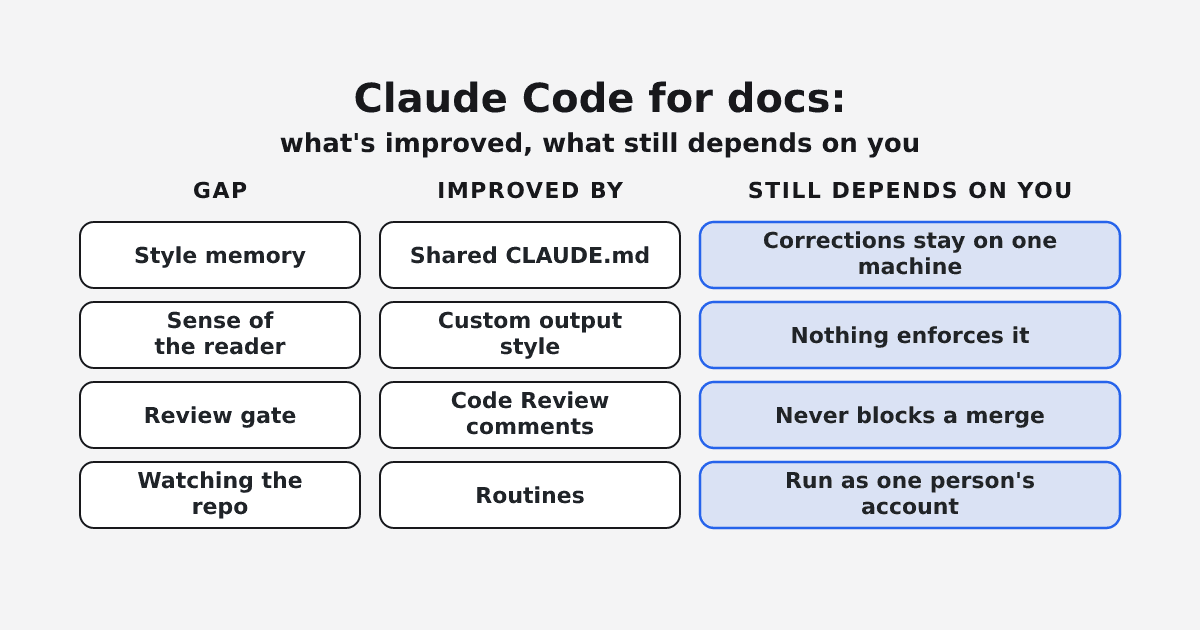
Most of that is fixable today. Claude Code reads project instructions, path-scoped rules, skills, a custom output style, and hooks. Set up together, they give Claude your reader, your terms, and a lint check after every edit. Features such as routines, Code Review, and shared project instructions partly close each of the old capability gaps. What they leave in place is a dependency on one person: learned corrections stay on one machine, routines run as one person's account, and Claude's own review never blocks a merge.
Every Claude Code claim here was checked against the documentation for v2.1.301, released October 15, 2026, per the Claude Code changelog. None of it comes from a hands-on repository test.
TL;DR
- Name your reader and terms in a short CLAUDE.md; scope docs rules to docs files.
- Add an output style for user-facing pages and a lint hook after every edit.
- Routines run as one person, and Code Review never blocks a merge.
- Stop building your own pipeline when the docs must keep running while you are away.
Why Claude Code writes like an engineer
The engineer voice is the default by design. With no output style selected, Claude works from Claude Code's standard system prompt, "which is written for software engineering tasks." Unless you tell it who the reader is, it works from instructions written for engineering work, not for your reader.
Your instructions also compete for attention. CLAUDE.md files and auto memory load at the start of every session, but Claude treats them as "context, not enforced configuration." The same page advises keeping each CLAUDE.md under 200 lines, because longer files reduce adherence. Pasting your full style guide in works against you.
So split the work: judgment calls (who the reader is, what a page is for) go in short instructions, and mechanical rules go to something deterministic. Mintlify's Ethan Palm puts it this way in how Mintlify uses Claude Code as a technical writing assistant: "Move mechanical rules out of CLAUDE.md. If a rule can be enforced by something deterministic like a linter or a hook, it should be."
Before you start
- Claude Code running in the repository that holds your docs.
- A written style guide and term list.
- Vale configured for your style guide, plus
jq, which the hooks guide uses to read the edited file's path.
Each example below is adapted from a documented snippet. Test it in your repository before you rely on it.
 (opens the full-size image in a new tab)
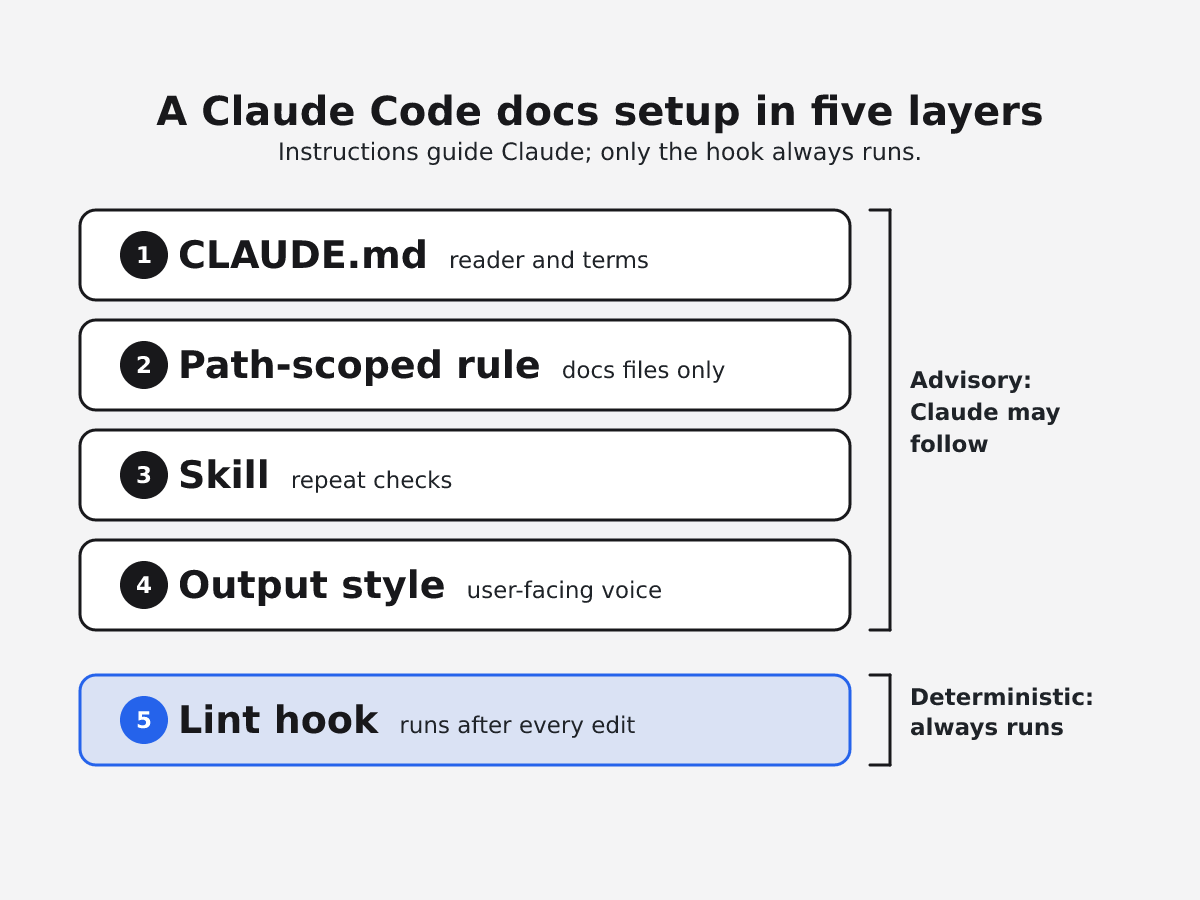
Set up Claude Code for documentation in five steps
1. Write a short CLAUDE.md that names the reader
A project CLAUDE.md lives at ./CLAUDE.md or ./.claude/CLAUDE.md, and its instructions are "shared with your team through version control." Lead with the reader, then terminology, then a pointer to the full guide. Example, with placeholders for your own content:
# Documentation conventions

## Reader
Write for <role> who already know <what they know> and want to <their goal>.

## Terminology
- Use "<preferred term>" and never "<variant>"

## Style
- Follow <path to your style guide> for anything not covered here.
2. Scope docs rules to docs files
Rules in .claude/rules/ with a paths field load only when Claude reads or edits a matching file, according to the memory documentation. That keeps them out of your 200-line budget. Example, adapted from the documented format:
---
paths:
  - "docs/**/*.md"
---

# Docs page rules

- One instruction per numbered step
- Start each step with a verb
3. Package repeat checks as a skill
A skill lives at .claude/skills/<skill-name>/SKILL.md. Claude loads it when relevant based on the description, or you run it with /skill-name. Commit it so your team gets it too. Example, using the documented minimal format:
---
name: terminology-check
description: Checks a docs page against the term list. Use when a docs page is created or edited.
---

Compare every product term on the page with the Terminology section of CLAUDE.md and list each mismatch with its line.
Plugins are the packaging layer for reusing the same setup across multiple repositories. In one Reddit post, a user describes packaging the ASD-STE100 standard for Claude as "~60 writing rules." EkLine's open-source ekline-docs-skills plugin includes style-guide and terminology skills. For more options, see the 10 best Claude skills for documentation, ranked.
4. Add an output style for user-facing docs
A custom output style "can also turn Claude into something other than a software engineer, such as a writing assistant." Save it in .claude/output-styles/. Leave out keep-coding-instructions when Claude won't be doing software engineering in that session, then switch with /output-style. Example, using the documented frontmatter:
---
name: User docs
description: Writes and edits pages for the reader named in CLAUDE.md
---

You are editing user-facing documentation. Lead every page with the reader's task.
Explain what a feature changes for the reader before how it is built.
5. Put mechanical rules in a lint hook
Hooks give you "deterministic control: certain actions always happen rather than relying on the LLM to choose to run them." Palm's Vale hook runs after every write or edit. Here is its PostToolUse part:
{
  "hooks": {
    "PostToolUse": [
      {
        "matcher": "Write|Edit",
        "hooks": [
          {
            "type": "command",
            "command": "vale \"$(jq -r '.tool_input.file_path // empty')\""
          }
        ]
      }
    ]
  }
}
For a PostToolUse hook, exit code 2 "Shows stderr to Claude; the tool already ran." As published, the hook prints Vale's results to stdout, which Claude does not see. To hand them to Claude, write them to stderr and exit 2. Either way, the edit is already saved.
Four gaps, checked against the current docs
| Gap | What the docs show now | What still holds |
|---|---|---|
| No lasting style or terminology memory | Project CLAUDE.md shared through git; organization-wide managed CLAUDE.md; path-scoped rules | Memory is advisory; auto memory stays on one machine |
| No sense of the reader | A custom output style can make Claude a writing assistant | Nothing enforces the style |
| No review gate | Code Review comments on pull requests; a GitHub Action can run on pull requests | Code Review never blocks a merge |
| Nothing watching the repo | Routines run on a schedule or on merged pull requests | Research preview; each routine belongs to one person's account |
What remains is about ownership.
Shared instructions are covered, but what Claude learns from your corrections stays with you. Auto memory, the notes Claude saves from your corrections, "is machine-local," so a term you fix on your laptop is unknown to a teammate's session. A subagent (a helper Claude starts with its own instructions) with memory: project keeps its notes in a folder that is "shareable via version control." That works when someone reviews and commits those notes.
The output style gives Claude a reader, but "nothing enforces it," and subagents other than a fork run their own system prompt, so the style does not reach them. You write the reader in by hand.
Code Review "never approves or blocks the pull request," and is available on Team and Enterprise plans for GitHub only. A REVIEW.md file can add team rules, and /code-review runs locally on any plan. The Claude Code GitHub Action costs GitHub Actions minutes plus API tokens per run (or subscription usage with an OAuth token), and its docs don't describe it as a merge gate.
Routines can trigger on merged pull requests, and Anthropic's own example is a weekly docs-drift routine that opens update pull requests. They are in research preview, and they "belong to your individual claude.ai account." Their pull requests carry your GitHub user.
Where the setup fails, and how to recover
- Instructions fade. Trim CLAUDE.md and move page rules into a path-scoped rule.
- Voice slips inside a subagent. Write the reader into its prompt.
- Lint errors land after the page is saved. To block an action first, the memory docs point to a
PreToolUsehook. - A routine shows green but did nothing useful. The routines page warns that a green status "does not mean the task in your prompt succeeded," and webhook events beyond hourly caps are dropped. Read what it opened.
- A draft reads well and fails when followed. One writer on Hacker News describes Claude-generated writeups that "fall apart when you actually try to follow the instructions they lay out." Have a developer walk every procedure before it ships.
When Claude Code alone is enough
Claude Code now has project memory, skills, hooks, subagents, a GitHub Action, routines, and Code Review, so a writer willing to maintain the setup can build much of a docs workflow themselves. Claude Code alone is a good fit when:
- One writer owns the docs and is around to drive most sessions.
- The docs live in one repository, or a plugin carries the setup across a few.
- Your team already runs a CI linter that can fail a pull request, so you don't need Claude to be the gate.
- You accept research-preview routines acting as your account.
If that describes your team, the five steps are a complete setup.
The test: does the docs process run without you?
Palm wants to "take a vacation without blocking docs ships for a week and a half." Ask four questions about your setup:
- If an API change merges while you are out for two weeks, does a docs pull request appear under an identity your team owns?
- When a teammate corrects a term, does the next session on someone else's machine know about it?
- Can a docs problem fail a check and block the merge?
- Who maintains the hooks, rules, and routines when you move to another project?
With Claude Code alone, the answers are "with routines it runs as you; with the GitHub Action it runs as the Claude GitHub App, through a workflow you maintain," "only if someone commits it," "not through Code Review," and "you." When two or more of those answers worry you, look at tooling built for shared ownership.
Where EkLine fits
EkLine answers the same four questions for a team, and the writer still decides what ships.
Instructions and skills the whole team edits
In Docs Agent, custom instructions apply to every session your organization runs, including sessions started from GitHub, GitLab, or Slack, and any member can edit them. You set the reader there too. Custom skills are authored once and copied into every new session, run with /custom-<slug>. According to the EkLine changelog, Docs Agent "remembers context about your repositories and conventions across sessions, so your whole team benefits from shared knowledge."
Watching the repository as a team
With automatic PR review, when a non-draft pull request opens on GitHub or GitLab, EkLine stays silent at low confidence, posts a suggestion at medium, and opens a docs pull request at high confidence. Scheduled Agents run templates such as Docs Drift Review and Code Sample Review hourly, daily, weekly, or monthly, and deliver a pull request, a Slack message, or both. According to the changelog, any organization member can create and manage them.
A check that can block the merge
Docs Reviewer runs in CI on GitHub Actions, GitLab CI, and Bitbucket Pipelines. Add fail_on_error: true so the job fails when EkLine finds an issue, then a branch protection rule, as the style guide enforcement page describes.
Before: an API change merges during your vacation, and the docs wait for you. After: when automatic PR review is confident about the change, a docs pull request is waiting for your review when you get back. In an EkLine case study, Socure's one technical writer merged 348 documentation updates in seven weeks.
Know the limits: the automatic PR review assessment runs once per pull request, its confidence thresholds are fixed, and linked Jira or Linear tickets are not included.
FAQ
Claude Code can read AGENTS.md as your project instructions when the repository has no CLAUDE.md. By default, when both exist, it reads CLAUDE.md only; import AGENTS.md from CLAUDE.md, or set project instructions to load both.
Name your reader and voice in a short CLAUDE.md, use a custom output style for user-facing pages, and let a lint hook catch mechanical rules. Nothing enforces the style, so review diffs for voice before you merge.
Start with one skill per repeat task, such as a terminology check, in .claude/skills/. Shared options include an ASD-STE100 rule set and EkLine's open-source ekline-docs-skills plugin.
Try it on one repository
To check whether your docs process keeps running without you, request Docs Agent access and test EkLine with one repository and one human reviewer. Docs Agent is on all plans, with access on request through support@ekline.io.
Sources
- Claude Code changelog
- How Claude remembers your project
- Output styles
- Skills
- Extend Claude Code
- Automate actions with hooks
- Hooks reference
- Subagents
- Code Review
- Claude Code GitHub Actions
- Automate work with routines
- How Mintlify uses Claude Code as a technical writing assistant
- Hacker News comment on Claude-generated writeups
- Reddit post: ASD-STE100 packaged as Claude writing rules
- ekline-docs-skills on GitHub
- The 10 best Claude skills for documentation, ranked
- Custom instructions and repository notes
- Package a workflow as a skill
- EkLine changelog
- Automatic PR review
- Scheduled agents
- Docs Reviewer overview
- Style guide enforcement
- Socure case study
- Docs Agent getting started