Is your site ready for AI agents? Score your website and docs
A hand check of robots.txt, llms.txt and the sitemap covers 3 of 23 checks. Agent readiness scans your website and docs site the way AI agents fetch them and returns a score, your Blockers and Gaps, and the fixes to make first.
- Written by
- Lucas Suárez (opens in a new tab)
- Published on
- Read time
- 5 min

When a developer asks Claude, ChatGPT, or Perplexity how to use your API, the assistant may fetch your website and docs and answer from what comes back. If a firewall serves it a challenge page, or your answer loads only with JavaScript, the agent stops there.
One response is a hand check: open robots.txt, add an llms.txt, confirm the sitemap. That covers three items, in no order. It shows what your browser got back, not what an agent got.
Agent readiness scans your website and docs site in one pass. It reads both sites the way Claude, ChatGPT, and Perplexity fetch them, and grades what it collected against 23 checks. You get a score out of 100, the Blockers and Gaps it found, and a ranked list of fixes. A Blocker stops agents outright. A Gap makes them miss or misread something.
What a hand check of three files misses
A team can read robots.txt, llms.txt, and the sitemap in an afternoon. Scanners such as Cloudflare's already return a score with a prompt for each failing check. But those three files cover 3 of the 23 checks.
Three Blockers sit where a file check can't see: a firewall or bot protection that answers with a challenge page, docs that need a login, and a page whose answer is missing from the first HTML response. Prices shown only in an image are a Gap no file check finds either.
When Cloudflare Radar scanned the most visited domains, leaving out redirects, ad servers, and similar services, it found that 78% have robots.txt. Yet "the vast majority are written for traditional search engine crawlers, not AI agents."
Shipping llms.txt doesn't close the list either. Langfuse checked its live site against public agent readiness checklists. It noted that "langfuse.com already has a lot of this (llms.txt, .md mirrors, content negotiation, docs MCP, agent-skills index)," and still found missing discovery metadata, JSON-LD, and Markdown 404s.
In the report, llms.txt is one Gap among 23 checks. A Blocker such as a firewall challenge keeps the score at 49 or below.
How Agent readiness grades both sites
The 23 checks sit in three stages: Find ("Can agents reach your pages at all?"), Read ("Can agents read what they reach?"), and Act ("Can agents use your product?"). They come from two open specs, AgentReady v2.0 and the Agent-Friendly Documentation Spec, plus a few of EkLine's own.
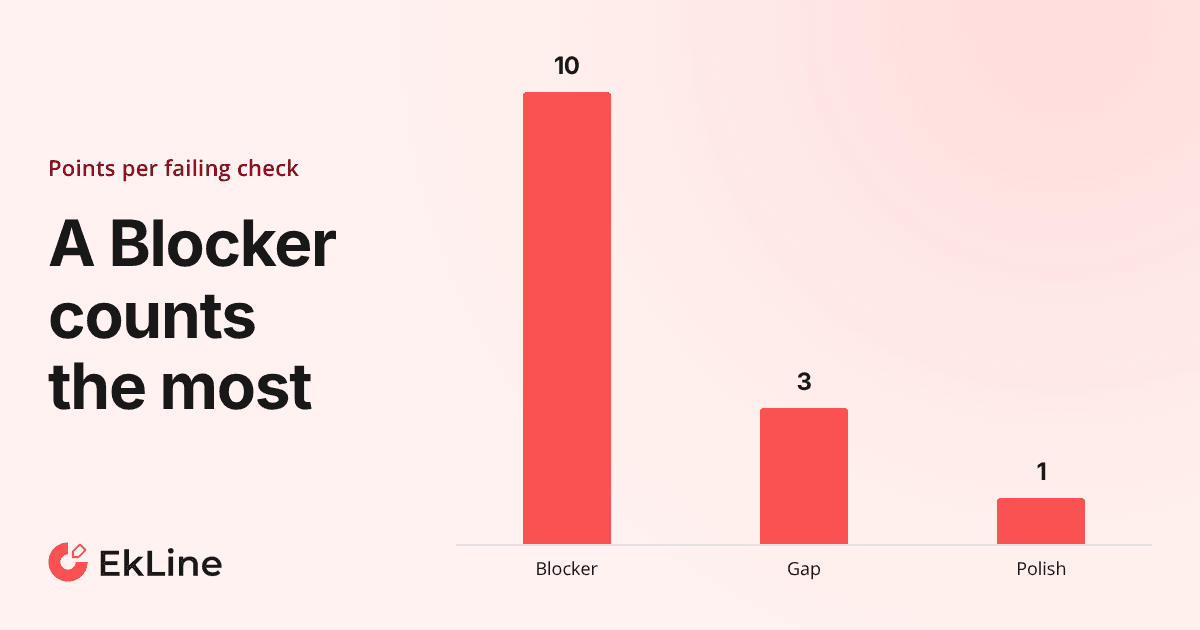
Each failing check counts as a Blocker (10 points), a Gap (3 points), or Polish (1 point). The score is the points of the checks that pass, out of the points of every check that applies. Ready is 80 to 100, Partial is 50 to 79, and Blocked is 0 to 49. While any Blocker is open, the score stays at 49 or below.
For each check, the Pages we read list shows every address it fetched and the response it got. The checks about an API, MCP server, SDK, or CLI run only for what the scan finds on your sites or what you add under Edit sites. If the scan can't find something a check looks for, such as an OpenAPI description, that check shows Not observed and doesn't count against your score.
The report grades what the scan collects against 23 checks. It does not prove that an agent will recommend your product or complete an integration.
From a score to the first fix
Fixes are ranked by level and then by pages affected. In the full report, Start here is the one fix to make first. All fixes lists every fix by rank, with its level, who fixes it, the effort, and the status.
Before: an agent fails, and someone checks robots.txt and llms.txt by hand. The team ends with a list in no order and no record of progress.
After: you run a scan, which takes about 4 minutes. The Overview shows the score, Blockers, Gaps, and Start here. When the Docs Agent or Marketing Agent owns a fix, Start opens a session of that agent with the fix. The fix shows Review PR once there is a pull request for your team to review. When your engineers own it, they click Copy prompt for your coding agent and paste it into the agent they use.
After the change is live, Check again on the fix shows Passed, or Still failing with what changed. History lists each scan with its score, so you can see the number move.
A fix that looks done may not pass. In its write-up on agent-ready docs, Prisma reported that "two of our fixes did not flip their checks on the first pass."
FAQ
Enter your website and docs site at ekline.io/agent-readiness. In about 4 minutes you get a score out of 100, your Blockers and Gaps, and the first fixes to make. Sign in to start the fixes.
It checks only public sites. If your docs need a login on purpose, select My docs are private on purpose. The scan then grades what an agent can reach without signing in, such as a public llms.txt or index. If bot protection challenges every request, the report says "We couldn't check" the site. AI agents most likely get the same challenge, so that becomes your first fix.
The check at ekline.io/agent-readiness is free, with no sign-up. Starting a fix in EkLine opens an agent session, which uses credits.
Run a free Agent readiness check on your website and docs, and start with the fixes it puts first.
Sources
- Agent readiness check, EkLine
- Check your sites are ready for AI agents, EkLine docs
- Agent readiness checks and scoring, EkLine docs
- Introducing the Agent Readiness score, Cloudflare
- Improve agent discovery: MCP and ARD catalogs, JSON-LD, Markdown 404s, Langfuse on GitHub
- How to Make Your Docs Agent-Ready: llms.txt, Parity, MCP, Prisma