What Are GitHub Actions Lockfiles, and Do They Replace SHA Pinning?
GitHub Actions workflow lockfiles record the commit and source repository behind every action an onboarded workflow uses, transitive actions included. What they replace, what they leave to you, and how to pilot one release workflow.
- Written by
- Puneet Arora (opens in a new tab)
- Published on
- Read time
- 15 min

Your SDK release workflow runs when someone pushes a version tag. Its steps read actions/checkout@v4, actions/setup-node@v4, and actions/attest-build-provenance@v1. Each @v4 or @v1 is a git ref in another team's repository. The commit it points to can change after your team reviewed the workflow, and nothing in your repository records which commit was reviewed.
The usual fix is to pin every action to a full commit SHA, as the Lullabot architecture decision record requires. Teams keep those pins current with Renovate, Dependabot, pinact, or ratchet, and frizbee converts tags to SHAs. That fixes the lines you can see. Andrew Nesbitt pointed out the gap: a SHA pin locks only the outer action, and a helper action it calls by tag can still change.
GitHub's workflow dependency lockfile moves pinning into one machine-generated file per repository. For each onboarded workflow, it records the ref, the resolved commit, and the source repository's identity, transitive actions included. For repositories that adopt it, GitHub says SHA pinning in workflow files is no longer necessary. The guarantee stops at known edges: the dependencies inside reusable workflows you call, container images pulled by tag, and the safety of the pinned code. Reviewers still read every lock diff. For one release workflow on github.com, a bounded pilot is a reasonable next step, unless you run GitHub Enterprise Server or depend mostly on reusable workflows you do not control.
TL;DR
- A lockfile at
.github/workflows/actions.lockrecords each onboarded workflow's dependencies, their commits, and their source repositories' IDs, transitive actions included. - For repositories that adopt a lockfile, GitHub says inline SHA pinning is no longer necessary. Keep SHAs wherever no lockfile reaches.
- Generating the file, onboarding a workflow, running
--verifyin CI, and the Require lockfile policy are four separate controls. Only the policy blocks runs of workflows nobody onboarded. - Your lockfile does not control the dependencies inside a reusable workflow you call, and container images pulled by tag are not locked.
- The feature and its pre-1.0 CLI are in preview, and GHES is not supported. Pilot one workflow before you require locking.
What changed, and what is still preview
On October 14, 2026, GitHub put workflow lockfiles into public preview for GitHub Enterprise Cloud (including data residency), Team, and Free plans. Each of GitHub's lockfile pages, starting with the concept page, says the feature is in public preview and subject to change.
The gh-actions-lock README says the tool is pre-1.0, that its file format, flags, and behavior may change without notice between releases, and that GitHub Enterprise Server is not supported. Everything below describes v0.2.0, published October 12, 2026, as it stood on October 15, 2026.
What the lockfile records
Each repository gets one lockfile at .github/workflows/actions.lock. You can onboard workflows to it individually or all at once. The concept page says the file should never be edited by hand. The gh actions-lock extension generates it, which requires write access.
The file has two sections. workflows lists the dependencies each onboarded workflow uses. dependencies holds one entry per dependency, with three kinds of field:
refis the tag or branch the workflow names.commitis the code that will run, writtensha1-....owner_idandrepo_idlet GitHub confirm at run time that the repository behind the name is still the one you locked.
Transitive actions appear as a uses: list under the parent entry, as in the lockfile in the extension's own repository. That file has no integrity or content hash field, only the commit (our reading; GitHub does not state it).
Once a workflow is onboarded, every action it uses must be in the lockfile. According to the README, the job-start check confirms that the repository was not renamed or transferred, that the pinned commit still exists, and that full-version tags still point at it. In its words, "A failed check blocks the run."
A test run on one release workflow
We onboarded the release workflow from the opening in a test run with gh-actions-lock v0.2.0 (gh 2.102.0, Linux). We ran the release binary directly. We did not exercise hosted run-time enforcement, the Require lockfile policy, or Dependabot. The original release.yml:
name: release
on:
  push:
    tags: ['v*']
permissions:
  contents: read
  id-token: write
  attestations: write
jobs:
  publish:
    runs-on: ubuntu-latest
    steps:
      - uses: actions/checkout@v4
      - uses: actions/setup-node@v4
        with:
          node-version: 22
      - run: npm ci && npm pack
      - uses: actions/attest-build-provenance@v1
        with:
          subject-path: '*.tgz'
GitHub's how-to installs the extension with gh extension install github/gh-actions-lock. Onboarding one workflow takes its path:
gh actions-lock .github/workflows/release.ymlIt exited 0 and printed:
Scanning 1 workflow
Planning pins
Pinned 3 actions (+ 2 transitive) across 1 workflow
  actions/checkout@v4.4.0 (11d5960)
    └─ .github/workflows/release.yml
  actions/setup-node@v4.4.0 (49933ea)
    └─ .github/workflows/release.yml
  actions/attest-build-provenance@v1.4.4 (ef24412)
    └─ .github/workflows/release.yml
Transitive dependencies (from composite actions):
  actions/attest-build-provenance@36fa7d0 via actions/attest-build-provenance@v1.4.4
  actions/attest@67422f5 via actions/attest-build-provenance@v1.4.4
It also rewrote the workflow: @v4 became @v4.4.0, and @v1 became @v1.4.4. The two transitive entries come from inside the composite actions/attest-build-provenance; no workflow line names them. The excerpt below is machine-generated output from the test run, copied verbatim. Each # … marks lines we cut.
# This file is machine-generated by `gh actions-lock`.
# Do not edit by hand; run `gh actions-lock` to update.
# Docs: https://gh.io/actions-lockfile
version: 'v0.0.3'
workflows:
    '.github/workflows/release.yml':
        - 'actions/attest-build-provenance@v1.4.4'
        - 'actions/checkout@v4.4.0'
        - 'actions/setup-node@v4.4.0'
dependencies:
    # …
    'actions/attest-build-provenance@v1.4.4':
        ref: 'v1.4.4'
        commit: 'sha1-ef244123eb79f2f7a7e75d99086184180e6d0018'
        owner_id: 44036562
        repo_id: 760702757
        uses:
            - 'actions/attest-build-provenance@36fa7d009e22618ca7cd599486979b8150596c74'
            - 'actions/attest@67422f5511b7ff725f4dbd6fb9bd2cd925c65a8d'
    'actions/attest@67422f5511b7ff725f4dbd6fb9bd2cd925c65a8d':
        ref: 'v1.4.1'
        commit: 'sha1-67422f5511b7ff725f4dbd6fb9bd2cd925c65a8d'
        owner_id: 44036562
        repo_id: 760701061
    # …
With the lockfile committed, gh actions-lock --verify printed "All 1 workflow valid" and exited 0. We then appended - uses: actions/upload-artifact@v4 without relocking, and --verify exited 1:
Scanning 1 workflow
1 of 1 workflow failed
✗ Not pinned actions/upload-artifact@v4
  used in workflow but not pinned in lockfile (actions/upload-artifact@v4)
  see: https://docs.github.com/en/actions/security-for-github-actions/security-guides/security-hardening-for-github-actions#using-third-party-actions
  ↳ .github/workflows/release.yml
Re-run without --verify to apply fixes.
The offline --verify-local also exited 1, with "1 of 1 workflow failed: 1 not-pinned." Its flag help says it only checks that every action has an entry, not that the entries are trustworthy. That makes it a fit for a pre-commit hook, while GitHub's docs use --verify in CI.
Direct, transitive, and reusable workflows: where the boundary sits
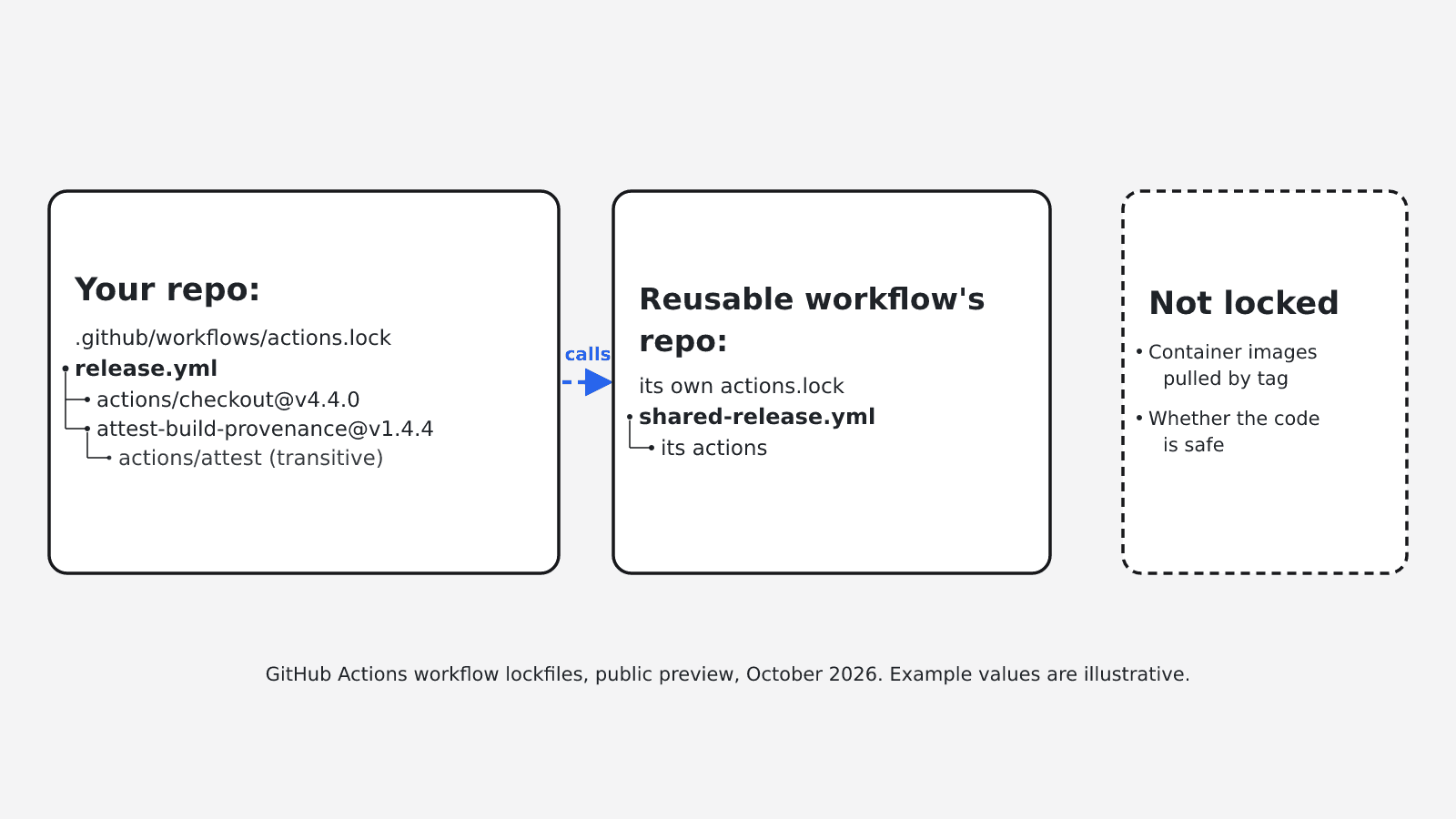
The concept page draws the line: "A lockfile covers the workflows in its own repository. It extends to transitive dependencies (actions that your action dependencies use), except for dependencies of reusable workflow calls. A reusable workflow is covered by the lockfile of the repository where it is defined."
Your release workflow's direct steps land in your file, and so do the actions inside its composite actions. The dependencies inside a reusable workflow it calls do not. The lockfile of the repository that defines that reusable workflow covers them, if that repository has one.
Our test matched the dependency boundary but recorded less than the concept page describes. That page says the lockfile pins the reusable workflows your workflows depend on, too. We onboarded a workflow whose only dependency was a call to slsa-framework/slsa-github-generator/.github/workflows/generator_generic_slsa3.yml@v2.1.0. The tool reported "All 1 workflow valid" and left the file unchanged, and the caller's lockfile recorded '.github/workflows/release.yml': [], with no entry for the call. The how-to recommends onboarding repositories that hold shared workflows first.
Local uses: ./… actions are rewritten to uses: $/…, which always resolves to the running commit, though the README still lists local-path actions as a short-term gap. GitHub's docs say nothing about container images. The CLI source warns that a docker://image:tag step "is not covered by the actions lockfile; container image tags are mutable."
Do lockfiles replace inline SHA pinning?
For repositories that adopt one, GitHub says yes. The concept page says SHA pinning in workflow files "is no longer necessary." The secure use reference keeps full-length SHA pinning as the guidance for repositories that cannot adopt a lockfile.
The condition applies per workflow. Workflows you have not onboarded, reusable workflows from repositories without a lockfile, and docker:// steps still need their own pins.
The SHA policy keeps working. GitHub's page on governing workflow execution says you can leave "Require actions to be pinned to a full-length commit SHA" enabled. For locked dependencies, GitHub checks the locked commit. During a staged rollout, the policy still enforces SHA pinning for workflows that have not adopted the lockfile.
Onboarding does change existing pins. In our test, actions/checkout@11d5960a326750d5838078e36cf38b85af677262 # v4.4.0 became actions/checkout@v4.4.0 on a default run, with the commit moved into the lockfile. With --no-narrow, the SHA stayed in the workflow file, which is the fix a maintainer gave in issue #130. If your organization allows only selected actions, the how-to warns that allowlist entries pinned to a tag stop matching. Use a wildcard or the full commit SHA instead.
Inline SHA pinning and a lockfile, side by side
| Criterion | Inline full-length SHA pinning | Lockfile (onboarded workflow) |
|---|---|---|
| Where the pin lives | Each uses: line in each workflow file | One actions.lock per repository; workflow lines carry a version tag unless you use --no-narrow |
| Transitive actions | Whatever the composite action's author wrote | Recorded under the parent entry, except inside reusable workflow calls |
| Repository identity | Not recorded | owner_id and repo_id, checked at job start |
| What a reviewer sees | A changed SHA on each edited line | One diff with ref, commit, IDs, and transitive edges |
| Enforcement | Full-length SHA policy | Job-start checks, --verify as a required check, Require lockfile policy, SHA policy on the locked commit |
| Update automation | Renovate, Dependabot, pinact, or ratchet | Dependabot regenerates the lock entry in its pull request; it does not onboard |
| Container images by tag | Not covered by action pins | Not locked |
| Availability | GitHub's guidance for repositories that cannot adopt a lockfile | Public preview on Enterprise Cloud (including data residency), Team, and Free; no GHES |
File, onboarding, CI check, and policy are four different controls
A lockfile in the repository does not prove that every workflow is governed.
| Control | What it does | Availability | On failure |
|---|---|---|---|
| Generating the file | Pins each resolvable action and writes the lockfile | People with write access, through the gh extension | All or nothing: if it hits an error it cannot fix, it changes no workflow and no lockfile entry |
| Onboarding a workflow | Adds it to workflows; every dependency must then be locked | Individually or all at once | A failed job-start check blocks the run (README); we did not test this |
--verify in CI | A frozen check that fails if the lockfile is incomplete or the runner would reject a pin | Any CI job that runs the CLI | Exits 1 (our test); blocks merges only as a required check |
| Require lockfile policy | Blocks runs of targeted workflows that use actions but are not onboarded | Public repositories, and private repositories on Team or Enterprise; Evaluate mode only on GitHub Enterprise | Blocks runs in Active mode; Evaluate reports to Policy insights; we did not test this |
Until the policy targets it, a workflow nobody onboarded runs with whatever refs its file contains. The enforcement guide covers both the policy rollout and the verify job. GitHub's pages do not say directly whether private repositories on the Free plan can use the policy.
What a reviewer approves on a lock update
The enforcement guide sets the condition: "A lockfile is only a security control if someone reads the diff." On each lock pull request, check:
- Each changed
commit, which is the code your release will run. The how-to treats it like any dependency version bump. - Each changed
owner_idorrepo_id, which the how-to calls rare and worth investigating before you merge. - New entries in a
uses:list, which are transitive actions nobody typed into a workflow. - The
workflowssection, to see whether a workflow dropped out.
A normal run trusts refs such as main or v3 from the lockfile and does not re-resolve them. If upstream force-pushed or deleted a locked commit, --relock errors. Accepting the new commit takes gh actions-lock --relock --accept-moved, and that change deserves its own review.
For onboarded workflows, Dependabot regenerates the matching lockfile entry in the same pull request as the version update. It does not onboard workflows; it reports that onboarding is required. Beyond having Dependabot manage GitHub Actions dependencies, no configuration is needed. GitHub notes that this maintains coverage rather than extending it. Neither a minimum Dependabot version nor Renovate support is documented.
The case for staying with SHA pins and Dependabot
The objection: "We already pin to SHAs and have Dependabot; this is a preview that adds another file and another failure mode." SHA pins plus Dependabot already fix and update every direct reference. The preview adds a pre-1.0 CLI, workflow rewrites, allowlist changes, CodeQL alerts, and early policy bugs. In the proposal thread, one commenter wrote in May 2026 that they would not use it instead of SHA pinning until it worked with Dependabot or Renovate.
For direct references the objection holds, because an inline SHA and a lock entry fix the same commit. Our inference from the documented behavior is that inline SHAs leave three gaps that a lockfile closes for onboarded workflows:
- Transitive actions.
- A renamed or transferred source repository.
- A run-time check that every dependency is locked.
Dependabot now regenerates lock entries, which answers the integration objection. --no-narrow keeps SHAs in the workflow file. The pre-1.0 CLI, allowlist changes, and CodeQL alerts still argue for testing on one workflow first.
Early-adopter reports
These come from the issue tracker, not from GitHub's documented behavior.
- Issue #130 (closed): fix mode rewrote commit pins into tags. The maintainer pointed to
--no-narrow. - Issue #131 (open): after a lockfile rewrite, CodeQL flags the new tag references as unpinned.
- Issue #168 (open): a locked Docker container action, or a
docker://step inside a locked composite action, still pulls the image itsaction.ymlnames, usually by tag. If the tag moves, the job runs a different image with no lockfile diff and no warning. - Issue #169 (closed): with the SHA-pinning policy on, version-tagged actions run through a reusable workflow were rejected despite a valid lockfile. A GitHub maintainer said a backend fix should address it, and the issue is closed.
What a lockfile does not establish
The changelog says locking "does not determine whether the dependency itself is safe," so review dependencies before you lock them. The secure use reference still says to audit the source code of every action you use.
Beyond the coverage limits described earlier, GitHub lists no other exclusions; the rest is our inference. The lock records commits without a content hash, while the earlier third-party gh-actions-lockfile records integrity hashes. Code an action downloads at run time is outside the lock, a point raised in the proposal thread. So are images pulled by tag, the runner image, workflow permissions, and secret handling.
Checklist: pilot one SDK or API release workflow
- Inventory every
uses:line: direct and composite actions, reusable workflows and their repositories, local./actions, and image-based actions. - Onboard the repositories that hold reusable workflows you control first. Record the others as out of scope.
- Onboard only the release workflow. Add
--no-narrowif you want SHAs kept in the file. We expect that to make the pilot easier to back out, but we did not test a rollback. - Review every
commit,owner_id,repo_id, and transitive entry in the generated lockfile. - Move tag-based allowlist entries to a wildcard or full SHA, and decide how to triage CodeQL alerts.
- Require CODEOWNERS review of
.github/workflows/actions.lock, with a named owner. - Make a
gh actions-lock --verifyCI job a required check. For pre-commit, the enforcement guide usesgh actions-lock --verify-local --no-fix. - Keep Dependabot on GitHub Actions dependencies, and keep the full-length SHA policy enabled.
- On GitHub Enterprise, run the Require lockfile policy in Evaluate mode, scoped to this workflow. GitHub says not to switch it to Active "until you're confident you have systems in place to keep the lockfile up to date for all targeted workflows."
- Exit test over the next few releases: each release ran onboarded,
--verifyfailed only on real drift, every lock diff had a named reviewer, and a Dependabot update arrived with its lock entry.
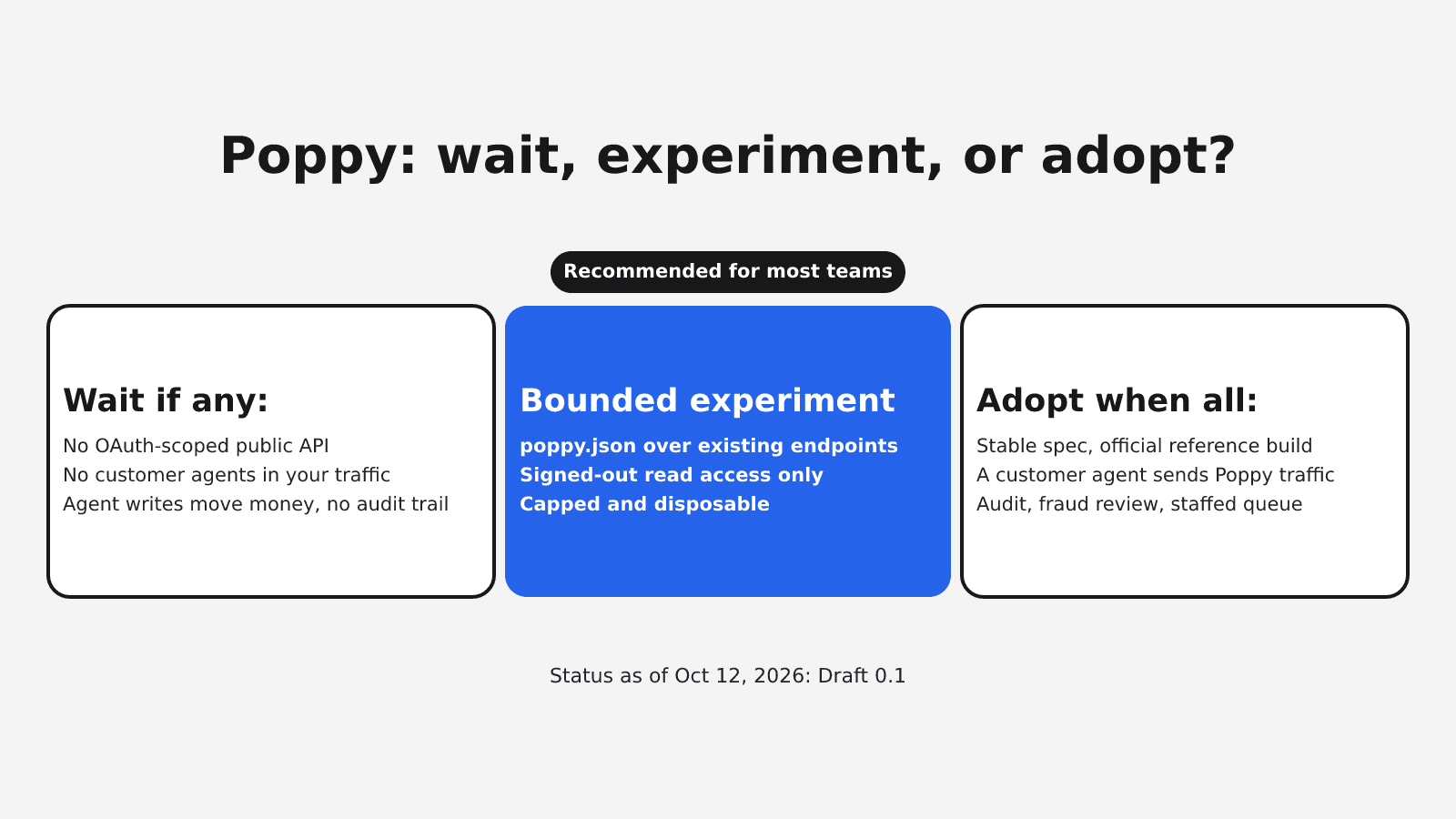
Defer the pilot if any of these apply:
- You run GitHub Enterprise Server.
- You depend mostly on reusable workflows you do not control.
- You rely on Docker-image-based actions that you need pinned.
- Nobody owns lock diffs.
If you defer, keep SHA pins with Dependabot and revisit after the CLI reaches 1.0.
To start, follow GitHub's guide to locking action dependencies in a repository's workflows, then the guide to enforcing lockfiles when you are ready for the policy.
FAQ
The commit you pinned stays. A default run rewrites the line to its version tag and moves the commit into the lockfile; --no-narrow keeps the SHA in the workflow. Tag-based allowlist entries stop matching, and CodeQL may flag the rewritten tags.
Yes. For locked dependencies, GitHub evaluates the policy against the locked commit. Workflows that are not onboarded still need full-length SHAs in the workflow file.
For onboarded workflows, Dependabot regenerates the matching lockfile entry in its version-update pull request. It does not onboard new workflows.
Not their dependencies. The actions inside a reusable workflow are covered by the lockfile of the repository where it is defined, so GitHub recommends onboarding shared-workflow repositories first. GitHub's concept page says reusable workflows themselves are pinned, but in our v0.2.0 test the caller's lockfile recorded no entry for the call.
Sources
- GitHub Actions workflow lockfiles in public preview, GitHub Changelog, October 14, 2026
- Workflow dependency lockfiles, GitHub Docs
- Locking action dependencies in a repository's workflows, GitHub Docs
- Enforcing lockfiles for action dependencies, GitHub Docs
- Governing execution of GitHub Actions workflows, GitHub Docs
- Secure use reference, GitHub Docs
- Keeping your actions up to date with Dependabot, GitHub Docs
- gh-actions-lock README, GitHub
- gh-actions-lock CLI flag help, GitHub
- gh-actions-lock workflow file parser, GitHub
- gh-actions-lock example lockfile, GitHub
- gh-actions-lock releases, GitHub
- Help Shape Workflow Dependency Locking, GitHub Community
- gh-actions-lock issue #130
- gh-actions-lock issue #131
- gh-actions-lock issue #168
- gh-actions-lock issue #169
- Andrew Nesbitt on GitHub Actions as a package manager, December 6, 2025
- Always pin GitHub Actions to a commit hash, Lullabot architecture decision record
- pinact
- ratchet
- frizbee
- gh-actions-lockfile